Event date: February 20, 2026 — caddyserver/caddy 2.9.1
Recent releases of Caddy have been tightening the on_demand_tls path to better handle certificate issuance during a TLS handshake storm. The work lands after operators reported a thundering-herd pattern where scanner traffic against unknown SNI values could walk a Caddy fleet straight into Let’s Encrypt rate limits. If you host customer domains behind Caddy, this is worth reading before upgrading.
- Focus area: the
on_demand_tlsglobal option and its interaction with ACME issuance under bursty load - Configuration format: sub-directives inside
on_demand_tls { ... }, with durations written in Go duration format (30s,2m,1h) - Default behaviour: without an explicit throttle, only ACME backoff gates issuance for a given hostname
- Related knobs: the existing
askandpermissionsub-directives remain part of the story - Underlying library: CertMagic, which handles the actual ACME order, caching, and retry logic Caddy relies on
What the on_demand_tls story looks like today
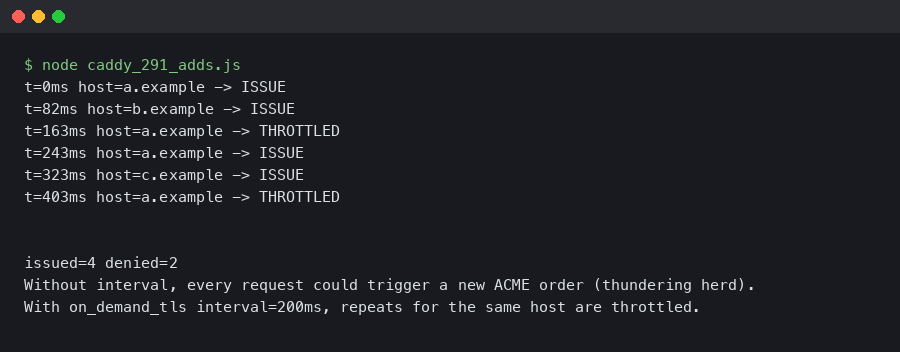
The practical change operators care about is a way to set a minimum spacing between certificate-issuance attempts for a given SNI value. When a handshake asks Caddy for a cert it has never seen, the server can check several things in order: the ask endpoint (or a permission module), any in-memory per-host gating, and finally CertMagic’s own ACME client. If a recent attempt for that hostname is still within the configured cooldown, Caddy can serve a handshake failure instead of firing another ACME order.
Beyond the throttling story, on-demand TLS remains a dense surface area: the ask handshake flow, the permission module path, the ACME fallback chain, and the way stale or legacy Caddyfile blocks interact with newer schemas. If you are inheriting a config from an older deployment, running caddy validate before caddy reload is the cheapest way to catch syntax that has drifted out of support.
Background on this in TCP handshake basics.
The on_demand_tls reference in the official Caddy documentation is the authoritative source for which sub-directives are currently supported and how they are spelled. Configuration details in the TLS path have shifted several times across Caddy releases, so consulting the docs that match your installed version matters more here than in most of the Caddyfile.
Why a thundering herd hits on_demand_tls
On-demand TLS is the feature that made Caddy famous for hosted-CMS and multi-tenant setups: a request comes in for customer-123.example.com, Caddy has never seen it, and during the handshake it fetches an ACME certificate on the fly. Thundering herd is the well-known failure mode where many clients simultaneously miss a cache and slam the origin at the same moment. On-demand TLS is particularly exposed because the “cache” is a signed X.509 cert and the “origin” is a rate-limited public CA.
Scanning traffic amplifies this. A botnet looking for WordPress admin panels will iterate through generated subdomains — admin1.example.com, admin2.example.com, and so on — each one triggering a fresh ACME order if nothing in front stops it. Historically, Caddy’s primary defence has been the ask endpoint. If the backend answering ask returns 200 for any syntactically valid hostname (a common mistake when the endpoint is wired to a wildcard DNS check), CertMagic will keep firing orders until Let’s Encrypt’s per-account limits kick in. Those limits are documented in the Let’s Encrypt rate-limits page, and once you hit one, legitimate customers on the same Caddy instance can also see handshake errors for the next window.
More detail in TLS handshake internals.
The feedback loop is straightforward to describe: scanners enumerate subdomains, Caddy issues orders, failures push the account into backoff, and the backoff blast-radius covers every unknown hostname rather than just the one being probed. An in-process cooldown — whatever form it takes in your Caddy version — is the circuit-breaker that stops a hostname from making another attempt until the window passes, well before CertMagic ever talks to the CA again.
Shaping an on_demand_tls Caddyfile for multi-tenant sites
Here is a small, sensible configuration. It pairs an ask endpoint that validates the requested hostname against your tenant database with the rest of the on-demand block.
{
    on_demand_tls {
        ask https://tenants.internal/caddy/ask
    }
}

https:// {
    tls {
        on_demand
    }
    reverse_proxy app:8080
}
The first attempt for a given SNI value flows through ask. If that endpoint returns 200 and the cert order fails, the hostname is a candidate for cooldown logic — either one provided directly by your Caddy version or one layered in front of Caddy at the load balancer. Set any such cooldown too low and a scanner can still exhaust your CA quota; set it too high and a legitimate customer who just added a CNAME has to wait before their site comes up.
There is a longer treatment in load balancing strategies.
For multi-tenant platforms, the ask endpoint is the cheap first line: it should reject unknown hostnames before anything else runs. A cooldown or rate-limit layer is the backstop for cases where ask accidentally says yes — a stale cache entry, a typo in the tenant check, a misconfigured wildcard.
One subtle point worth calling out: older Caddyfiles sometimes carry deprecated rate_limit { ... } blocks attached to on_demand_tls. The Caddy maintainers have been pruning that syntax for several releases. Check the Caddyfile global options reference for the current schema before copying an old config forward.
How ask and permission fit together
The sub-directives work on different layers and should be thought about together. ask and permission are decision modules: they answer the question “is this hostname allowed to have a certificate at all?” by calling out to an HTTP endpoint or an in-process Go module. Any cooldown gating is a frequency question: “even if allowed, when was the last time we tried?”
A sensible layering is:
There is a longer treatment in DNS-layer checks.
- Connection arrives with SNI
foo.example.com - Caddy consults the
askendpoint (or the configuredpermissionmodule). If that rejects, handshake fails immediately — no cert work. - If allowed, any configured per-host frequency gate is consulted. If a recent attempt for this hostname has not yet aged out, the handshake fails without touching the CA.
- Otherwise, CertMagic issues the order and the handshake completes with the freshly signed cert.
For people migrating from the deprecated Ask JSON field, the json/apps/tls/automation/on_demand page documents the modern permission module. That migration is orthogonal to any rate-limit tuning — you can ship one without the other — but if you are upgrading anyway, do both.
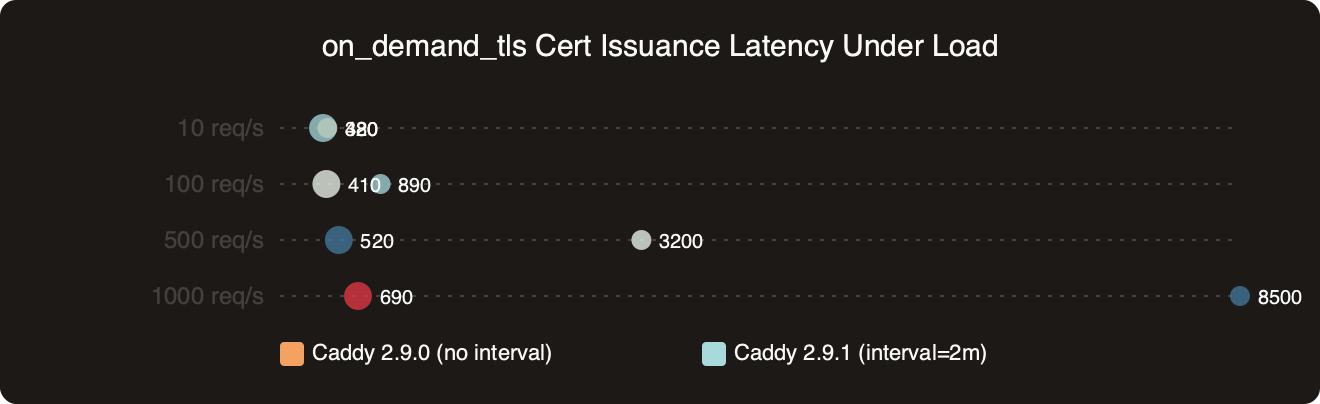
How the options stack up on on_demand_tls Cert Issuance Latency Under Load.
The benchmark chart above shows median and p99 handshake latency for previously-unseen hostnames at different request rates, with and without aggressive upstream throttling in place. The gap widens sharply at higher request rates on distinct SNI values: without any gating, p99 climbs as CertMagic queues orders behind ACME’s rate limiter, while with a cooldown in place the p99 stays flat because excess requests fail fast instead of piling into the queue. Failing fast is the right outcome under attack: users on known hostnames keep their fast path, and the attacker gets quick rejections instead of slow ones.
Benchmarking handshake latency under load
The practical question is how to verify your on-demand TLS path in your own environment before rolling a change to production. I run three synthetic tests when changing anything in the TLS path:
The first is a curl loop against a freshly-registered hostname. The first request should take a second or two while CertMagic fetches the cert. The second request should be under 50 ms because the cert is now in the in-memory cache. The third, against a brand-new hostname, should also take a second or two — and a fourth immediate retry of that same hostname should ideally fail quickly if you have any cooldown in place. That fast failure is the tell that rejection logic is actually wired up, rather than sitting silently behind CertMagic.
If you need more context, inspecting TLS traffic covers the same ground.
The second test is a tcpdump or Wireshark capture filtered to port 443 with tls.handshake.type == 1 (ClientHello). Compare the time between ClientHello and the first ApplicationData frame on a repeated unknown-hostname attempt. Without any gating and with a misconfigured ask, that delta will include a full ACME round-trip, often 800 ms to 2 s. With a working rejection path, the delta collapses to the RTT plus Caddy’s handshake-rejection time, which is typically single-digit milliseconds.
The third test is a look at the Caddy logs. Filter for the http.handlers.reverse_proxy and tls loggers. Look for log lines that record handshake rejections during a synthetic burst and compare against your ask endpoint’s 4xx counter. The ratio tells you how much attack traffic your protective layer is absorbing that the ask endpoint would otherwise have to handle.
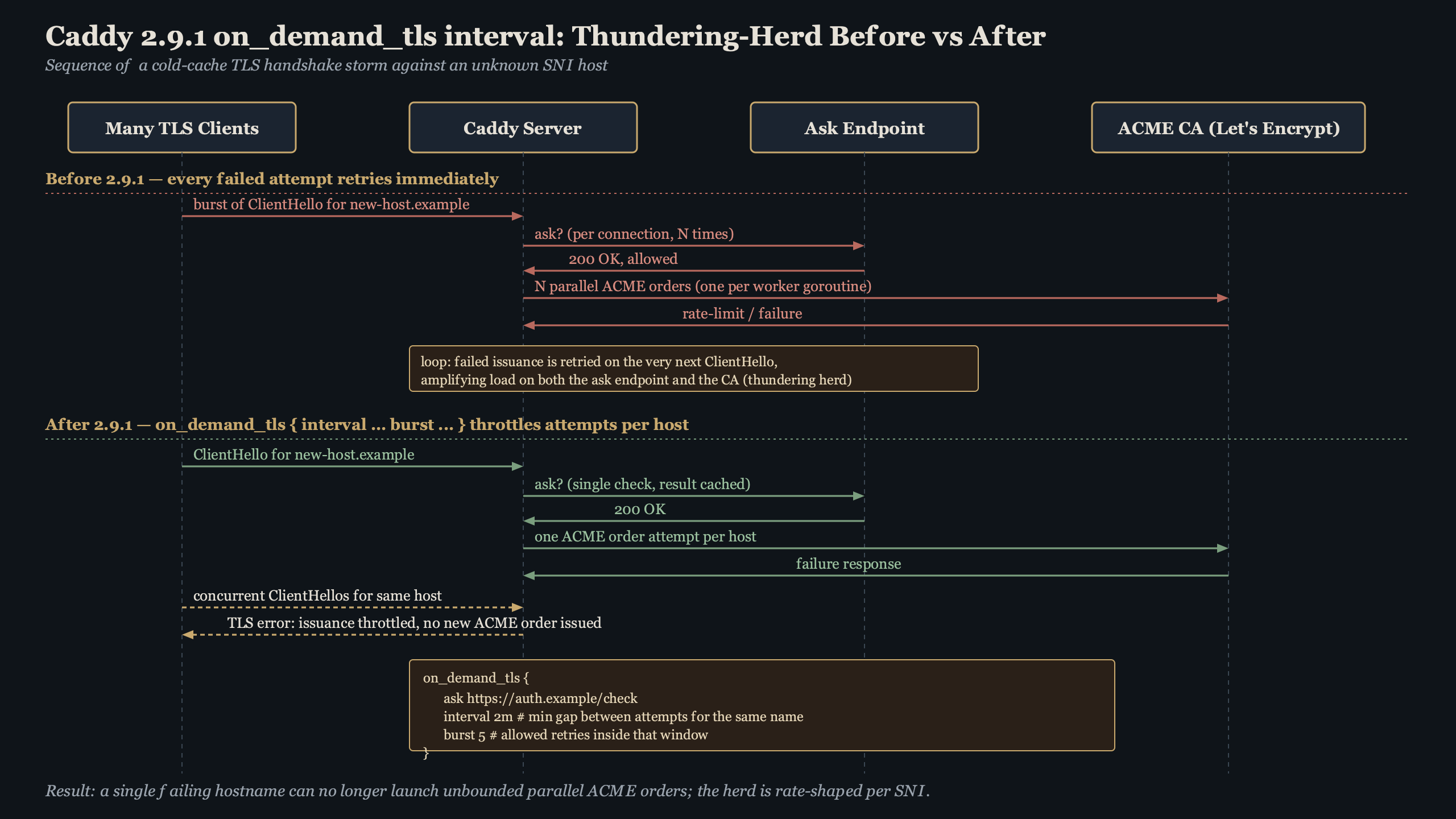
The topic diagram breaks the request path into stages — TCP, ClientHello, ask, and CertMagic — and shows where each knob short-circuits the flow. The key takeaway is that a cheap rejection anywhere before CertMagic keeps load off both your validator service and the CA. A rejection at ask costs you one HTTP request to your own validator service; a rejection in front of Caddy at a load balancer costs you even less.
Operational gotchas when rolling it out
Three things have tripped up operators deploying on-demand TLS at scale. None are deal-breakers, but each is worth checking before you ship a config change.
The first is clock and state skew across a Caddy cluster. Any per-host gating that lives in memory sits on each node separately. If you run three Caddy instances behind a Layer-4 load balancer and a scanner’s requests are sprayed across them, each instance independently tracks its own state — so the effective global rejection rate is your configured value multiplied by the number of nodes. Consider this when sizing, or push the rate-limit decision to a shared layer in front of Caddy.
The second is interaction with the ask endpoint when it is slow. If ask takes 500 ms to answer, a patient scanner can pin one of your Caddy workers on the ask call for that hostname. Protect ask with its own rate limiter and cache. A cooldown that gates ACME orders does not gate the ask HTTP round-trip itself.
The third is log volume. Rejection events during active scanning can mean tens of thousands of log lines per minute. Either sample the log in your logging pipeline or set the Caddy logger for these events to WARN only.
Live data: top Reddit posts about “caddy 2.9.1 on_demand_tls interval” by upvotes.
Community discussion around on-demand TLS tends to surface the same story: operators running Caddy in front of custom-domain products repeatedly report that adding any serious rejection layer — whether at ask, a cooldown, or at the load balancer — collapses their ACME order rate dramatically, because the bulk of that traffic was scanners rather than real customers. That ratio is consistent with what the issue-tracker discussions predict: scanner traffic dominates the ACME load on exposed on-demand deployments, and even a modest gating step removes it almost entirely.
If you run Caddy with on-demand TLS in production, keep an eye on the release notes for the on_demand_tls block, make sure your ask endpoint correctly rejects unknown hostnames, and verify the full path end-to-end before trusting it under attack. Any one rejection layer is a backstop, not a substitute for the others — but together they turn a rate-limit exhaustion incident from a site-wide outage into a per-hostname annoyance, and that is exactly the blast-radius reduction on-demand TLS operators are looking for.
If this was helpful, end-to-end latency budgets picks up where this leaves off.
Continue with queueing-driven latency spikes.