
Introduction
In the realm of Computer Networking and Network Security, visibility is everything. For a Network Engineer, System Administration professional, or a DevOps Networking specialist, the ability to peer inside the wire is the difference between blindly guessing at a problem and solving it with surgical precision. This is where Wireshark, the world’s foremost network protocol analyzer, becomes an indispensable tool.

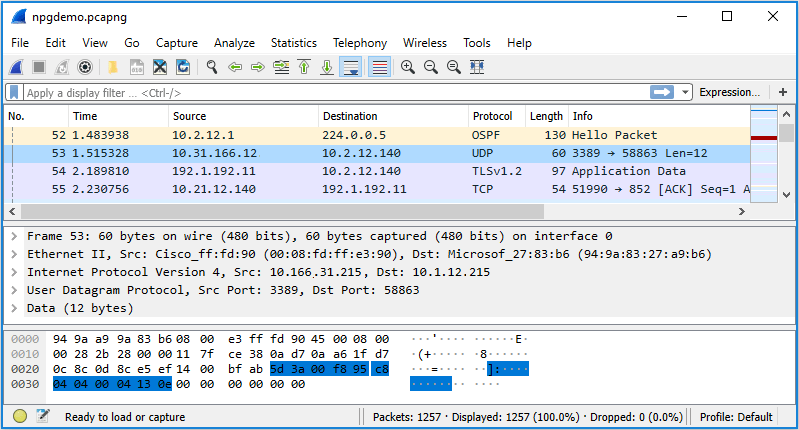
Wireshark allows professionals to capture traffic running across a network interface, dissecting it bit by bit according to the OSI Model. From the physical Ethernet frames and Network Cables signaling up to the Application Layer where HTTP Protocol and DNS Protocol reside, Wireshark reveals the truth of network communication. However, the modern internet poses a significant challenge to traditional Packet Analysis: encryption.
With the ubiquitous adoption of the HTTPS Protocol and TLS (Transport Layer Security), the payload of network packets is obscured. While this is vital for security, it complicates Network Troubleshooting and Network Monitoring. Traditional methods of using an RSA private key to decrypt traffic are becoming obsolete due to Perfect Forward Secrecy (PFS) and Ephemeral Diffie–Hellman (EDH) key exchanges. This article explores comprehensive strategies for using Wireshark, specifically focusing on modern techniques to decrypt and analyze TLS traffic using session key logging across various programming environments including Python, Go, and Node.js.
Section 1: The Evolution of Packet Analysis and Encryption
To understand why we need specific techniques to read traffic today, we must look at how Network Architecture has evolved. In the early days of TCP/IP, protocols like Telnet and HTTP sent data in plaintext. A simple capture on a Router or Switch via port mirroring would reveal passwords and data. Today, Network Standards mandate encryption.
The Challenge of Perfect Forward Secrecy
In older SSL/TLS implementations, if you possessed the server’s private RSA key, you could upload it to Wireshark and decrypt any captured session, past or present. However, modern Network Security best practices utilize cipher suites that support Perfect Forward Secrecy. In this scheme, a unique session key is generated for every single connection using algorithms like ECDHE (Elliptic Curve Diffie-Hellman Ephemeral).
Consequently, having the server’s private certificate is no longer sufficient. To analyze the traffic for Network Performance issues, Latency bottlenecks, or API debugging, we must extract the session keys generated by the client or server at runtime. This approach is often referred to as the “Pre-Master Secret” or “Session Key” logging method.
Programmatic Packet Capture
Before diving into decryption, it is helpful to understand how we can interact with packets programmatically. While Wireshark is the GUI tool of choice, Network Programming often involves using libraries to capture traffic for automated analysis. Python’s Scapy is a powerful tool for this, often used by those in Network Development.
from scapy.all import sniff, IP, TCP

def packet_callback(packet):
    if packet.haslayer(IP):
        ip_layer = packet.getlayer(IP)
        print(f"New Packet: {ip_layer.src} -> {ip_layer.dst}")

    if packet.haslayer(TCP):
        tcp_layer = packet.getlayer(TCP)
        print(f"TCP Port: {tcp_layer.sport} -> {tcp_layer.dport}")
        # In a real scenario, encrypted payloads would look like garbage data here
        print(f"Payload Size: {len(tcp_layer.payload)}")

# Sniff packets on the default interface
# count=10 limits the capture to 10 packets
print("Starting capture...")
sniff(prn=packet_callback, count=10)
While the script above captures headers perfectly, the payload for Web Services running over HTTPS will be unreadable. To solve this in Wireshark, we utilize the SSLKEYLOGFILE standard.
Section 2: Decrypting TLS Traffic in Modern Environments
The industry-standard solution for decrypting TLS traffic without compromising the private key is to force the application (browser, CLI tool, or custom script) to dump the symmetric session keys to a file. Wireshark can then read this file to decrypt the traffic in real-time or post-capture.
1. The Universal Standard: SSLKEYLOGFILE
AI code generation on computer screen – Are AI data poisoning attacks the new software supply chain attack …
Most modern libraries, including OpenSSL, BoringSSL, and NSS (used by Firefox and Chrome), check for an environment variable named SSLKEYLOGFILE. If this variable is set to a file path, the library will append the session secrets to that file.
For a Digital Nomad or Remote Work engineer troubleshooting a connection from a coffee shop, this is invaluable. You simply set the variable and launch your browser.
Linux/macOS:
export SSLKEYLOGFILE=~/tls-secrets.log
Windows:
Set it via System Properties → Environment Variables.
2. Python Applications
Python is a staple in Network Automation and Backend Development. When using standard libraries like requests (which relies on urllib3 and openssl), enabling decryption is straightforward because Python respects the environment variable.
However, for custom Socket Programming or specific implementations, you might need to ensure your environment is set up correctly before the SSL context is initialized.
import os
import requests
import logging

# Set the environment variable programmatically before making requests
# Ideally, this is done in the shell, but can be done in code for testing
key_log_path = os.path.abspath("ssl_keys.log")
os.environ["SSLKEYLOGFILE"] = key_log_path

print(f"TLS Secrets will be logged to: {key_log_path}")

try:
    # Make a request to a secure endpoint
    # This traffic will be encrypted on the wire, but keys are now logged
    response = requests.get('https://www.google.com')
    print(f"Response Status: {response.status_code}")

    # Verify the log file was created
    if os.path.exists(key_log_path):
        print("Success: Key log file generated.")
        with open(key_log_path, 'r') as f:
            print(f"First line of keys: {f.readline().strip()}...")
    else:
        print("Warning: No key log file found. Check OpenSSL version.")

except Exception as e:
    print(f"An error occurred: {e}")
3. Node.js Applications
In the world of Microservices and API Design, Node.js is ubiquitous. Unlike Python, Node.js uses a specific command-line flag or a different environment variable structure to enable key logging. This is crucial for debugging REST API or GraphQL calls between services.
You can run your Node application with the --tls-keylog flag:
node --tls-keylog=./tls-keys.log app.js
Alternatively, you can handle this via environment variables if you are running inside a containerized environment like Docker or Kubernetes, where modifying the startup command might be complex.
const https = require('https');
const fs = require('fs');

// In Node.js, we can also inspect the TLSSocket if we need specific debugging
// However, the --tls-keylog flag is the standard way to dump keys for Wireshark.

const options = {
  hostname: 'www.example.com',
  port: 443,
  path: '/',
  method: 'GET'
};

console.log("Starting HTTPS request...");
console.log("Ensure you ran this script with: node --tls-keylog=keys.log script.js");

const req = https.request(options, (res) => {
  console.log(`statusCode: ${res.statusCode}`);

  res.on('data', (d) => {
    process.stdout.write(d);
  });
});

req.on('error', (error) => {
  console.error(error);
});

req.end();
Section 3: Advanced Implementations (Go and Custom Protocols)
Go (Golang) has become the language of choice for Cloud Networking, Service Mesh implementations, and high-performance Network Tools. Go’s standard library crypto/tls does not automatically respect the SSLKEYLOGFILE environment variable by default in older versions or specific configurations. You often need to explicitly wire up the KeyLogWriter in the TLS configuration.
AI code generation on computer screen – AIwire – Covering Scientific & Technical AI
This is a common pitfall for Network Engineers moving into Software-Defined Networking (SDN) development. You must modify the source code to enable debug capabilities.
package main

import (
	"crypto/tls"
	"fmt"
	"net/http"
	"os"
)

func main() {
	// Define the path for the key log file
	logPath := "go_ssl_keys.log"

	// Open the file for writing (append mode)
	w, err := os.OpenFile(logPath, os.O_WRONLY|os.O_CREATE|os.O_APPEND, 0600)
	if err != nil {
		panic(err)
	}
	defer w.Close()

	// Create a custom TLS configuration
	// The KeyLogWriter field is the magic link to Wireshark
	tlsConfig := &tls.Config{
		KeyLogWriter: w,
	}

	// Create a transport that uses this config
	transport := &http.Transport{
		TLSClientConfig: tlsConfig,
	}

	// Create the client
	client := &http.Client{
		Transport: transport,
	}

	fmt.Printf("Making request, keys will be logged to %s\n", logPath)
	resp, err := client.Get("https://example.com")
	if err != nil {
		panic(err)
	}
	defer resp.Body.Close()

	fmt.Printf("Response status: %s\n", resp.Status)
}
Configuring Wireshark
Once you have generated the log file (e.g., keys.log) using any of the methods above, the integration into Wireshark is uniform:
- Open Wireshark and go to Edit → Preferences.
- Expand Protocols and locate TLS (or SSL in older versions).
- Look for the field labeled (Pre)-Master-Secret log filename.
- Browse and select your generated log file.
Instantly, packets that were previously marked as “TLSv1.2 Application Data” will transform. You will see the underlying HTTP streams, complete with JSON payloads, headers, and cookies. This is critical for debugging API Security issues or analyzing Load Balancing behavior.
Section 4: Best Practices and Network Optimization
Decrypting traffic is powerful, but it requires adherence to strict best practices, especially regarding Network Security and data privacy.
Security Implications
Never leave SSLKEYLOGFILE enabled on production servers permanently. If an attacker gains read access to the file system, they can decrypt all captured traffic, rendering the encryption useless. This technique should be used strictly for Network Troubleshooting and development sessions.
Filtering for Clarity
AI code generation on computer screen – AltText.ai: Alt Text Generator Powered by AI
When analyzing high-throughput networks, Wireshark can crash if it tries to decrypt everything. Use Capture Filters (BPF syntax) to limit what you record, and Display Filters to limit what you analyze.
- Capture Filter:
host 192.168.1.50 and port 443 - Display Filter:
http.request.method == "POST" and ip.addr == 192.168.1.50
Analyzing Network Performance
Beyond decryption, use Wireshark to analyze Bandwidth usage and TCP/IP health. Look for:
- Retransmissions: Indicative of packet loss or congestion.
- Zero Window: Indicates the receiver is overwhelmed.
- Time-to-Live (TTL) Exceeded: Potential routing loops.
Custom Dissectors with Lua
For proprietary protocols running on top of TCP or UDP (common in Travel Tech or legacy industrial systems), you might need to write a custom dissector. Wireshark includes an embedded Lua interpreter for this purpose.
-- A simple Lua dissector for a custom protocol on port 9999
local my_proto = Proto("myproto", "My Custom Protocol")

-- Define fields
local f_msg_type = ProtoField.uint8("myproto.type", "Message Type", base.HEX)
local f_msg_len = ProtoField.uint16("myproto.len", "Length", base.DEC)

my_proto.fields = { f_msg_type, f_msg_len }

-- Dissector function
function my_proto.dissector(buffer, pinfo, tree)
    pinfo.cols.protocol = "MYPROTO"

    local subtree = tree:add(my_proto, buffer(), "My Protocol Data")

    -- Parse the first byte as type
    subtree:add(f_msg_type, buffer(0,1))

    -- Parse next 2 bytes as length
    subtree:add(f_msg_len, buffer(1,2))
end

-- Register the dissector to a port
local tcp_port = DissectorTable.get("tcp.port")
tcp_port:add(9999, my_proto)
Conclusion
Mastering Wireshark is a journey that takes a Network Engineer from seeing the network as a black box to visualizing the flow of data with clarity. By understanding how to bypass the hurdles of modern encryption through session key logging, professionals can troubleshoot complex Web Services, audit API Security, and optimize Network Performance effectively.
Whether you are debugging a Go microservice, analyzing a Python script’s connectivity, or inspecting Node.js traffic, the combination of SSLKEYLOGFILE and Wireshark remains the gold standard. As we move toward HTTP/3 and QUIC, tools and techniques will evolve, but the fundamental need to inspect the packet—the atom of the internet—will remain constant. For those in Tech Travel, DevOps, or System Administration, these skills are not just optional; they are essential for maintaining the robust digital infrastructure we rely on every day.