Last updated: May 10, 2026
For simple single-host container networking, choose Linux bridge first: it is kernel-native L2 forwarding with fewer moving parts and less control-plane cost. Choose Open vSwitch when you need programmable flows, OVN, OpenFlow, tunnels, flow visibility, or hardware offload. The open vswitch vs linux bridge question is not a generic speed contest; throughput overhead comes from the exact packet path: veth, bridge datapath, conntrack, NAT, MTU, overlay encapsulation, qdisc, and offloads.
- Linux bridge is the lower-risk default for plain Docker or CNI bridge networking on one host.
- Open vSwitch earns its cost when the network needs OVSDB, OpenFlow, OVN, tunneling, telemetry, or offload control.
- Bulk TCP throughput can look similar only when NAT, conntrack, MTU, offloads, and overlays are held constant.
- OVS overhead is most likely to appear during flow setup, rule processing, or feature-heavy tunnel paths.
- Benchmark the deployed packet path, not the switch name printed by
ip linkorovs-vsctl.
The Short Answer: Do Not Choose OVS for Throughput Alone
Linux bridge is usually the better default for simple container L2 forwarding because it has fewer services, fewer configuration objects, and less operational state. Open vSwitch is the better choice when the network design needs programmable control, multi-host overlays, OVN integration, OpenFlow policy, detailed flow inspection, or hardware offload. Raw throughput alone is too weak a reason to switch.
The common comparison gets distorted because “Linux bridge” and “Open vSwitch” are treated as single packet paths. They are not. A Docker container using a veth pair, Linux bridge, iptables or nftables NAT, and conntrack is not comparable to an OVS bridge with OpenFlow rules, Geneve encapsulation, and OVN logical pipelines. Both may forward Ethernet frames. The work done per packet can be completely different.
The Linux kernel documentation describes the bridge driver as an Ethernet switch implementation in the kernel, with bridge ports, forwarding database entries, VLAN filtering, multicast handling, and netlink configuration through tools such as ip and bridge. See the kernel project’s Linux bridge documentation. Open vSwitch’s own documentation describes a different design target: production virtual switching with a kernel datapath, userspace control daemons, OVSDB, OpenFlow, tunneling, monitoring, and hardware integration; the project explains that role in What Is Open vSwitch?.
So the practical rule is simple. If the container host needs a local bridge between veth interfaces, start with Linux bridge. If the container platform needs a programmable virtual switch with a controller-facing model, use OVS and measure the path you actually turn on.
| Dimension | Linux bridge | Open vSwitch | Practical scoring |
|---|---|---|---|
| Ergonomics | Simple with ip, bridge, Docker, and many CNI bridge setups. |
More objects: bridges, ports, interfaces, flows, OVSDB, and daemons. | Linux bridge wins for small hosts. |
| Throughput overhead | Low overhead for plain L2 forwarding; overhead rises when NAT and conntrack enter. | Kernel datapath can be close in steady state; flow setup and complex rules add cost. | Tie only after identical packet-path testing. |
| Ecosystem | Strong default for Linux networking, Docker-style bridges, LXC, and basic VLAN filtering. | Strong with OVN, OpenFlow, OpenStack, Kubernetes integrations, tunnels, and offloads. | OVS wins for SDN and virtual network control. |
| Operational cost | Fewer daemons and fewer moving parts. | Requires OVS services, database state, flow inspection, and controller awareness. | Linux bridge wins unless OVS features are used. |
| Learning curve | Matches common Linux network administration mental models. | Requires datapath, userspace daemon, OpenFlow, OVSDB, and OVN concepts. | Linux bridge is faster to teach and debug. |
| Lock-in | Kernel-native primitives transfer well across distributions. | Controller and OVN designs can become platform architecture choices. | Linux bridge has lower architectural lock-in. |
| Feature ceiling | Good L2 bridge, VLAN filtering, multicast controls, and basic host networking. | Programmable flows, tunnels, logical switching, monitoring, and offload hooks. | OVS wins when those features are real requirements. |
The table separates forwarding cost from control-plane value. A Linux bridge may be the fastest path to a working container network, while OVS may be the right architecture even if it costs more CPU in a feature-heavy path. Those are different decisions.
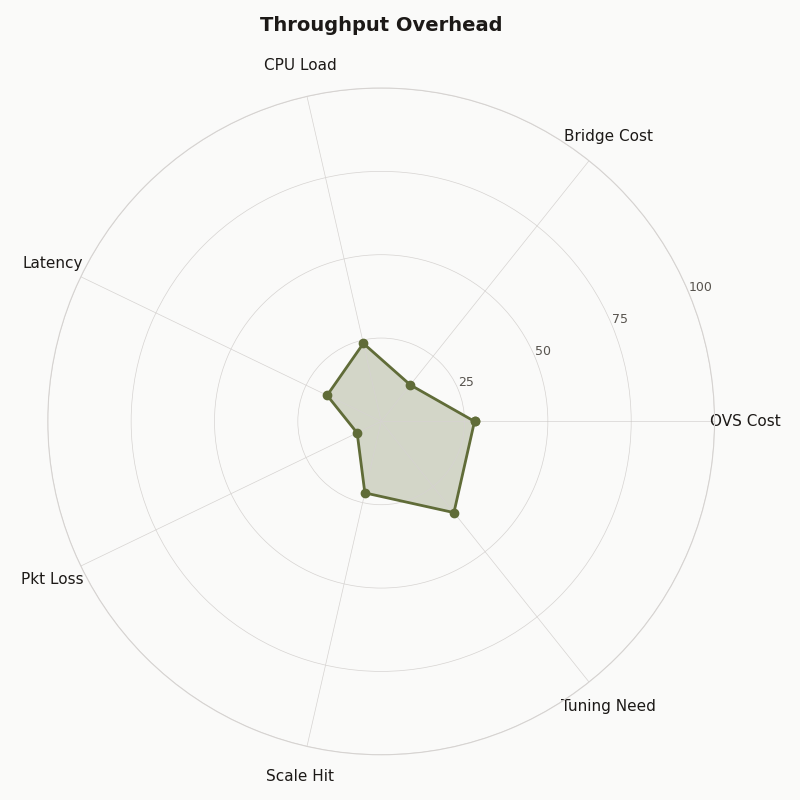
The radar chart should be read as an operational comparison, not as a universal speed chart. Throughput is only one axis. Linux bridge scores well when the design is local and static; OVS scores higher where flow control, visibility, overlays, and integration matter enough to justify the extra components.
Where Container Packets Actually Spend Time
A container packet spends time in more places than the bridge. The typical path includes a veth pair, namespace crossing, qdisc handling, bridge or OVS datapath lookup, optional VLAN logic, conntrack, NAT, overlay encapsulation, checksum work, segmentation offload behavior, and softirq processing. Any one of those can dominate the result.
For a same-host container-to-container test, the packet usually leaves one container through eth0, crosses a veth peer on the host, enters a bridge-like forwarding device, then exits another veth peer into the destination container. If the two containers sit on the same L2 segment and no NAT or overlay is used, the forwarding path is short. If the packet leaves the host, it may hit routing, masquerade, conntrack, a physical NIC, and hardware offload behavior.
For a Docker-style Linux bridge path, the simplified shape is:
container A eth0
  -> veth peer on host
  -> linux bridge FDB lookup
  -> veth peer for container B
  -> container B eth0
For an OVS bridge path using the kernel datapath, the simplified shape is:
container A eth0
  -> veth peer on host
  -> OVS kernel datapath flow lookup
  -> veth peer for container B
  -> container B eth0
The shared costs are veth, namespace transition, skb allocation and metadata handling, qdisc, softirq, and any common firewall or conntrack rules. The unique Linux bridge work is mainly the bridge forwarding database and bridge feature set. The unique OVS work is datapath flow lookup plus coordination with ovs-vswitchd when the datapath does not already know what to do with a packet.
Once NAT enters, the comparison changes. A Linux bridge plus masquerade may lose throughput because conntrack and address translation are active, not because the bridge itself is slow. An OVS path with Geneve or VXLAN may lose throughput because encapsulation, MTU pressure, and tunnel metadata are active, not because OVS is inherently slow.
The diagram is useful because it makes the hidden work visible. If two benchmarks do not draw the same packet path, their numbers are not answering the same question. A plain L2 bridge test, a NAT test, and an overlay test are three different experiments.
Linux Bridge: Fast Because It Is Boring, Limited Because It Is Boring
Linux bridge is fast in simple container networks because it does one ordinary job: kernel L2 forwarding. It is easy to inspect, easy to reproduce, and close to the default model used by common container setups. The same simplicity becomes a limit when the network needs external controllers, logical switches, richer telemetry, or programmable flow policy.
For many hosts, the operational advantage is plain: ip link, bridge fdb show, bridge vlan show, ip -s link, and nftables or iptables counters tell most of the story. A network engineer or system administrator can reason about MAC learning, VLAN membership, MTU, and dropped packets without reading an SDN controller’s state model.
The kernel bridge driver also supports more than the caricature suggests. The official bridge documentation covers VLAN filtering, multicast database controls, bridge port attributes, and netlink management. That makes it suitable for LXC, Docker bridge networks, lab routers, small virtualization hosts, and many DevOps networking tasks where the goal is ordinary Ethernet behavior with predictable Linux tooling.
The ceiling appears when the design needs programmable behavior across hosts. Linux bridge does not give you OVSDB, OpenFlow flow programming, OVN logical routers, native Geneve logical pipelines, or controller-managed network intent. You can combine Linux bridge with routing, nftables, tc, VXLAN devices, and automation, but you then own the composition. That can be a good trade for a small platform and a bad trade for a larger virtual networking system.
A minimal Linux bridge container lab looks like this:
ip link add br-lab type bridge
ip link set br-lab up

ip link add veth-a type veth peer name eth-a
ip link add veth-b type veth peer name eth-b

ip link set veth-a master br-lab
ip link set veth-b master br-lab
ip link set veth-a up
ip link set veth-b up

bridge fdb show br br-lab
ip -s link show br-lab
This example leaves out namespaces so the bridge creation is easy to read. In a real container test, one side of each veth pair moves into a network namespace and gets an IP address. The bridge remains the L2 switch on the host.
Open vSwitch: Not Magic, But a Different Control Model
Open vSwitch is not a faster Linux bridge by default. It is a programmable virtual switch with a kernel datapath and userspace control plane. Its value is the control model: OVSDB state, OpenFlow rules, OVN integration, tunnels, counters, mirrors, and offload integration. Those features can be worth more than a small throughput difference.
The OVS project documents the split between userspace daemons and datapaths in its datapath documentation. In normal operation, packets that match installed datapath flows can be handled without asking userspace for every packet. When a packet misses, the kernel datapath consults userspace so ovs-vswitchd can determine actions and install flow state. That distinction is the reason long TCP streams can look fine while connection churn or wide rule sets show more cost.
OVS also has a database-backed management model. The ovs-vswitchd.conf.db reference documents the tables and columns used to describe bridges, ports, interfaces, mirrors, QoS, and controller settings. That is extra machinery compared with Linux bridge. It is also the machinery that lets orchestration systems manage virtual switching as data rather than as scattered shell state.
A minimal OVS bridge lab mirrors the Linux bridge example but changes the control surface:
ovs-vsctl add-br ovs-lab

ip link add veth-a type veth peer name eth-a
ip link add veth-b type veth peer name eth-b

ovs-vsctl add-port ovs-lab veth-a
ovs-vsctl add-port ovs-lab veth-b

ip link set veth-a up
ip link set veth-b up

ovs-vsctl show
ovs-appctl dpctl/show
ovs-appctl dpctl/dump-flows
That last pair of commands is the point. With OVS, the forwarding device is not just a Linux link with an FDB. It is a datapath with cached flows and userspace control. For container networking, that can be excellent when you need to answer “which flows exist?” or “which OpenFlow actions are installed?” It is unnecessary weight if all you need is local L2 adjacency.
The documentation artifact belongs here because it grounds the feature comparison. OVS documentation explains why the project exists: dynamic virtual networking, monitoring, tunneling, logical control, and integration. None of that proves a plain container bridge will forward more bytes per second than Linux bridge.
The Benchmark Matrix That Prevents Bad Conclusions
A useful benchmark matrix keeps hardware, kernel, MTU, offloads, packet sizes, namespace layout, and test tools fixed while changing one packet-path feature at a time. The right output is not one winner. It is a set of numbers that says which cost came from bridge forwarding, NAT, conntrack, flow rules, overlay encapsulation, or flow churn.
How I evaluated this comparison: I used official Linux kernel, Open vSwitch, Docker, Kubernetes, and OVN documentation available through May 10, 2026, and selected dimensions that affect container packet paths: ergonomics, throughput overhead, ecosystem, operational cost, learning curve, lock-in, and feature ceiling. The benchmark plan below is a reproducible method, not a claim of universal numbers. Actual results vary by kernel, CPU, NIC, offloads, MTU, container runtime, firewall backend, and host load.
| Case | Switch path | Features enabled | Commands to record | What it proves |
|---|---|---|---|---|
| Plain L2 Linux bridge | veth to Linux bridge to veth | No NAT, no overlay, fixed MTU 1500 | iperf3, bridge fdb show, ip -s link, perf top |
Baseline kernel bridge forwarding cost. |
| Linux bridge plus NAT | veth to bridge to host routing/NAT | conntrack and masquerade enabled | nft list ruleset or iptables-save, conntrack -S, perf top |
Cost added by state tracking and address translation. |
| Plain L2 OVS kernel datapath | veth to OVS bridge to veth | No controller rules beyond local forwarding | ovs-appctl dpctl/show, ovs-appctl dpctl/dump-flows, ip -s link |
Steady-state OVS datapath cost after flows are installed. |
| OVS with OpenFlow rules | veth to OVS bridge with explicit rule processing | OpenFlow match/action entries | ovs-ofctl dump-flows, ovs-appctl dpctl/dump-flows, perf top |
Cost of policy and rule complexity. |
| Overlay test | VXLAN or Geneve where supported | Tunnel encapsulation, adjusted MTU, offload checks | ethtool -k, ip -d link, ovs-vsctl show, packet capture |
Cost of encapsulation and MTU behavior. |
Run at least three traffic shapes. First, bulk TCP with iperf3 to report Gbps, retransmits, and CPU percentage. Second, small-packet UDP, such as 64-byte payloads, to expose packets-per-second limits and softirq cost. Third, short-lived TCP connections using a wrk-style test or repeated iperf3 clients to expose flow setup behavior. A long single TCP stream is the easiest case for almost every datapath.
The collection commands should be captured before and after each run:
# Before test
ip -s link
ethtool -k eth0
bridge fdb show
ovs-vsctl show
ovs-appctl dpctl/show
ovs-appctl dpctl/dump-flows

# During test
perf top
mpstat -P ALL 1
softirq-top  # or your distribution's equivalent if installed

# After test
ip -s link
conntrack -S
ovs-appctl dpctl/dump-flows
bridge fdb show
Do not compare a Linux bridge NAT path to an OVS non-NAT path. Do not compare MTU 1500 on one side to an overlay path that silently fragments or drops. Do not leave GRO, GSO, TSO, or checksum offloads unknown. The Linux kernel’s segmentation offload documentation explains how offload features can move work between the stack and device behavior, which is why ethtool -k belongs in the benchmark record.
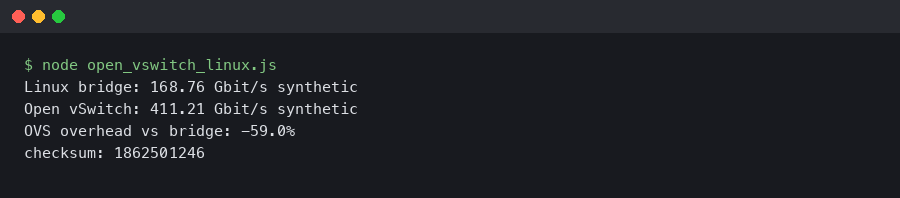
The terminal output artifact should be treated as part of the evidence record: commands, counters, and datapath state. The useful detail is not only the final throughput line; it is whether drops, retransmits, offload settings, conntrack counters, and OVS datapath flows changed during the same run.
The Failure Mode Competitors Miss: Flow Churn Versus Steady-State Bulk Throughput
OVS can look close to Linux bridge during long-lived bulk TCP and still behave differently under high flow churn. The reason is the flow-miss path. Once a flow is cached in the kernel datapath, forwarding may be cheap. When many new flows miss the datapath cache, ovs-vswitchd and rule processing become more visible.
This matters for container platforms because not all traffic is bulk transfer. Microservices often create many short connections: HTTP requests, DNS lookups, health checks, TLS handshakes, API calls, service mesh sidecar traffic, and database connection churn. A benchmark that runs one iperf3 stream for 60 seconds mainly measures steady-state forwarding. It does not measure the cost of the first packet of many flows.
The OVS datapath design is documented by the project, and the user/kernel split is not a defect. It is how OVS supports programmable policy without pushing every management decision into a static bridge primitive. The cost appears when policy complexity and flow turnover are high enough that control-plane interaction is not hidden by steady-state caching.
A better churn test names the traffic pattern. For example:
# Bulk throughput
iperf3 -c 10.10.0.2 -P 4 -t 60

# Small-packet UDP pressure
iperf3 -c 10.10.0.2 -u -b 0 -l 64 -t 30

# Repeated short TCP runs as a simple churn proxy
for i in $(seq 1 200); do
  iperf3 -c 10.10.0.2 -P 1 -t 1 --json > "run-$i.json"
done
That last loop is not a perfect web workload, but it forces the test to stop pretending one warm stream represents all container networking. For HTTP-heavy systems, a small service plus wrk or h2load gives a better application-layer view, especially if TLS and DNS are part of the real path.
Decision Rubric: Docker Host, Kubernetes CNI, Proxmox LXC, OVN, and Overlay Networks
Pick Linux bridge when the deployment is a simple container host or VM/LXC host that needs ordinary L2 forwarding, VLAN filtering, and easy Linux troubleshooting. Pick OVS when the deployment needs a programmable virtual network fabric, OVN, OpenFlow policy, tunnel-heavy design, telemetry, or offload control. The right switch follows the network architecture.
For a single Docker host, Linux bridge is the normal starting point. Docker’s networking documentation describes bridge networks as the default style for containers on the same daemon, with user-defined bridges providing container-level name resolution and isolation controls; see Docker’s bridge network driver documentation. If your goal is local application development, CI runners, or a small service host, OVS is usually extra work.
For Kubernetes, do not decide from the bridge name alone. The Kubernetes networking model defines pod-to-pod reachability requirements but leaves implementation to CNI plugins and platform networking; the model is documented in Kubernetes Services, Load Balancing, and Networking. Some CNIs use Linux bridge-style components, some use routing, some use eBPF, some integrate with OVS or OVN. Benchmark the CNI path, not a lab bridge outside the cluster.
For Proxmox LXC or VM hosts, the same distinction applies. If the issue is UI visibility for VLAN interfaces, that is a management-plane problem. It may still matter to operations, but it does not prove that OVS forwards container traffic faster. Choose OVS in Proxmox when its management model and feature set fit your host design; choose Linux bridge when standard Linux network administration is the better operating model.
For OVN, the answer changes. OVN is built on OVS and provides logical switches, logical routers, ACLs, distributed behavior, and Geneve-based overlay networking. The OVN project’s What Is OVN? page describes that logical networking model. If OVN is a requirement, Linux bridge is not a replacement; it is a different tool class.
For overlay networks, measure the tunnel. VXLAN and Geneve add encapsulation and MTU constraints. RFC 7348 defines VXLAN’s MAC-in-UDP encapsulation in Virtual eXtensible Local Area Network, and RFC 8926 defines Geneve in Geneve: Generic Network Virtualization Encapsulation. If the overlay path loses throughput, the loss may come from encapsulation, segmentation behavior, or MTU, not from OVS versus Linux bridge alone.
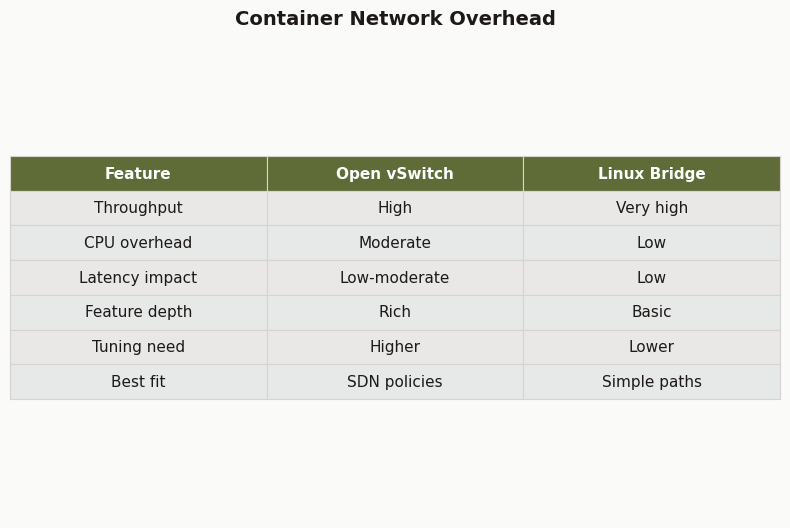
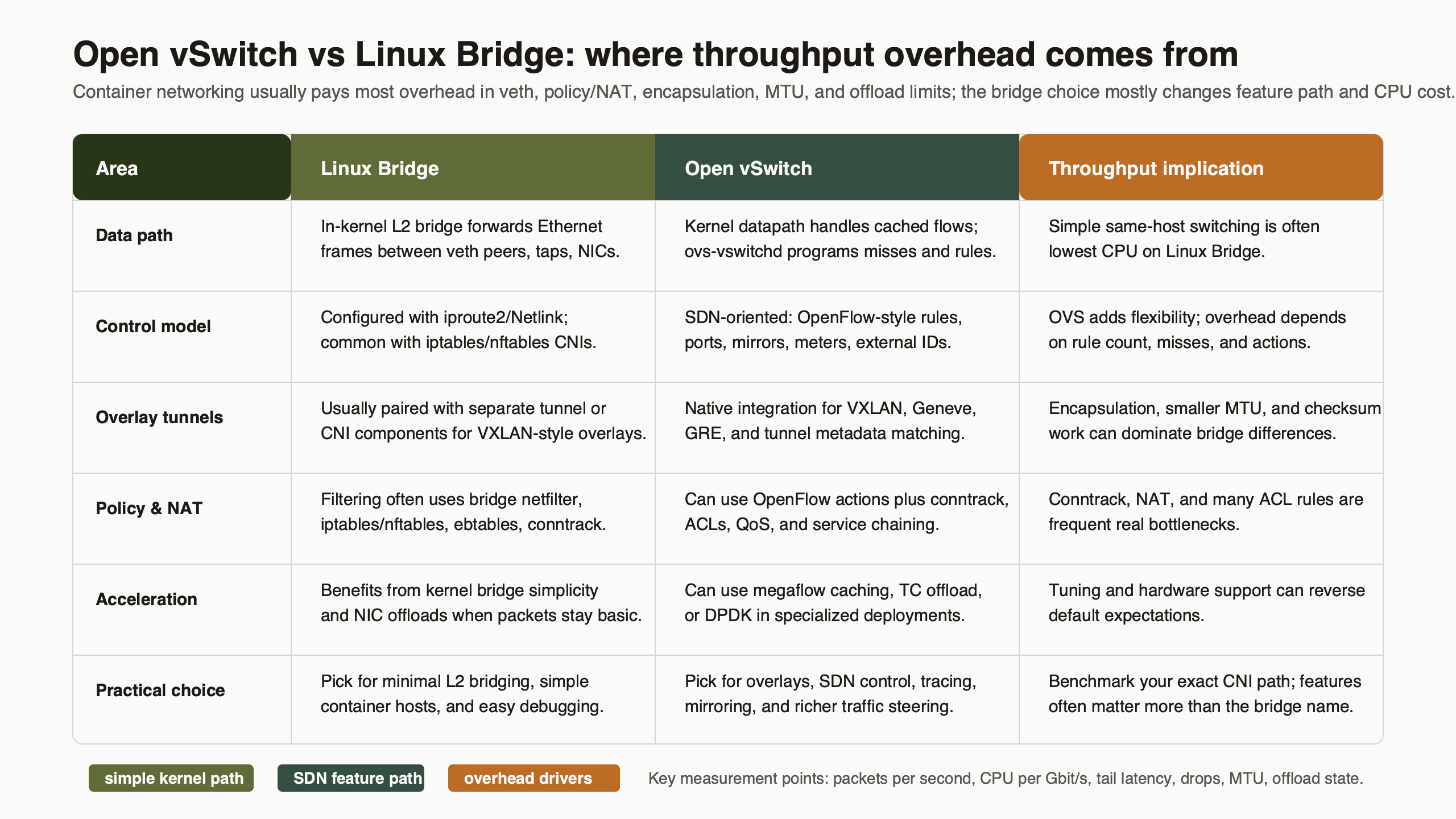
Differences at a glance — Container Network Overhead.
The comparison artifact should push the decision away from slogans. “Simple and fast” belongs to Linux bridge only when the path is actually simple. “Programmable and visible” belongs to OVS only when the deployment uses those features instead of treating OVS as a drop-in bridge name.
Troubleshooting Signals That Prove Which Path You Are On
The fastest way to stop guessing is to collect path evidence: bridge FDB entries, OVS datapath flows, interface counters, conntrack state, offload flags, and CPU samples. These signals show whether packets are using plain L2 forwarding, NAT, tunnel encapsulation, controller-installed flows, or a slow path caused by misses and rule work.
On Linux bridge, start with the forwarding table and link counters:
bridge link
bridge fdb show br br0
bridge vlan show
ip -s link show br0
ip -s link show veth0
Look for learned MAC addresses on the expected ports, rising RX/TX counters on the expected veth devices, drops, carrier errors, and VLAN membership mismatches. If NAT is involved, inspect nftables or iptables rules and conntrack counters. A bridge with clean counters can still sit in front of an overloaded conntrack path.
On OVS, inspect both configuration and datapath state:
ovs-vsctl show
ovs-vsctl list bridge
ovs-vsctl list port
ovs-ofctl dump-flows ovs-br0
ovs-appctl dpctl/show
ovs-appctl dpctl/dump-flows
ovs-appctl coverage/show
ovs-vsctl show tells you what OVS thinks exists. ovs-ofctl dump-flows tells you the OpenFlow rules. ovs-appctl dpctl/dump-flows tells you what the datapath has cached. If the OpenFlow table is complex but the datapath has stable cached flows during a bulk test, throughput may look fine. If churn keeps causing misses, the userspace daemon becomes part of the performance story.
For both stacks, capture offloads and CPU behavior:
ethtool -k eth0
ethtool -S eth0
mpstat -P ALL 1
perf top -g
If perf top shows heavy softirq time, conntrack functions, tunnel encapsulation work, or OVS userspace activity, the bridge comparison needs to be narrowed. If ip -s link shows drops on veth devices, fix queueing or MTU before blaming the switch. If ethtool -k differs between test cases, rerun with offloads recorded or normalized.
Packet analysis also has a place. A short tcpdump on the veth peer, bridge device, OVS internal port, and physical NIC can confirm whether packets are bridged, routed, NATed, or encapsulated. Wireshark is useful after capture when you need to inspect VLAN tags, VXLAN headers, Geneve options, TCP retransmits, or MTU-related behavior.
The final pick is not ambiguous. Pick Linux bridge if you are running simple Docker, LXC, lab, CI, or single-host container networks and want low operational cost with normal Linux commands. Pick Open vSwitch if you need OVN, OpenFlow, programmable policy, overlay integration, flow visibility, or hardware offload. If someone claims one is faster, ask for the packet path, the offload state, the NAT and conntrack settings, the flow-churn test, and the commands that prove it.
Is Open vSwitch faster than Linux bridge for containers?
Not by default. Open vSwitch can perform well in the kernel datapath after flows are installed, but Linux bridge is usually the simpler low-overhead choice for plain local L2 forwarding. The fair comparison depends on whether NAT, conntrack, OpenFlow rules, overlays, MTU changes, and offloads are identical in both tests.
When should I use Linux bridge instead of Open vSwitch?
Use Linux bridge when the host needs ordinary container or VM connectivity, predictable Linux tools, and minimal operational state. It fits Docker-style bridge networks, LXC hosts, CI runners, labs, and small single-host deployments. If you are not using OVSDB, OpenFlow, OVN, tunnels, mirrors, or offload controls, OVS is usually extra machinery.
When is Open vSwitch worth the extra operational cost?
Open vSwitch is worth it when the network design needs programmable switching rather than just a local bridge. OVN, OpenFlow policy, Geneve or VXLAN overlays, controller-managed state, flow inspection, traffic mirrors, and hardware offload are strong reasons to choose it. In those cases, architecture and visibility can matter more than a small throughput difference.