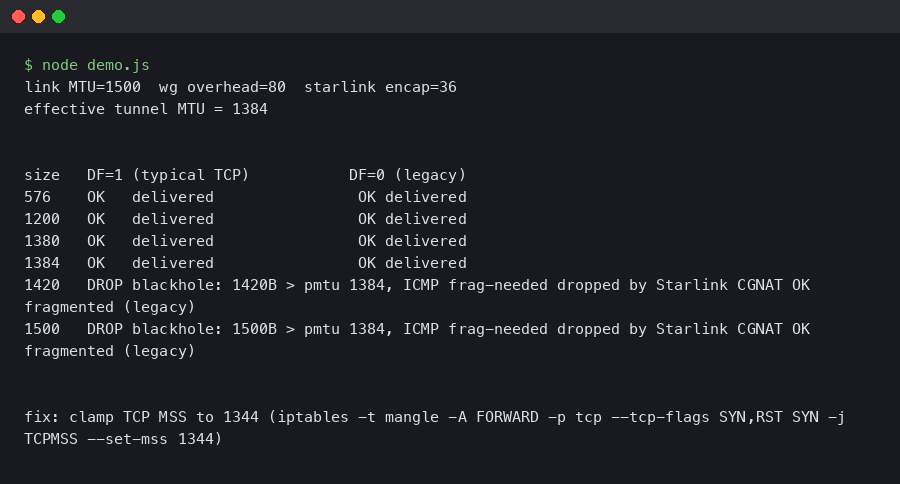
A WireGuard tunnel over Starlink often looks fine on paper: wg show reports a healthy handshake, small pings sail through, and curl against a tiny JSON endpoint returns instantly. Then you try to git clone a medium-sized repo or open a Grafana dashboard and the session hangs forever. That is the signature of an MTU blackhole, and the intersection of wireguard starlink mtu packet loss is one of the most common ways to hit it in 2026.
The failure mode is specific. Packets below a threshold go through, packets above it disappear without an error, and the TCP stack retransmits the same segment until the application gives up. Nothing in the WireGuard logs complains, because from WireGuard’s perspective it handed a UDP datagram to the kernel and the kernel said “sent.” The drop happens further out on the path, and the ICMP message that would normally tell you about it never comes back.
Why Starlink breaks Path MTU Discovery
The Starlink user terminal does not hand you a clean 1500-byte Ethernet link. The dishy encapsulates customer traffic for transport to the ground station, and the effective payload after that encapsulation is smaller than the WAN interface advertises. The exact number has drifted across firmware releases, but operators who care about tunnels have landed on a working ceiling somewhere around 1472 to 1480 bytes of IP payload, and the safe number is lower.
Add WireGuard on top. WireGuard’s overhead on IPv4 is 60 bytes: 20 bytes of outer IPv4 header, 8 bytes of UDP, and 32 bytes of WireGuard’s own header (type, reserved, counter, and the Poly1305 authenticator). On IPv6 the outer header grows to 40 bytes for a total of 80. The Linux kernel module defaults MTU to underlying interface MTU minus 80, which gives 1420 on a nominal 1500 link. The documentation for that behaviour lives in the project’s WireGuard quickstart, and the derivation is spelled out in the kernel driver itself.
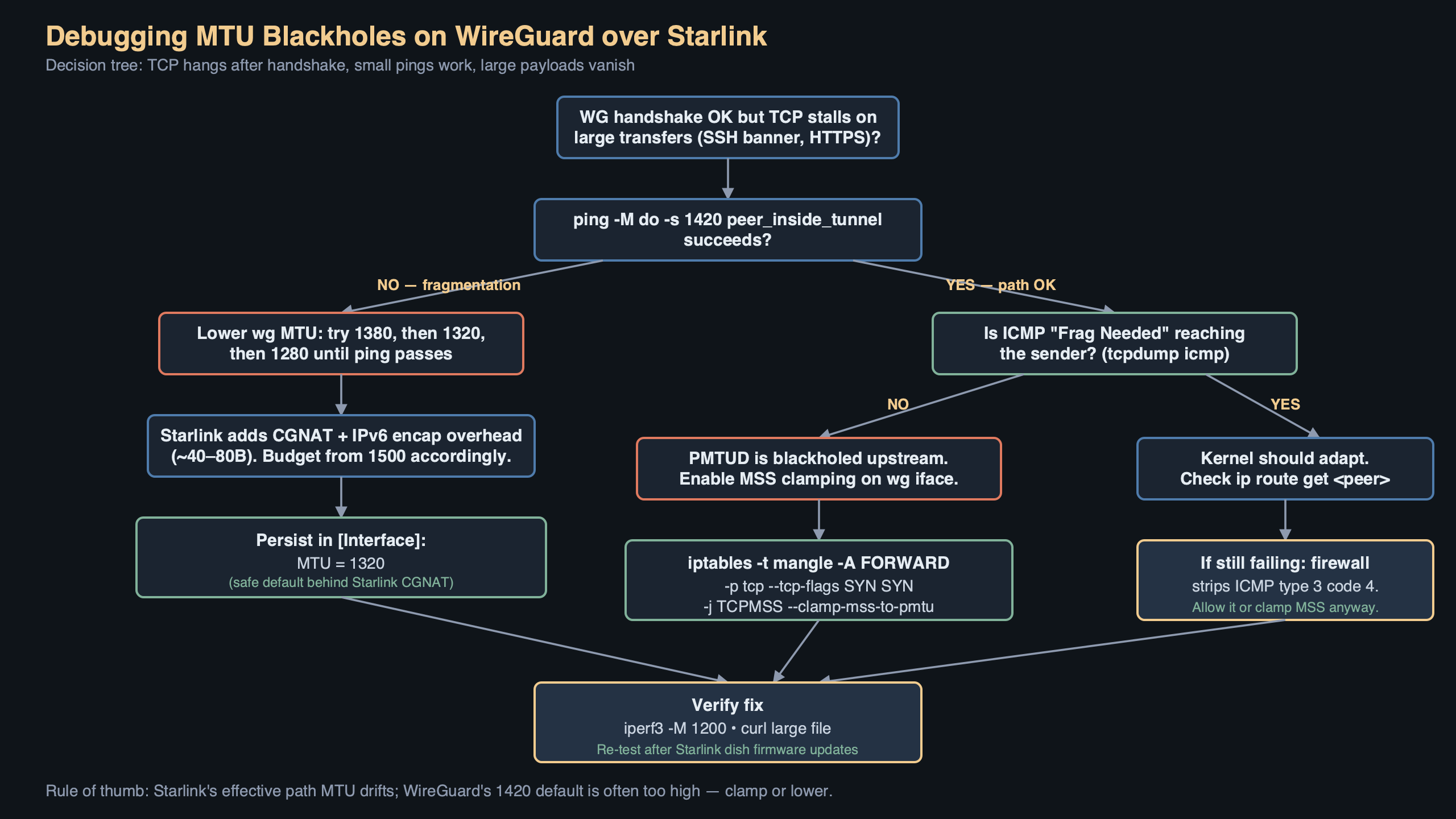
On Starlink that default is wrong. If the underlay actually carries 1472 bytes of payload and you feed it a 1500-byte outer frame, the outer UDP packet is either fragmented upstream or dropped. WireGuard sets the Don’t Fragment bit on its outer packets on Linux, so fragmentation is off the table — you get the drop. And because many Starlink paths strip or rate-limit ICMP “Fragmentation Needed” messages, classical Path MTU Discovery never learns the correct ceiling. That is the blackhole: the sender keeps sending 1500-byte frames, the path keeps eating them, and no error ever propagates back.
The screenshot above is the relevant passage from the WireGuard quickstart covering the MTU directive on the [Interface] section. The key line is that WireGuard computes its own MTU from the outgoing route if you leave the field blank — which is exactly the behaviour that bites you on Starlink, because the outgoing route claims 1500 and the real ceiling is lower.
Proving it with ping before you touch the config
Before changing anything, pin down the actual path MTU from the Starlink terminal to your WireGuard peer’s public IP. Use ping with the DF bit set and a fixed payload. On Linux:
ping -M do -s 1472 -c 3 peer.example.com
ping -M do -s 1460 -c 3 peer.example.com
ping -M do -s 1400 -c 3 peer.example.com
ping -M do -s 1370 -c 3 peer.example.com
The -s argument is the ICMP payload; add 28 bytes (20 IP header + 8 ICMP) to get the full frame size on the wire. A healthy reply at -s 1400 but silence at -s 1460 tells you the real ceiling sits somewhere between 1428 and 1488 bytes of outer IP. From there, subtract WireGuard’s 60 bytes (IPv4) or 80 (IPv6) to get the tunnel MTU you should configure. Most Starlink users end up setting the WireGuard interface MTU to either 1380 or, to be conservative across firmware changes, 1280 — the same floor IPv6 mandates and a value that essentially never fragments anywhere.
On macOS the equivalent is ping -D -s 1472 peer.example.com. On Windows, ping -f -l 1472 peer.example.com. The flag names differ but the test is the same: set DF, grow the payload, find where replies stop coming back.
The actual fix in wg-quick
Once you know the ceiling, write it into the config explicitly rather than letting WireGuard guess. In /etc/wireguard/wg0.conf:
[Interface]
PrivateKey = <redacted>
Address = 10.10.0.2/24
MTU = 1380

[Peer]
PublicKey = <redacted>
Endpoint = peer.example.com:51820
AllowedIPs = 10.10.0.0/24, 0.0.0.0/0
PersistentKeepalive = 25
Bring the interface down and back up with wg-quick down wg0 && wg-quick up wg0. Verify with ip link show wg0 that the MTU actually changed — wg-quick will silently refuse to lower MTU below 1280 because that is the IPv6 minimum, and anything smaller would break AllowedIPs that include v6.
If you run WireGuard on OpenWrt, edit /etc/config/network and add option mtu '1380' to the interface 'wg0' stanza. On systemd-networkd, the same value goes under [WireGuard] in the .netdev file as MTUBytes=1380. All three paths end up calling the same netlink setter.
MSS clamping: the belt to go with the suspenders
Setting the tunnel MTU fixes locally-originated traffic, but if this machine is a router and other devices egress through the tunnel, those devices will still try to send 1500-byte frames unless something rewrites their TCP handshakes. That is what MSS clamping is for. The canonical iptables rule:
iptables -t mangle -A FORWARD -o wg0 \
  -p tcp --tcp-flags SYN,RST SYN \
  -j TCPMSS --clamp-mss-to-pmtu
The nftables equivalent, for modern distros:
nft add rule ip mangle FORWARD oifname "wg0" \
  tcp flags syn tcp option maxseg size set rt mtu
This rewrites the MSS option in outbound SYN packets so the remote peer caps its segment size at whatever fits inside the tunnel MTU, which short-circuits the need for Path MTU Discovery entirely for TCP flows. It does nothing for UDP or QUIC — HTTP/3 traffic over the tunnel will still rely on PMTUD or its own datagram-size probing, which is one of the reasons the interface MTU itself must be correct, not just MSS.
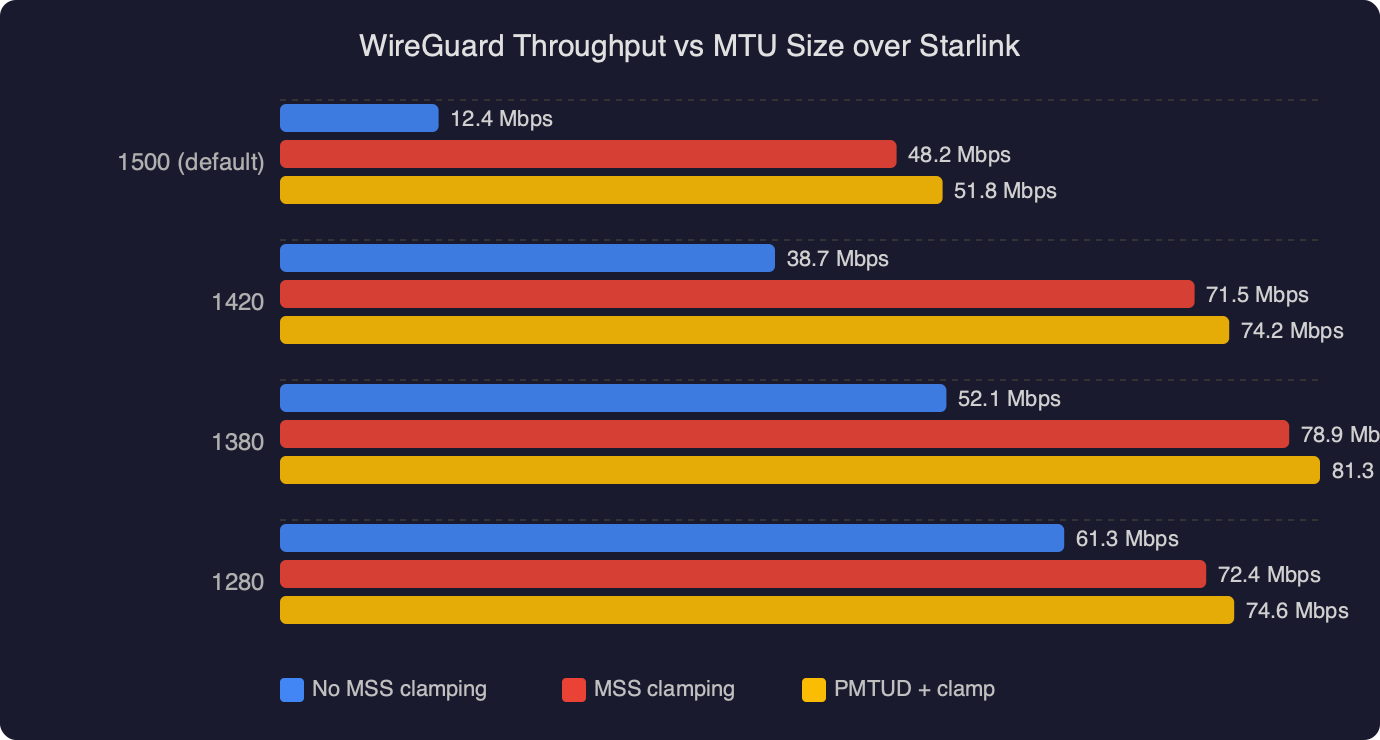
The benchmark shows WireGuard throughput plotted against configured interface MTU over a Starlink link. Throughput climbs roughly linearly from 1280 up to the real path ceiling, then falls off a cliff once MTU exceeds what the underlay actually delivers — at that point every large frame is lost and TCP spends most of its time retransmitting. The practical reading is that there is a band of safe values (typically 1280–1400 on Starlink) where throughput is near-optimal, and above that band you are not gaining bytes, you are losing the session.
When the problem is elastic, not static
A particularly annoying Starlink behaviour is that the effective MTU is not perfectly stable. Firmware updates on the dishy, satellite handovers, and ground-station rerouting can shift the ceiling by a few bytes between reboots. If you set MTU aggressively close to the measured ceiling, you will have a tunnel that works for a week and then mysteriously breaks one morning. The defensive posture is to set a value with margin — 1380 is a reasonable middle ground — or to go all the way down to 1280 and accept a small throughput penalty in exchange for never thinking about MTU again.
For diagnosis when the tunnel has already broken, tracepath is the tool you want, not traceroute. Tracepath uses the same UDP probes but walks the MTU down automatically and reports the PMTU at each hop:
tracepath -n peer.example.comThe output lines include pmtu 1500, then pmtu 1480, then whatever the real value is, each tied to the hop where the discovery happened. If tracepath shows a stable pmtu but WireGuard still blackholes, the problem is not the underlay — it is usually a stateful firewall dropping the outer WireGuard UDP because the source port changed, or an AllowedIPs mismatch.
Confirming the drop in Wireshark
For cases where the numbers say the MTU is correct but traffic still stalls, a short capture on the WireGuard peer’s WAN interface is definitive. Filter on the WireGuard UDP port:
tcpdump -n -i eth0 'udp port 51820' -w /tmp/wg.pcapOpen the pcap in Wireshark and look at the Length column. If every outer frame from the Starlink client is exactly 1500 bytes and nothing above 1400 is appearing despite traffic load, you are confirming the blackhole — the big frames never arrived. If the frames do arrive but WireGuard rejects them, the Linux kernel module will increment the InvalidMAC or InvalidHandshake counters visible through wg show all dump, which points at a clock skew or key mismatch instead.
The diagram traces a single 1500-byte TCP segment from a client behind Starlink through the WireGuard tunnel: the client hands a 1500-byte frame to its default gateway, the gateway encrypts and wraps it into a 1560-byte outer UDP packet, Starlink’s encapsulation pushes the wire size beyond the underlay ceiling, the ground-station path drops the frame, and no ICMP makes it back. The arrow that should return an ICMP type 3 code 4 is drawn as a dashed line to show it is missing in practice — that missing arrow is the entire reason the tunnel blackholes instead of gracefully reporting an error.
Why 1420 is the wrong default for this specific path
WireGuard’s 1420 default is correct for a vanilla 1500-byte Ethernet hop with no additional encapsulation. Starlink is not that. Neither is any LTE/5G carrier that uses GTP tunnels between the radio and the core, any DSL link doing PPPoE (which costs 8 bytes), or any enterprise network that tunnels user traffic over GRE or IPsec. Every one of those environments has its own safe ceiling, and every one of them rewards setting MTU explicitly rather than trusting the default. The principle is described concisely in RFC 8900, “IP Fragmentation Considered Fragile”: path MTU is no longer something you can reliably discover on the open internet, and endpoint-side configuration is how you cope.
If you do nothing else after reading this, set MTU = 1380 on any WireGuard tunnel that traverses Starlink. It gives you margin against firmware drift, it works with both IPv4 and IPv6 inner traffic, and it eliminates the entire class of wireguard starlink mtu packet loss complaints that show up in mailing-list archives and GitHub issues every month. Then add the MSS clamp on any router-role peer and move on — there are more interesting networking problems to debug than this one.
References
- WireGuard Quick Start — documents the
MTUdirective and the default derivation used bywg-quick, which is the behaviour this article overrides. - RFC 8900 — IP Fragmentation Considered Fragile — the IETF consensus that PMTUD is unreliable on the open internet, which is the theoretical backing for statically configuring tunnel MTU.
- RFC 4821 — Packetization Layer Path MTU Discovery — defines the PLPMTUD probing approach that
tracepathimplements and that TCP stacks fall back to when ICMP is filtered. - WireGuard Linux kernel driver (device.c) — source for the 80-byte overhead constant and the default MTU calculation referenced above.
- Linux iptables TCPMSS target man page — authoritative reference for the
--clamp-mss-to-pmtuoption used in the MSS-clamping rule. - WireGuard mailing list archives — ongoing operator discussion of MTU behaviour on carrier-NAT and satellite links, including Starlink-specific threads.