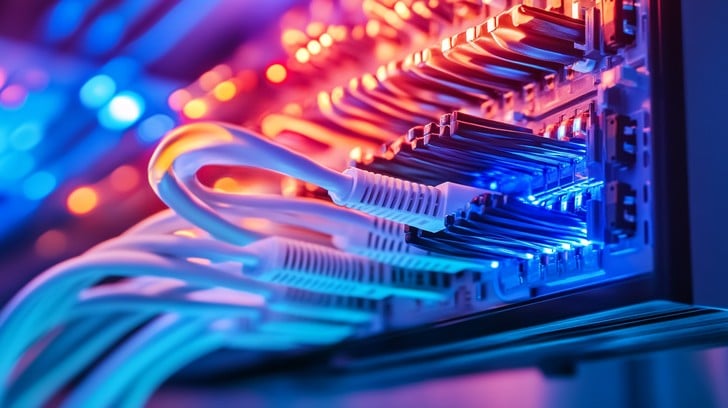
In an era dominated by cloud computing, wireless everything, and the promise of 5G, it’s easy to overlook the physical backbone that makes it all possible: the humble network cable. From the sprawling data centers powering our digital lives to the simple Ethernet cord connecting a home office, these physical links are the unsung heroes of modern connectivity. While we celebrate the sophistication of the Application Layer and the complexities of Software-Defined Networking (SDN), the entire digital infrastructure rests upon the reliability and performance of the OSI Model’s Layer 1—the Physical Layer.
Understanding network cables is not just for a Network Engineer or a System Administration professional; it’s crucial for anyone in tech. A high-quality, properly installed cable is the difference between seamless 4K streaming and frustrating buffering, or between a high-performance Microservices architecture and a bottleneck-plagued system. This article will explore the different types of network cables, their applications, best practices for implementation, and how even in a world of Network Automation and Cloud Networking, these physical connections remain more critical than ever.
The Anatomy of a Connection: Understanding Cable Types and Standards
The first step in mastering network infrastructure is to understand the tools of the trade. Network cables come in various forms, each designed for specific environments, distances, and performance requirements. The two primary categories are copper-based twisted-pair cables and fiber optic cables.
Twisted-Pair Copper Cables (Ethernet)
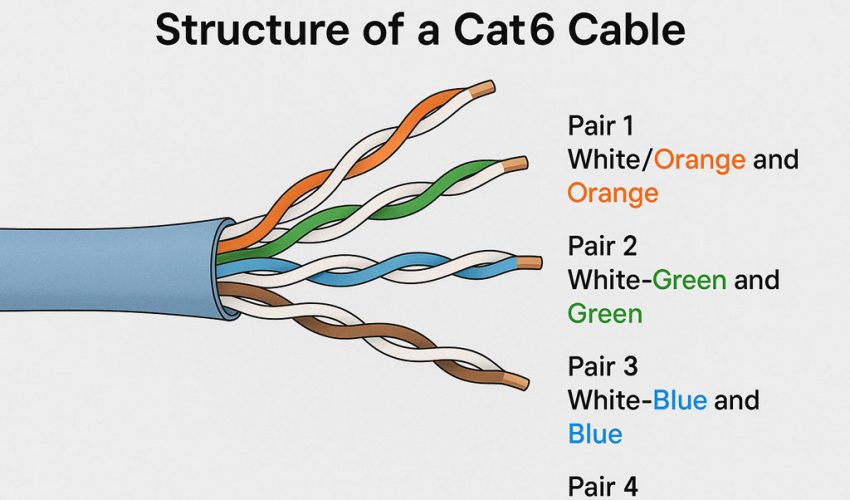
This is the most common type of cable used in local area networks (LANs). The “twisted-pair” design is a critical innovation that helps cancel out electromagnetic interference (EMI) from external sources and reduces crosstalk between neighboring wires. They are categorized by “Category” (Cat) ratings, which define their performance capabilities.
- Cat5e (Enhanced): An older standard, but still prevalent in some environments. It supports speeds up to 1 Gbps (Gigabit Ethernet) over distances up to 100 meters.
- Cat6: Offers better performance than Cat5e, with more stringent specifications for crosstalk and system noise. It supports 1 Gbps up to 100 meters and can even handle 10 Gbps over shorter distances (typically up to 55 meters).
- Cat6a (Augmented): A significant improvement, designed to reliably support 10 Gbps speeds over the full 100-meter distance. It often includes better shielding to combat alien crosstalk.
- Cat8: The latest and greatest, designed for high-speed, short-range connections within data centers. It supports staggering speeds of 25 Gbps or even 40 Gbps up to 30 meters.
These cables also come in Unshielded Twisted Pair (UTP) and Shielded Twisted Pair (STP) variants. UTP is common for office and home use, while STP is preferred in environments with high EMI, such as manufacturing floors or near heavy machinery.
Fiber Optic Cables
Instead of electrical signals, fiber optic cables transmit data using pulses of light through thin strands of glass or plastic. This method provides several key advantages: immense Bandwidth, much longer transmission distances, and complete immunity to EMI. They are the backbone of the internet, connecting cities and continents via subsea cables, and are standard in modern Data Center and enterprise network backbones.
- Multi-Mode Fiber (MMF): Uses a larger core and is designed for shorter distances (e.g., within a building or campus). It’s less expensive than its single-mode counterpart.
- Single-Mode Fiber (SMF): Has a much smaller core that allows only one mode of light to propagate. This reduces signal distortion and allows for incredible distances, spanning many kilometers, making it ideal for connecting geographically dispersed locations.
We can programmatically check the status of a network interface, which is the port where a network cable connects. This is a fundamental step in Network Troubleshooting. The Python library psutil provides a cross-platform way to retrieve this information.
import psutil
import platform

def check_network_interface_status():
    """
    Checks the status, speed, and duplex of all network interfaces.
    This helps verify the physical layer connection managed by the network cable.
    """
    if not hasattr(psutil, "net_if_stats"):
        print("psutil.net_if_stats() not available on this platform.")
        return

    stats = psutil.net_if_stats()
    addrs = psutil.net_if_addrs()

    print("--- Network Interface Status ---")
    for interface, stat in stats.items():
        print(f"Interface: {interface}")
        print(f"  Is Up: {stat.isup}")
        print(f"  Speed: {stat.speed} Mbps")

        # Duplex information might not be available on all OSes
        duplex_map = {
            psutil.NIC_DUPLEX_FULL: "Full",
            psutil.NIC_DUPLEX_HALF: "Half",
            psutil.NIC_DUPLEX_UNKNOWN: "Unknown"
        }
        print(f"  Duplex: {duplex_map.get(stat.duplex, 'N/A')}")

        if interface in addrs:
            for addr in addrs[interface]:
                if addr.family == psutil.AF_LINK: # MAC Address
                    print(f"  MAC Address: {addr.address}")
                elif addr.family == 2: # AF_INET (IPv4)
                    print(f"  IPv4 Address: {addr.address}")

        print("-" * 20)

if __name__ == "__main__":
    check_network_interface_status()
Implementation in Practice: Termination, Testing, and Troubleshooting
Having the right cable is only half the battle. Proper installation, termination, and testing are critical for achieving the rated Network Performance. A poorly terminated Cat6a cable can easily perform worse than a properly installed Cat5e cable.
Termination Standards: T568A and T568B
When terminating an Ethernet cable with an RJ45 connector, the individual wires must be placed in a specific order. The two standards that define this order are T568A and T568B. While electrically the same, consistency is key. T568B is the more common standard in the United States and for new commercial installations. A “straight-through” cable (the most common type, used to connect a device to a Switch or Router) has the same standard on both ends (e.g., B to B). A “crossover” cable (historically used to connect two similar devices directly) has one end terminated as T568A and the other as T568B. However, modern network devices almost universally support Auto MDI-X, which automatically detects the cable type and adjusts, making crossover cables largely obsolete.
Essential Network Tools for Cabling
A Network Administration toolkit for cabling includes:
- Crimper: Attaches the RJ45 connector to the end of the cable.
- Wire Stripper: Removes the outer jacket of the cable without damaging the twisted pairs inside.
- Punch-Down Tool: Used to terminate wires into a patch panel or keystone jack.
- Cable Tester: An invaluable device that verifies each wire is correctly connected and can check for shorts, open circuits, and proper pairing. Advanced testers can even certify a cable run to a specific category standard (e.g., Cat6a) and measure for issues like Latency and crosstalk.
Basic Network Troubleshooting with Code
When connectivity fails, the problem can be anywhere from a misconfigured firewall to a faulty cable. Simple Network Commands like ping and traceroute are first-line diagnostic tools. We can automate these checks with a simple Python script.
import subprocess
import platform

def run_network_diagnostics(host="8.8.8.8"):
    """
    Runs basic network diagnostics (ping and traceroute) to a target host.
    A failure in the first few hops could indicate a local network or cabling issue.
    """
    print(f"--- Running Diagnostics for {host} ---")

    # Determine the correct ping command based on the OS
    ping_param = "-n" if platform.system().lower() == "windows" else "-c"
    ping_command = ["ping", ping_param, "4", host]

    # Determine the correct traceroute command
    trace_command = ["tracert", host] if platform.system().lower() == "windows" else ["traceroute", host]

    try:
        print(f"\n> Pinging {host}...")
        ping_output = subprocess.check_output(ping_command, universal_newlines=True)
        print(ping_output)
    except subprocess.CalledProcessError as e:
        print(f"Ping failed: {e}")
    except FileNotFoundError:
        print("Ping command not found. Is it in your system's PATH?")

    try:
        print(f"\n> Tracing route to {host}...")
        trace_output = subprocess.check_output(trace_command, universal_newlines=True)
        print(trace_output)
    except subprocess.CalledProcessError as e:
        print(f"Traceroute failed: {e}")
    except FileNotFoundError:
        print("Traceroute/tracert command not found. Is it in your system's PATH?")


if __name__ == "__main__":
    # Test with a reliable public DNS server
    run_network_diagnostics(host="8.8.8.8")
    # Test a local gateway (replace with your router's IP)
    run_network_diagnostics(host="192.168.1.1")
Cabling in Modern Network Architecture
The principles of good cabling scale from a home office to massive hyperscale data centers. In modern Network Architecture, a structured and well-designed cabling plan is fundamental for scalability, manageability, and reliability.
Data Center Cabling Design
In data centers, cabling strategy is a core component of Network Design. Thousands of servers must be connected to switches with maximum performance and minimum clutter. Common designs include:
- Top-of-Rack (ToR): A network switch is placed in every server rack. Servers in the rack connect to this switch using short, manageable copper cables (like Cat6a or Direct Attach Copper cables). The ToR switch then connects to the core network, usually via high-speed fiber optic uplinks. This minimizes the amount of long-distance copper cabling.
- End-of-Row (EoR): Each row of racks is served by one or more larger network switches placed at the end of the row. This requires longer cable runs from each server to the EoR switches but can simplify switch management.
Network Automation and the Physical Layer
While Network Automation often focuses on configuring devices via Network APIs, it can also provide visibility into the physical layer. Scripts can be used to poll network devices to check the status of their interfaces, providing a real-time view of physical connectivity. For a DevOps Networking professional, automating these checks is crucial for maintaining a healthy infrastructure. Using libraries like netmiko in Python, we can programmatically interact with network hardware.
This example demonstrates connecting to a Cisco IOS-based switch and checking the status of a specific interface. This can tell you if a cable is connected and if the link is active.
from netmiko import ConnectHandler
import getpass

# --- IMPORTANT ---
# This requires the 'netmiko' library: pip install netmiko
# This is a demonstration and requires a real network device to connect to.
# Replace with your device's details.

def check_switch_interface_status(device_info, interface_name):
    """
    Connects to a network device using Netmiko and checks an interface's status.
    This is a practical example of network automation for physical layer monitoring.
    """
    try:
        with ConnectHandler(**device_info) as net_connect:
            print(f"Successfully connected to {device_info['host']}")

            # The command can vary based on the network OS
            command = f"show interfaces {interface_name}"
            output = net_connect.send_command(command)

            print(f"\n--- Output for '{command}' ---")
            print(output)

            # A simple check for link status
            if f"{interface_name} is up, line protocol is up" in output:
                print(f"\n[SUCCESS] Interface {interface_name} is UP and connected.")
            else:
                print(f"\n[WARNING] Interface {interface_name} is DOWN or not connected.")

    except Exception as e:
        print(f"Failed to connect or execute command: {e}")

if __name__ == "__main__":
    # Example device information (replace with your actual device)
    cisco_switch = {
        'device_type': 'cisco_ios',
        'host': '192.168.1.254', # IP of your switch
        'username': 'admin',
        'password': getpass.getpass(), # Prompts for password securely
        'secret': getpass.getpass(prompt='Enter enable secret: '), # Optional enable password
    }

    interface_to_check = 'GigabitEthernet1/0/1'

    check_switch_interface_status(cisco_switch, interface_to_check)
Best Practices for Performance and Reliability
Following best practices ensures your cabling infrastructure is a long-term asset, not a recurring problem. This is vital for everyone from a Digital Nomad optimizing their home setup for reliable Remote Work to an engineer designing a new data center.
Choose the Right Cable for the Job
Don’t over-spec or under-spec. Using Cat8 in a home network is overkill and expensive. Using Cat5e for a new 10 Gbps data center link is a recipe for failure. Match the cable category to the required speed and distance. For new installations, Cat6a is often a good future-proof choice for copper, while fiber is the standard for backbones and long distances.
Proper Installation and Cable Management
- Respect the Bend Radius: Every cable has a minimum bend radius. Bending it too sharply can damage the internal wires or fibers, degrading performance.
- Avoid EMI Sources: Keep copper cables away from power lines, fluorescent lights, and motors to prevent interference.
- Use Cable Management: Use patch panels, cable trays, and velcro ties to keep cables organized. A “spaghetti” mess is not only ugly but also makes troubleshooting nearly impossible and can restrict airflow, leading to overheating.
- Label Everything: Label both ends of every cable. This simple step can save hours of frustration during Network Troubleshooting.
Cabling and Network Security
The physical layer is a often-overlooked aspect of Network Security. If an attacker can gain physical access to your network cables, they can potentially tap into the data stream. Using shielded cables can offer some protection, but the primary defense is controlling physical access to wiring closets, server rooms, and data centers.
Conclusion: The Foundation of the Digital World
Network cables are the foundational layer upon which our entire digital world is built. From the TCP/IP packets that form our web traffic to the complex operations of Cloud Networking, all data must eventually travel over a physical medium. A deep understanding of cable types, installation standards, and troubleshooting techniques is a timeless and essential skill for any technology professional.
By investing in high-quality cabling, adhering to installation best practices, and leveraging Network Automation tools for monitoring, you build a reliable, high-performance foundation. This ensures that whether you’re supporting a global enterprise, a bustling data center, or a productive remote work environment, your network’s physical infrastructure will be an asset, not a liability. The next time you plug in an Ethernet cable, take a moment to appreciate the decades of engineering that make that simple click possible.