The question “do I need application-level heartbeats or can I rely on TCP keepalive” comes up in basically every long-lived connection design conversation, and the answer is almost always the same: you need application-level heartbeats, and TCP keepalive is at best a backup for when your application hasn’t sent anything in a long time. This article walks through why the kernel-level mechanism doesn’t do what people often assume it does, what application heartbeats actually accomplish that keepalive can’t, and how to size both layers correctly when you do use them together.
What TCP keepalive actually does
TCP keepalive is a kernel feature, defined in RFC 1122 §4.2.3.6, that periodically sends an empty TCP segment with the ACK flag set on an idle connection. If the peer responds with an ACK, the connection is alive. If the peer fails to respond after a configured number of probes, the kernel marks the socket as broken and the next read or write will fail with ECONNRESET.
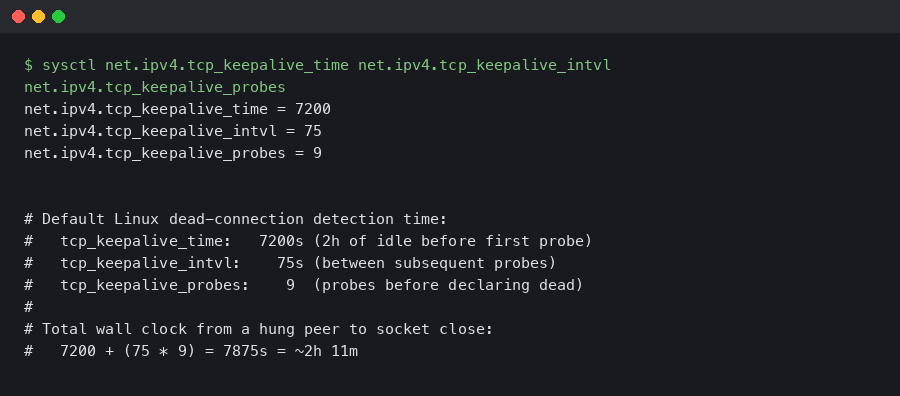
The defaults on Linux, unchanged since the early 1990s, are:
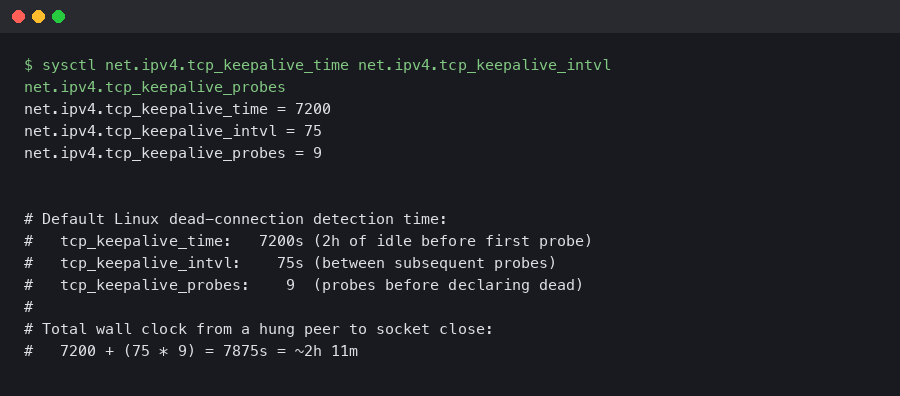
Read those numbers again. Two hours of complete idle before the kernel sends the first probe. Then nine probes, 75 seconds apart, before declaring the connection dead. Total time from “peer crashed and stopped responding” to “local socket reports a broken connection” — at the defaults — is over two hours and eleven minutes.
If your application has any kind of liveness requirement tighter than two hours, the default TCP keepalive will not help you. You either need to override the defaults at the socket level, or you need application-level heartbeats, or both.
Tuning TCP keepalive at the socket level
You can override the kernel defaults per-socket with the SO_KEEPALIVE, TCP_KEEPIDLE, TCP_KEEPINTVL, and TCP_KEEPCNT socket options. In Linux C:
int yes = 1;
setsockopt(sock, SOL_SOCKET, SO_KEEPALIVE, &yes, sizeof(yes));
int idle = 30;     // wait 30s of idle before first probe
int intvl = 10;    // 10s between probes
int cnt = 3;       // 3 probes before declaring dead
setsockopt(sock, IPPROTO_TCP, TCP_KEEPIDLE, &idle, sizeof(idle));
setsockopt(sock, IPPROTO_TCP, TCP_KEEPINTVL, &intvl, sizeof(intvl));
setsockopt(sock, IPPROTO_TCP, TCP_KEEPCNT, &cnt, sizeof(cnt));
With these settings, a dead peer is detected within 30 + (10 * 3) = 60 seconds. That’s much more reasonable for a real application. Most modern application servers expose these socket options through their library bindings — Go’s TCPConn.SetKeepAlivePeriod, Java’s Socket.setKeepAlive (though Java doesn’t expose all four parameters cleanly), Python’s socket.setsockopt with the same constants.

Why application heartbeats still matter
Even with tuned TCP keepalive, there are failure modes the kernel mechanism cannot detect:
- The remote process is alive but hung. The TCP stack still ACKs the keepalive probes (because TCP runs in the kernel) but the application is deadlocked, garbage collecting for 30 seconds, blocked on a slow disk, or otherwise not making progress. From your perspective the connection looks fine but the peer is not actually doing anything.
- The remote process is alive but the application logic is broken. The peer is still ACKing TCP segments, still receiving and parsing your messages, but a bug or a queue overflow has caused it to stop generating responses. Keepalive can’t tell you that.
- NAT or load balancer connection table eviction. A middlebox between you and the peer drops the connection from its translation table after some idle period. The peer never knows. Your TCP stack never knows. Your next packet gets a TCP RST that takes another round trip to manifest as a closed socket.
- Asymmetric routing. Your packets reach the peer, the peer’s packets get lost en route back. TCP keepalive doesn’t help here either — the probe goes out, the peer responds, the response is lost, the kernel retries. Eventually it gives up but the timing is determined by the kernel’s retry policy, not by your application’s requirements.
The only way to test that the peer is alive AND the application is making progress AND the network path is symmetric is to send something at the application layer that requires a meaningful application-level response. A heartbeat message that the peer parses, processes, and responds to. If any link in the chain is broken, the heartbeat times out and you know to drop the connection.
What an application heartbeat should look like
The minimal heartbeat is a small message in your protocol that the peer acknowledges with another small message. The shape varies by protocol:
- WebSocket: use the built-in PING/PONG control frames. Every modern WebSocket library exposes them. Send PING every 30 seconds, expect PONG back within 5 seconds.
- gRPC: uses HTTP/2 PING frames at the transport layer, configurable through keepalive parameters in both client and server (KeepaliveParams in Go, NettyServerBuilder.keepAliveTime in Java). The PING is below the application layer but does require the gRPC service to be running and responsive.
- Custom binary protocols: reserve a message type for HEARTBEAT and require the peer to respond with HEARTBEAT_ACK. Include a sequence number so you can detect dropped responses.
- Plain HTTP long-polling or SSE: the server sends a comment line (a line starting with
:in SSE) every N seconds. The client doesn’t need to respond — receiving the comment is enough to know the connection is still flowing.
Sizing the heartbeat interval
The heartbeat interval is a tradeoff. Too frequent and you waste bandwidth on a healthy connection. Too infrequent and your time-to-detect a dead peer is too long.
The rule of thumb that’s worked for me: pick the longest acceptable detection time for your use case, then make the heartbeat interval one-third of that. If you can tolerate a 60-second window where a dead peer is undetected, send a heartbeat every 20 seconds. The factor of 3 lets you miss one heartbeat without taking action and still detect failure within the budget on the second one.
For most server-to-server use cases, 30-second heartbeats with a 90-second timeout are reasonable. For latency-sensitive use cases like gaming or trading, you might go to 5-second heartbeats with 15-second timeouts. For low-frequency use cases like background workers, you might go to 5-minute heartbeats with 15-minute timeouts.
Common bugs in heartbeat implementations
Heartbeats are simple in concept and easy to implement wrong. The bugs I’ve seen in production:
- The heartbeat sender shares a queue with the application traffic. When the queue is full, the heartbeat blocks. The peer thinks you’re dead because your heartbeats stopped, not because the connection is actually broken. Use a separate code path for heartbeats so they bypass any application-level queueing.
- The heartbeat responder runs in the same thread as the message handler. If the message handler is processing a slow request, the heartbeat response is delayed. The peer thinks you’re dead. Run the heartbeat response on a dedicated thread or in an async context that’s not blocked by application work.
- Heartbeat timeout is reset by application traffic. Some implementations reset the dead-peer timer on any incoming bytes, including bytes from real application messages. This sounds reasonable until you realize that the peer might be sending messages but never responding to your specific heartbeats — which means the application logic is broken, not the network. The timer should be tied to heartbeat acks specifically.
- Heartbeats sent only by one side. If only the client sends heartbeats, the client detects a dead server, but the server never detects a dead client and the server-side socket leaks. Both sides should send heartbeats independently.
TCP keepalive is a backstop for connections that are completely idle for very long periods. It does not detect application hangs, asymmetric network failures, NAT eviction, or any failure where the remote kernel is alive but the remote application is broken. For any protocol that needs to know whether the peer is alive within minutes (or seconds), implement application-level heartbeats and tune them to your latency budget. Use TCP keepalive in addition, with the per-socket timeouts cranked down from the kernel defaults, so that long-idle connections still get cleaned up. Don’t pick one or the other — they detect different failures and the right answer is almost always both.