Actually, I should clarify — I finally caved. Last week, I ripped out my perfectly functional WiFi 6E setup and dropped nearly a grand on a top-tier WiFi 7 mesh system. The marketing hype got to me. You know the pitch: “Multi-Link Operation (MLO) fixes latency forever,” and “320 MHz channels mean wired speeds without the wire.”
Spoiler: It’s a mess.
But we are sitting here in February 2026, two years after the WiFi 7 (802.11be) standard was finalized, and I’m staring at a ping plot that looks like a heart attack victim’s EKG. The hardware is ready. The silicon is there. But the software stack? It’s holding everything back. And if you’re thinking about upgrading your office or home lab right now, put your wallet away. Let’s talk about why the 6 GHz band isn’t the sanctuary it was in 2024, and why MLO is currently more of a bug than a feature.
The 320 MHz Trap
The biggest selling point of WiFi 7 is the massive 320 MHz channel width. In theory, this doubles the throughput of WiFi 6E’s 160 MHz channels. But in my apartment? Probably not a chance.
Here’s the physics problem nobody puts on the box: Noise floor.
I tested this yesterday with a Pixel 10 Pro and my new router. Standing five feet away? 3.8 Gbps. Amazing. But I walked into the hallway—maybe 20 feet and one layer of drywall away—and the link rate plummeted to 800 Mbps. Why? Because the router had to drop from 4096-QAM down to 256-QAM just to keep the signal intelligible over the noise.
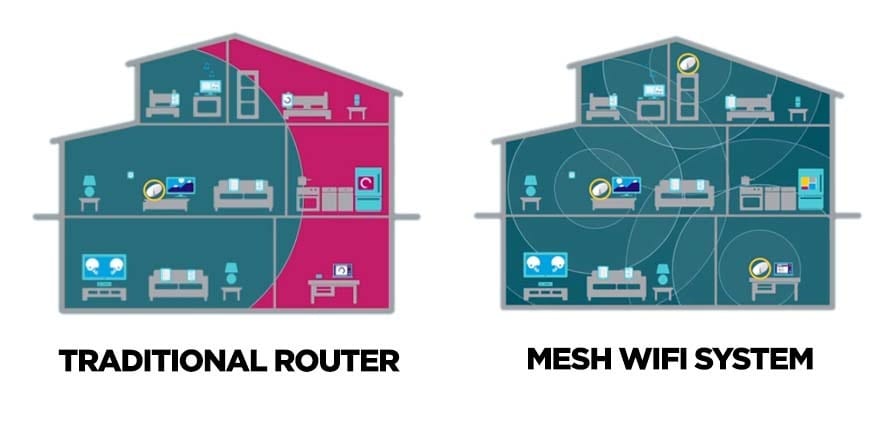
Worse, finding a contiguous 320 MHz block in the 6 GHz spectrum is getting harder. Back in 2024, 6 GHz was a ghost town. But now? My neighbors have ISP-provided gateways broadcasting on UNII-5. If their slice overlaps with mine even a little, the whole 320 MHz wide channel suffers from interference.
MLO: The “Killer Feature” That Kills Connections
Multi-Link Operation was supposed to be the holy grail. But in practice, on Windows 11 (even with the 25H2 update), it’s a disaster. The driver implementation for the Intel BE200 card—which is in almost every laptop right now—seems to aggressively prefer the 6 GHz band even when the signal is weak, rather than falling back to a strong 5 GHz signal.
I wrote a quick Python script to monitor the BSSID switching behavior because I felt like I was going crazy. And I watched the system flap between 5 GHz and 6 GHz every 45 seconds. Each switch caused a micro-stutter in my SSH sessions. That’s not “seamless”; that’s annoying.
The AFC Headache
Another thing people forget: Standard Power (SP) 6 GHz requires Automated Frequency Coordination (AFC). I tried setting up a bridge to my garage last weekend. The AP refused to transmit on 6 GHz because it couldn’t reach the AFC server due to a DNS misconfiguration on my Pi-hole. The fail-state wasn’t “transmit at low power”; it was “disable the radio entirely.”
Security: WPA3 is Non-Negotiable
You literally cannot use 6 GHz without WPA3. This sounds great until you try to connect that one “smart” thermostat from 2021 that claims to support WPA3 but actually crashes when it sees a PMF (Protected Management Frames) required handshake.
My Recommendation for 2026
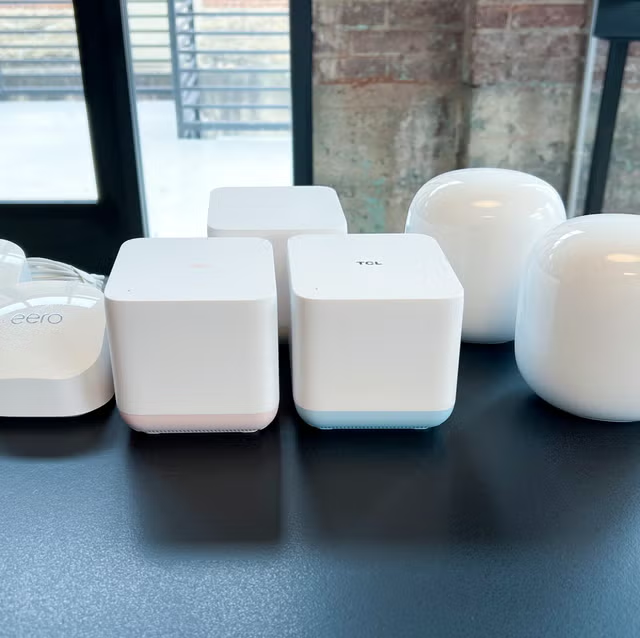
Look, I love new tech. But unless you are transferring terabytes of video footage locally between two machines sitting in the same room, WiFi 7 isn’t worth the premium yet.
The sweet spot right now is actually high-end WiFi 6E gear. The prices have crashed since the WiFi 7 launch. And for the love of god, wire your stationary devices. No amount of QAM can beat a $10 Cat6 cable.
FAQ
Is WiFi 7 worth upgrading to in 2026?
For most users, no. Unless you’re transferring terabytes of video locally between machines in the same room, WiFi 7 isn’t worth the premium in early 2026. High-end WiFi 6E gear is currently the sweet spot since prices crashed after the WiFi 7 launch. The software stack is holding back the hardware, and stationary devices benefit far more from a $10 Cat6 cable than any QAM improvement.
Why does my WiFi 7 link rate drop so much through walls?
The 320 MHz channel width is extremely sensitive to noise floor. Tested five feet from a router, a Pixel 10 Pro hit 3.8 Gbps, but 20 feet away through one drywall layer it plummeted to 800 Mbps. The router had to drop from 4096-QAM to 256-QAM to keep the signal intelligible. Finding a clean contiguous 320 MHz block in 6 GHz is also harder now that neighboring ISP gateways broadcast on UNII-5.
Why does MLO keep switching between 5 GHz and 6 GHz on Windows 11?
The Intel BE200 driver, shipped in most current laptops, aggressively prefers 6 GHz even when that signal is weak instead of falling back to a stronger 5 GHz link. Even on Windows 11 25H2, a Python BSSID monitoring script showed the system flapping between bands every 45 seconds. Each switch causes a micro-stutter, noticeably disrupting SSH sessions rather than delivering the seamless Multi-Link Operation experience marketed.
Why won’t my WiFi 7 access point transmit on 6 GHz Standard Power?
Standard Power on 6 GHz requires Automated Frequency Coordination (AFC), and if the AP can’t reach the AFC server the radio is disabled entirely rather than falling back to low power. In one garage bridge setup, a DNS misconfiguration on a Pi-hole blocked AFC server access and killed 6 GHz transmission. Additionally, 6 GHz mandates WPA3 with Protected Management Frames, which breaks older ‘smart’ devices that claim WPA3 support but crash on the handshake.