
I spent three days last week trying to troubleshoot a proprietary SD-WAN appliance that decided to drop BGP sessions randomly. It was a miserable experience. The vendor support kept asking me to reboot the box, pull logs from a locked-down CLI, and wait for firmware patches that never fixed the core issue. Actually, I ended up ripping the hardware out entirely.
I replaced it with a virtualized network function running on our existing edge compute cluster. It took 20 minutes to spin up. And the routing stabilized immediately.
We’ve been talking about network virtualization for a decade, mostly in the context of massive data centers. But the real shift is happening at the distributed edge. Managing separate physical boxes for routing, firewalls, and application compute at 50 different branch locations is a nightmare. You don’t need a dedicated router anymore. You just need a server.
The Performance Excuse is Dead
The oldest argument against running your network stack in a virtual machine is performance. People still think virtual routers introduce too much latency or can’t handle high throughput. That was true in 2018. It’s completely false now.
I ran some iperf3 tests last month pushing AES-256 IPsec traffic through a virtualized pfSense instance. We deployed this on Proxmox VE 8.1 across our 45 retail sites. The hardware was nothing special—just basic Atom C3000 edge nodes with 16GB of RAM. We consistently hit 4.2 Gbps throughput.
Three years ago, you had to buy a $4,000 dedicated appliance to get those numbers. Today, it’s just a VM running alongside your inventory database and local AI inference models.
But there is a catch, though. If you just attach a standard virtual network interface to your router VM, your CPU overhead will spike to 80% just handling interrupts. You have to bypass the hypervisor’s software bridge entirely.
Bypassing the Bottleneck with SR-IOV
The secret to making network virtualization actually work at the edge is Single Root I/O Virtualization (SR-IOV). Instead of making the CPU emulate a network card, SR-IOV takes a physical NIC and slices it into multiple independent hardware devices (Virtual Functions). Your virtual router talks directly to the silicon.
Here is how I configure this on our Debian-based edge nodes using an Intel X710 NIC. It’s shockingly simple once you know the exact sysfs paths.
#!/bin/bash
# Enable 4 Virtual Functions on the physical interface
PHYSICAL_IFACE="enp3s0f0"

# Check if SR-IOV is supported and enabled in BIOS
if [ ! -d "/sys/class/net/$PHYSICAL_IFACE/device" ]; then
    echo "Interface not found or PCIe passthrough disabled."
    exit 1
fi

# Allocate the VFs
echo 4 > /sys/class/net/$PHYSICAL_IFACE/device/sriov_numvfs

# Assign a static MAC and enable trust mode for the router VM
# Trust mode is required if your virtual router needs to tag VLANs
ip link set $PHYSICAL_IFACE vf 0 mac 02:11:22:33:44:50
ip link set $PHYSICAL_IFACE vf 0 trust on
ip link set $PHYSICAL_IFACE vf 0 spoofchk off

echo "SR-IOV VFs created successfully."
You pass that Virtual Function directly into your VM configuration. The hypervisor CPU doesn’t even see the packets. They flow straight from the wire into your virtual router’s memory space.
Consolidation is the Only Way Forward
The fallout from the Broadcom VMware licensing changes over the last couple of years forced a lot of us to rethink our entire infrastructure strategy. Probably when renewals jumped by 300% for some of my peers, they didn’t just look for a cheaper hypervisor. They looked at why they had so much hardware in the first place.
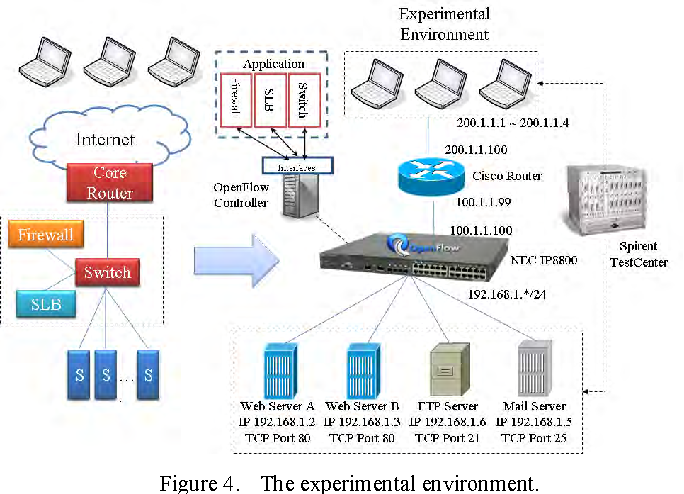
If you have a branch office, you probably have an SD-WAN appliance, a separate firewall, maybe a switch, and a small server running local applications. That’s four maintenance contracts. Four points of failure. Four different management portals.
Virtualizing the network means the network is just another application. You buy two generic compute nodes for high availability. You install a hypervisor. You deploy your SD-WAN agent, your SASE security stack, and your local apps as isolated instances on that same hardware.
When the network software acts up, you don’t dispatch a technician to swap a chassis. You roll back the VM snapshot. And if a node dies, the hypervisor boots the virtual router on the surviving node in seconds.
What Happens Next
The industry is aggressively moving away from single-purpose hardware. Vendors who only sell proprietary network boxes are going to have a very hard time justifying their existence.
But I expect that by Q3 2027, shipping a dedicated hardware router to a new branch office will be viewed the same way we view installing software from a CD-ROM today. It will seem absurdly outdated.
So stop buying network hardware. Buy compute, and run your network on top of it. Your pager will ring a lot less often.