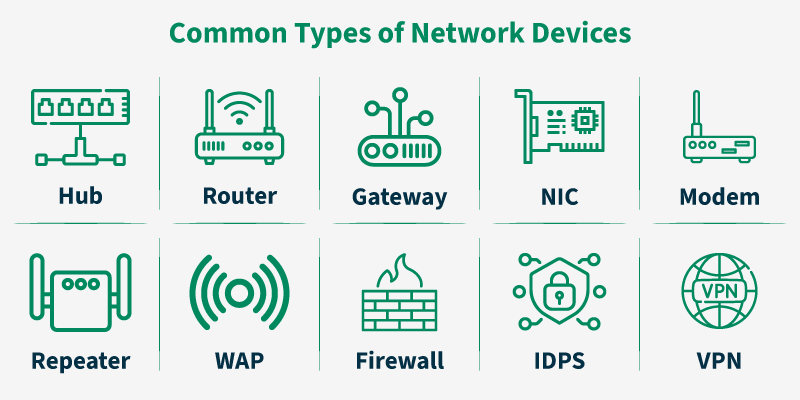
The Foundation of Our Digital World: Understanding Network Devices
In an era where seamless connectivity is not just a convenience but a necessity, the intricate dance of data across the globe happens almost magically. Whether you’re a digital nomad leveraging remote work capabilities from a cafe in a new city, a developer deploying microservices to the cloud, or simply streaming your favorite show, you are relying on a complex ecosystem of specialized hardware. These are the unsung heroes of our digital age: network devices. From the humble switch in your home office to the sophisticated routers powering the internet’s backbone, these devices are the fundamental building blocks of all computer networking.

However, the world of network devices is no longer just about physical boxes with blinking lights. The rise of Software-Defined Networking (SDN), network automation, and cloud networking has transformed them into programmable, intelligent platforms. For any modern network engineer, system administration professional, or DevOps practitioner, understanding both the foundational principles and the modern automation techniques is crucial. This article provides a comprehensive exploration of network devices, from their core functions within the OSI model to advanced programmatic interaction and modern network architecture.
Section 1: The Core Building Blocks of Network Communication
To truly appreciate network devices, we must first understand the framework they operate within: the Open Systems Interconnection (OSI) model. This conceptual model standardizes the functions of a telecommunication or computing system into seven abstract layers. Each network device primarily operates at one or more of these layers, defining its specific role in managing data traffic.
The OSI Model and Key Network Devices
- Layer 1 – The Physical Layer: This is the realm of raw bits and electrical signals. Devices like hubs (now largely obsolete) and repeaters operate here, simply regenerating and forwarding signals without any intelligence. This layer also defines physical specifications for network cables like Ethernet.
- Layer 2 – The Data Link Layer: This layer deals with MAC (Media Access Control) addresses. Switches are the primary device here. They intelligently forward data packets to specific devices on the same local network, creating a more efficient environment than a hub.
- Layer 3 – The Network Layer: This is where routing happens. Routers operate at this layer, using IP addresses (both IPv4 and IPv6) to forward packets between different networks. This is the fundamental process that makes the internet work.
- Layers 4-7 (Transport, Session, Presentation, Application): While dedicated devices exist for these layers (like load balancers and application-layer firewalls), this is primarily where protocols like TCP/IP, HTTP Protocol, and DNS Protocol are managed by the end-device’s operating system.
Practical Example: DNS Resolution with Python
Before a router can send your request to a website, your computer must first translate a human-readable domain name (like www.google.com) into a machine-readable IP address. This is a function of the Application Layer using the DNS Protocol. We can simulate this fundamental networking task using Python’s built-in socket programming library.
# Filename: dns_resolver.py
import socket

def resolve_hostname(hostname):
    """
    Resolves a given hostname to its IPv4 address using the socket library.
    This demonstrates a fundamental DNS lookup.
    """
    try:
        ip_address = socket.gethostbyname(hostname)
        print(f"Successfully resolved '{hostname}' to IP address: {ip_address}")
        return ip_address
    except socket.gaierror as e:
        print(f"Error: Could not resolve hostname '{hostname}'.")
        print(f"Reason: {e}")
        return None

# --- Main execution ---
if __name__ == "__main__":
    target_host = "www.example.com"
    resolve_hostname(target_host)

    target_host_fail = "nonexistent-domain-12345.com"
    resolve_hostname(target_host_fail)
This simple script demonstrates a crucial first step in any network communication. The operating system handles the complex DNS query process, but understanding this interaction is key to network troubleshooting.
Section 2: From Manual Configuration to Network Automation
Traditionally, network administration involved manually connecting to each device via a console cable or SSH and typing commands into a Command-Line Interface (CLI). While effective, this approach doesn’t scale in modern, dynamic environments. The shift towards infrastructure-as-code and DevOps networking has made network automation an essential skill.

The Power of Programmatic Control
Automating network device configuration offers numerous benefits:
- Consistency: Ensures that configurations are standardized across all devices, reducing human error.
- Speed: Allows for the rapid deployment of changes to hundreds or thousands of devices simultaneously.
- Scalability: Simplifies the management of large and complex network infrastructures, including those in cloud networking environments.
- Auditing: Programmatic scripts provide a clear, version-controlled record of all changes made to the network.
Modern network devices and controllers expose Network APIs (often REST API or NETCONF) to facilitate this automation. For legacy devices that only support CLI access, we can use libraries to automate SSH interactions.
Practical Example: Automating Device Commands with Paramiko
Let’s use the popular Python library `Paramiko` to connect to a network device (like a Cisco switch or router) via SSH and execute a simple command. This is a foundational task in network automation, allowing you to retrieve information or push configuration changes programmatically.
# Filename: simple_ssh_client.py
# You need to install paramiko first: pip install paramiko
import paramiko
import time
import getpass

def get_device_info(hostname, username, password):
    """
    Connects to a network device via SSH and runs a command.
    """
    try:
        # Create an SSH client instance
        client = paramiko.SSHClient()
        # Automatically add the server's host key
        client.set_missing_host_key_policy(paramiko.AutoAddPolicy())

        print(f"Connecting to {hostname}...")
        client.connect(hostname=hostname, username=username, password=password, port=22)
        print("Connection successful!")

        # Get an interactive shell
        remote_conn = client.invoke_shell()

        # Send a command to the device (e.g., 'show version' on a Cisco device)
        print("Sending command: show version")
        remote_conn.send("show version\n")

        # Give the device time to process the command
        time.sleep(2)

        # Read the output
        output = remote_conn.recv(65535).decode('utf-8')

        print("\n--- Device Output ---")
        print(output)
        print("---------------------\n")

    except paramiko.AuthenticationException:
        print("Authentication failed. Please check your credentials.")
    except Exception as e:
        print(f"An error occurred: {e}")
    finally:
        if 'client' in locals() and client.get_transport().is_active():
            print("Closing connection.")
            client.close()

# --- Main execution ---
if __name__ == "__main__":
    # In a real-world scenario, fetch these from a secure source, not hardcoded.
    DEVICE_IP = "192.168.1.1" # Replace with your device's IP
    DEVICE_USER = "admin"
    DEVICE_PASS = getpass.getpass(f"Enter password for {DEVICE_USER}@{DEVICE_IP}: ")

    get_device_info(DEVICE_IP, DEVICE_USER, DEVICE_PASS)
This script provides a template for building more complex automation workflows, such as backing up configurations, deploying security patches, or auditing device settings across your entire network architecture.
Section 3: Advanced Network Analysis and Programming
To move beyond basic configuration and truly understand network behavior, we must look at the data itself. Packet analysis is the process of capturing and inspecting the raw data packets that traverse a network. This is indispensable for network troubleshooting, performance tuning, and network security analysis.
Peeking Inside the Packets with Wireshark and Scapy
Wireshark is the world’s foremost network protocol analyzer. It’s a powerful GUI tool that lets you see what’s happening on your network at a microscopic level. For programmatic analysis and packet manipulation, the Python library Scapy is unparalleled. It allows you to create, send, sniff, and dissect network packets with just a few lines of code. This is a core component of advanced network programming.
Practical Example: A Simple Network Sniffer with Scapy
Let’s build a simple packet sniffer that captures the first 10 IP packets on the network and prints their source and destination addresses. This can help identify active devices and traffic flows on a local segment.
# Filename: packet_sniffer.py
# You need to install scapy first: pip install scapy
# Note: This script may require administrator/root privileges to run.
from scapy.all import sniff, IP

def packet_callback(packet):
    """
    This function is called for each captured packet.
    It checks if the packet has an IP layer and prints its details.
    """
    if IP in packet:
        ip_src = packet[IP].src
        ip_dst = packet[IP].dst
        proto = packet[IP].proto

        # Map protocol number to a human-readable name
        proto_map = {6: 'TCP', 17: 'UDP', 1: 'ICMP'}
        protocol_name = proto_map.get(proto, f"Other({proto})")

        print(f"IP Packet: {ip_src} -> {ip_dst} (Protocol: {protocol_name})")

def start_sniffer(packet_count):
    """
    Starts the packet sniffer for a specified number of packets.
    """
    print(f"Starting network sniffer for {packet_count} packets...")
    try:
        # sniff() is the main function from Scapy for capturing packets
        # 'prn' specifies the callback function to execute for each packet
        # 'count' specifies how many packets to capture
        # 'filter' can be used to capture specific traffic (e.g., "tcp port 80")
        # 'store=0' tells Scapy not to store the packets in memory
        sniff(prn=packet_callback, count=packet_count, store=0)
        print("\nSniffing complete.")
    except PermissionError:
        print("\nError: Permission denied. Please run this script with sudo or as an administrator.")
    except Exception as e:
        print(f"\nAn error occurred: {e}")

# --- Main execution ---
if __name__ == "__main__":
    # Capture the first 10 IP packets seen by the network interface
    start_sniffer(10)
This script provides a glimpse into the power of programmatic packet analysis. You could extend this to detect specific security threats, measure latency, or analyze network performance by examining packet timestamps and flags.
Section 4: Modern Network Design and Best Practices
The landscape of network design has evolved dramatically. The focus has shifted from rigid, hardware-centric architectures to flexible, software-driven models that embrace virtualization and cloud integration. Understanding these modern paradigms is essential for building resilient and scalable networks.
Software-Defined Networking (SDN) and Network Virtualization
SDN is a revolutionary approach that decouples the network’s control plane (which decides where traffic goes) from the data plane (which forwards the traffic). This allows for centralized management and programmability of the entire network through an SDN controller. Network virtualization (NV) complements this by creating virtual networks (like VLANs or VXLANs) that run on top of the physical infrastructure, enabling multi-tenancy and logical segmentation.
Security: A Non-Negotiable Pillar
In any network design, network security is paramount. Key components include:
- Firewalls: Act as barriers between trusted and untrusted networks, filtering traffic based on a defined set of security rules.
- VPN (Virtual Private Network): Creates a secure, encrypted tunnel over a public network (like the internet), essential for protecting data for remote work and connecting branch offices.
- Access Control Lists (ACLs): Rules applied to router and switch interfaces to permit or deny traffic based on criteria like source/destination IP address and port number.
Practical Example: Conceptual API Call to an SDN Controller
Modern network management often involves interacting with a REST API provided by an SDN controller or a firewall. The following conceptual Python code shows how you might use the `requests` library to add a new firewall rule to block traffic from a malicious IP address.
# Filename: sdn_firewall_rule.py
# Conceptual example of using a REST API to manage a network device.
# You need to install requests: pip install requests
import requests
import json

def add_firewall_rule(controller_ip, api_key, rule_name, source_ip, action):
    """
    Adds a new firewall rule via a hypothetical SDN controller's REST API.
    """
    api_endpoint = f"https://{controller_ip}/api/v1/firewall/rules"

    headers = {
        "Content-Type": "application/json",
        "X-Auth-Token": api_key
    }

    payload = {
        "name": rule_name,
        "source_address": source_ip,
        "destination_address": "any",
        "service": "any",
        "action": action # "deny" or "allow"
    }

    print(f"Attempting to add rule '{rule_name}' to block IP {source_ip}...")

    try:
        # In a real scenario, you would use verify=True with a proper SSL certificate
        response = requests.post(api_endpoint, headers=headers, data=json.dumps(payload), verify=False)

        # Check if the request was successful
        if response.status_code == 201: # 201 Created
            print("Successfully added firewall rule.")
            print("Response:", response.json())
        else:
            print(f"Failed to add rule. Status Code: {response.status_code}")
            print("Response Body:", response.text)

    except requests.exceptions.RequestException as e:
        print(f"An error occurred while making the API request: {e}")

# --- Main execution ---
if __name__ == "__main__":
    # These values would be specific to your SDN controller/firewall
    SDN_CONTROLLER_IP = "10.0.0.1"
    API_KEY = "your_secret_api_key_here"
    MALICIOUS_IP = "203.0.113.55"

    add_firewall_rule(
        controller_ip=SDN_CONTROLLER_IP,
        api_key=API_KEY,
        rule_name="Block-Malicious-Actor-01",
        source_ip=MALICIOUS_IP,
        action="deny"
    )
Conclusion: The Future is Programmable
Network devices are the bedrock of our interconnected world, evolving from static hardware into dynamic, intelligent, and programmable platforms. We’ve journeyed from the foundational roles of routers and switches within the OSI model to the powerful capabilities of network automation, programmatic packet analysis, and modern API-driven management. For professionals in IT, the message is clear: mastering both the timeless principles of computer networking and the modern tools of automation is no longer optional—it’s essential.
As networks become more complex with the integration of edge computing, IoT, and ever-increasing bandwidth demands, the ability to automate, monitor, and secure these intricate systems programmatically will be the defining skill of the next-generation network engineer. By embracing tools like Python, Scapy, and modern network APIs, you can move from being a network operator to a true network architect, building the resilient, secure, and scalable infrastructures of tomorrow.