
The Unseen Traffic: Why Your Smart Home Needs a Smarter Network
In our increasingly connected world, the modern home is a bustling hub of digital communication. From smart speakers and thermostats to robotic vacuums and intelligent lighting, Internet of Things (IoT) devices have seamlessly integrated into our daily lives, promising convenience and efficiency. However, this convenience comes with a hidden cost: a loss of control and potential privacy risks. Every “smart” device is a computer, often running proprietary software, constantly communicating with manufacturer-owned cloud servers. What data are they sending? How secure are these transmissions? What happens when a device’s functionality is tied to a service you can’t control?
This is where the discipline of Computer Networking and the skills of a Network Engineer become not just professional assets, but essential tools for personal digital sovereignty. By applying fundamental principles of Network Architecture and Network Security, you can transform your home network from a chaotic free-for-all into a meticulously managed and secure digital fortress. This article will guide you through the core concepts, practical implementations, and advanced techniques needed to monitor, control, and secure the IoT devices in your life, ensuring they work for you without compromising your privacy.
Section 1: Gaining Visibility with Packet Analysis and Network Segmentation
The first rule of network management is “you can’t secure what you can’t see.” Before you can control your IoT devices, you must first understand their behavior. What servers do they talk to? How often? What protocols are they using? Answering these questions requires a dive into the world of Packet Analysis and a foundational understanding of the OSI Model.
Understanding Device Communication with Packet Sniffing
Every piece of data sent over your network is encapsulated in a “packet.” By capturing and inspecting these packets, you can build a complete picture of a device’s network activity. While powerful GUI-based Network Tools like Wireshark are the industry standard for deep packet inspection, we can start with a simple Python script using the Scapy library to get a high-level overview. Scapy is a powerful interactive packet manipulation program and library that can forge or decode packets of a wide number of protocols, send them on the wire, capture them, and more.
Let’s write a script to identify the DNS queries a specific device is making. The DNS Protocol is like the internet’s phonebook; it translates human-readable domain names (like `example.com`) into machine-readable IPv4 or IPv6 addresses. Monitoring these requests is a fantastic way to see which cloud services a device is trying to contact.
import scapy.all as scapy

def sniff_dns_requests(interface, target_ip):
    """
    Sniffs network traffic on a given interface and prints DNS queries
    originating from the target IP address.
    """
    print(f"[*] Sniffing for DNS requests from {target_ip} on {interface}...")
    # BPF filter to capture DNS traffic (port 53) from the source IP
    bpf_filter = f"udp and port 53 and src host {target_ip}"

    scapy.sniff(iface=interface, filter=bpf_filter, prn=process_packet, store=False)

def process_packet(packet):
    """
    Callback function to process each captured packet.
    """
    # Check if the packet has a DNS layer and is a query (qr=0)
    if packet.haslayer(scapy.DNS) and packet.getlayer(scapy.DNS).qr == 0:
        dns_layer = packet.getlayer(scapy.DNS)
        # qd.qname contains the queried domain name
        domain = dns_layer.qd.qname.decode('utf-8')
        print(f"[+] Detected DNS Query: {domain}")

if __name__ == "__main__":
    # Replace with your network interface (e.g., 'eth0', 'en0', 'Wi-Fi')
    network_interface = "en0"
    # Replace with the IP address of the IoT device you want to monitor
    iot_device_ip = "192.168.1.152"

    sniff_dns_requests(network_interface, iot_device_ip)
By running this script, you might discover your smart vacuum is contacting `metrics.manufacturer.com`, `updates.manufacturer.com`, and several third-party analytics servers. This visibility is the crucial first step.
The Power of Segmentation
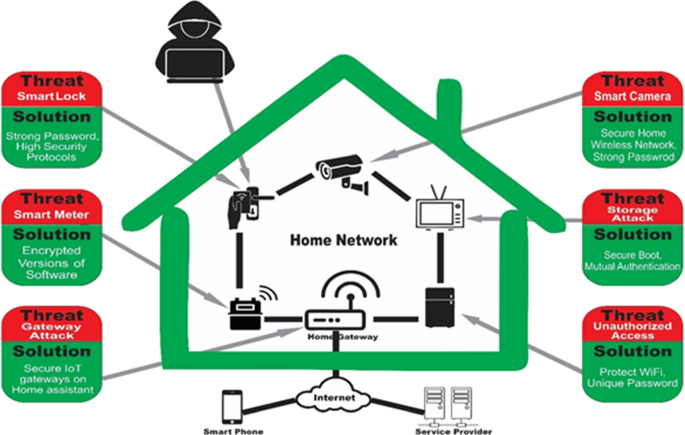
Smart home network security diagram – Smart home security: challenges, issues and solutions at different …
Armed with this knowledge, the next logical step is to isolate these chatty devices. The most fundamental best practice in Network Design is segmentation. Never allow IoT devices on the same network as your primary computers and smartphones. This prevents a compromised IoT device from becoming a pivot point for an attacker to access your sensitive data. The most common way to achieve this is through:
- Guest WiFi Networks: Most modern routers allow you to create a separate “guest” network. This is the simplest form of isolation.
- VLANs (Virtual LANs): A more robust solution where a single physical Switch can be configured to create multiple, isolated virtual networks. You could create a VLAN for your trusted devices, one for IoT, and another for guests, each with its own set of security rules. This requires a managed switch and a more advanced router.
Section 2: Implementing Granular Control with Firewalls and Automation
Once your devices are isolated on their own network segment, you can start defining rules for what they are and are not allowed to do. This is the primary function of a Firewall, a network security device that monitors and controls incoming and outgoing network traffic based on predetermined security rules. The goal is often to allow the device to function on your local network (e.g., so you can control it from your phone via the app) while blocking its ability to send data to the internet.
Crafting Firewall Rules
A common strategy is a “default deny” policy for your IoT network segment. This means that by default, no device on this network can access the internet. You then add specific “allow” rules for devices that absolutely require internet access to function (e.g., a smart thermostat that needs weather data). For a device you wish to run completely offline, you simply ensure no “allow” rules apply to it.
Many prosumer and open-source router firmwares like OpenWrt, DD-WRT, or pfSense provide a powerful interface for creating these rules. On a Linux-based router, you can use the `iptables` command-line tool. Here’s how you could block a specific device from accessing the internet (the WAN).
#!/bin/bash

# This script assumes you are running it on a Linux-based router (like OpenWrt)
# It blocks a specific IP from accessing the internet.

# The IP address of the IoT device to block
IOT_DEVICE_IP="192.168.20.50" # Assuming IoT VLAN uses 192.168.20.0/24

# The name of the interface that connects to the internet (e.g., eth0, pppoe-wan)
WAN_INTERFACE="eth0"

echo "Blocking internet access for $IOT_DEVICE_IP..."

# The FORWARD chain processes packets being routed through the device.
# We insert a rule at the top of the chain (-I FORWARD 1)
# to drop any packets from our source IP (-s) that are going
# out the WAN interface (-o).
iptables -I FORWARD 1 -s $IOT_DEVICE_IP -o $WAN_INTERFACE -j DROP

echo "Rule added. $IOT_DEVICE_IP is now blocked from the internet."

# To list the rules to verify:
# iptables -L FORWARD -v -n

# To remove the rule (e.g., to re-enable access):
# iptables -D FORWARD -s $IOT_DEVICE_IP -o $WAN_INTERFACE -j DROP
This simple script demonstrates a powerful concept in Network Administration. By controlling the flow of packets at the Network Layer, you become the ultimate gatekeeper for your network’s data.
Embracing Network Automation
Manually managing rules for dozens of devices is tedious. This is where Network Automation comes in. Using Python libraries like Netmiko or Paramiko (for SSH) or leveraging REST APIs on modern Network Devices, you can write scripts to programmatically add, remove, and update firewall rules, manage VLANs, and monitor device status. This approach is a cornerstone of modern DevOps Networking and Software-Defined Networking (SDN), bringing the power of code to network management.
Section 3: Advanced Techniques for Offline Operation and Traffic Hijacking
Sometimes, simply blocking a device’s internet access isn’t enough. Some devices are programmed to stop functioning if they can’t “phone home” to their manufacturer’s servers. In these scenarios, more advanced techniques are required to trick the device into thinking it’s online or to provide an alternative, local service for it to connect to. This is where a deep understanding of the TCP/IP suite, especially the Application Layer protocols like HTTP Protocol and HTTPS Protocol, becomes invaluable.
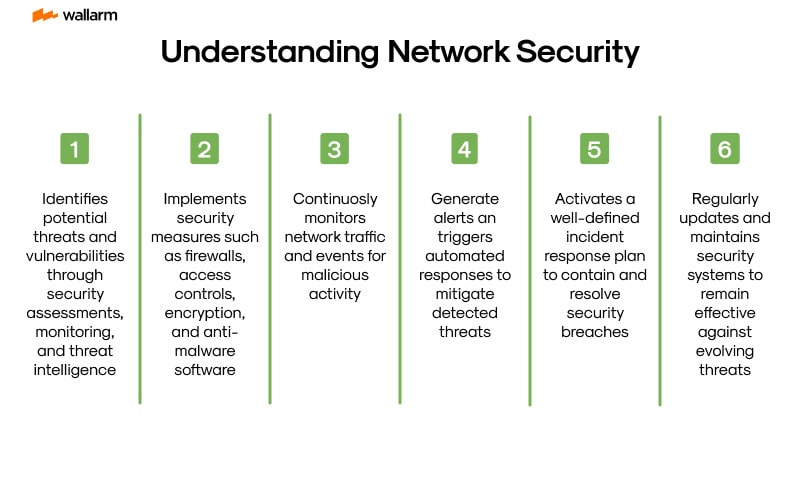
Smart home network security diagram – Schematic of the operation of an smart home system based on IoT …
DNS Sinkholing and Redirection
Instead of blocking all traffic, you can selectively block access to specific domains using a technique called DNS sinkholing. You set up a local DNS server that, when it receives a query for a malicious or unwanted domain (e.g., `analytics.manufacturer.com`), responds with a fake IP address, such as the IP of a local server you control or a non-routable address like `0.0.0.0`. This effectively creates a black hole for that specific traffic.
Here is a very basic Python script that demonstrates how a DNS sinkhole server could work. In a real-world scenario, you would use robust software like Pi-hole or AdGuard Home.
import socket

# A dictionary mapping blocked domains to a fake IP
SINKHOLE_IP = "0.0.0.0"
BLOCKED_DOMAINS = {
    b"phone-home.manufacturer.com.": SINKHOLE_IP,
    b"data-collection.vendor.net.": SINKHOLE_IP,
}

# A real upstream DNS server to forward legitimate requests to
UPSTREAM_DNS_SERVER = ("8.8.8.8", 53)

def run_dns_server(host='0.0.0.0', port=53):
    """A simple DNS server to sinkhole specific domains."""
    server_socket = socket.socket(socket.AF_INET, socket.SOCK_DGRAM)
    server_socket.bind((host, port))
    print(f"[*] DNS Sinkhole running on {host}:{port}")

    while True:
        try:
            # Receive DNS query from a client
            data, addr = server_socket.recvfrom(512)

            # Extract the queried domain from the DNS request
            # This is a simplified parsing for demonstration
            domain_start_index = 12
            domain_end_index = data.find(b'\x00', domain_start_index)
            queried_domain = data[domain_start_index:domain_end_index+1]

            # Reconstruct the domain name for lookup
            parts = []
            i = 0
            while i < len(queried_domain) -1:
                length = queried_domain[i]
                parts.append(queried_domain[i+1:i+1+length])
                i += length + 1
            full_domain = b'.'.join(parts) + b'.'

            if full_domain in BLOCKED_DOMAINS:
                print(f"[-] Sinkholing request for {full_domain.decode()} from {addr[0]}")
                # Craft a basic DNS response pointing to the sinkhole IP
                # This is a highly simplified response packet
                response = data[:2] + b'\x81\x80' + data[4:6] + data[4:6] + b'\x00\x00\x00\x00' + data[12:]
                response += b'\xc0\x0c'  # Pointer to the name
                response += b'\x00\x01\x00\x01\x00\x00\x00\x3c\x00\x04' # Type A, Class IN, TTL, Data length
                response += socket.inet_aton(SINKHOLE_IP)
                server_socket.sendto(response, addr)
            else:
                # Forward legitimate requests to the upstream DNS server
                print(f"[+] Forwarding request for {full_domain.decode()} from {addr[0]}")
                forward_socket = socket.socket(socket.AF_INET, socket.SOCK_DGRAM)
                forward_socket.sendto(data, UPSTREAM_DNS_SERVER)
                response, _ = forward_socket.recvfrom(512)
                server_socket.sendto(response, addr)
        except Exception as e:
            print(f"[!] Error: {e}")

if __name__ == "__main__":
    # Note: Running on port 53 typically requires root/administrator privileges.
    run_dns_server()
Revival Through Local Emulation
In extreme cases, where a device is rendered non-functional by a remote “kill switch,” a Network Engineer might need to reverse-engineer the device’s communication protocol. By analyzing captured packets with Wireshark, one can determine the exact REST API endpoints, data formats (like JSON or XML), and authentication methods the device uses. The next step is to create a local web service (using Python with Flask or FastAPI) that emulates the manufacturer’s cloud backend. By redirecting the device’s traffic to this local server (using DNS redirection), you can restore its functionality, making it fully operational offline and entirely under your control.
Section 4: Best Practices for a Secure and Optimized Network
Building a secure home or small office network requires a holistic approach. It’s not just about blocking a single device but creating a resilient and manageable Network Architecture. Here are some key best practices:

Core Security Measures
- Isolate and Conquer: As discussed, always use a separate, dedicated network (VLAN or Guest SSID) for IoT and untrusted devices.
- Default Deny Firewall: Configure your IoT network’s firewall to block all outbound traffic by default. Only open specific ports or allow specific IPs if absolutely necessary.
- Strong Wireless Security: Use WPA3 encryption for your WiFi networks if your devices support it. If not, use WPA2-AES with a very long, complex password. Disable WPS (Wi-Fi Protected Setup).
- Firmware Updates: Regularly update the firmware on your Routers, Switches, and access points. These updates often contain critical security patches.
Monitoring and Performance
- Continuous Monitoring: Set up Network Monitoring tools (like Zabbix, Nagios, or a Prometheus/Grafana stack) to keep an eye on Network Performance, including Bandwidth usage and Latency. This helps you spot anomalies that could indicate a misbehaving or compromised device.
- Regular Audits: Periodically use tools like Nmap to scan your own network to discover any new or unauthorized devices that may have connected.
- VPN for Remote Access: If you need to access your home network while traveling—a common need for a Digital Nomad—set up a VPN server on your router. Never expose services directly to the internet by opening ports on your firewall.
These practices, combining proactive Network Design with diligent Network Administration, create a layered defense that significantly enhances your digital privacy and security.
Conclusion: From Consumer to Architect
The proliferation of smart devices has presented a new set of challenges that demand a more active and educated approach to managing our personal networks. The skills of a Network Engineer—once confined to corporate data centers—are now invaluable for anyone serious about digital privacy and security. By understanding core concepts like the TCP/IP stack and Subnetting, and by leveraging powerful tools for Packet Analysis and Network Automation, you can transition from being a passive consumer of technology to the active architect of your own digital domain.
The journey begins with curiosity: questioning what your devices are doing and why. It progresses through the practical application of segmentation and firewall rules and can lead to advanced skills in Network Programming and protocol emulation. By taking control of your network’s traffic, you are not just securing a smart vacuum; you are safeguarding your digital life and ensuring your technology serves you, not the other way around.