In the vast, interconnected world of computer networking, data doesn’t travel in a single, continuous stream. Instead, it’s broken down into small, manageable units called packets. These packets are the fundamental building blocks of all digital communication, from browsing a website to joining a video call. Understanding how to capture, inspect, and interpret these packets—a practice known as packet analysis—is one of the most critical skills for any network engineer, system administrator, or cybersecurity professional. It’s the equivalent of a mechanic listening to an engine to diagnose a problem; by examining the traffic flowing across a network, you can uncover performance bottlenecks, troubleshoot complex connectivity issues, and detect malicious activity. This article will guide you through the essentials of packet analysis, from the core concepts of network protocols to practical, hands-on scripting with Python, providing you with the knowledge to turn raw network data into actionable insights.
The Foundations of Packet Analysis
Before diving into complex tools and scripts, it’s crucial to understand what a packet is and the environment it travels in. Packet analysis is less about the tools and more about understanding the language of the network—the protocols that govern communication.
What is a Network Packet?
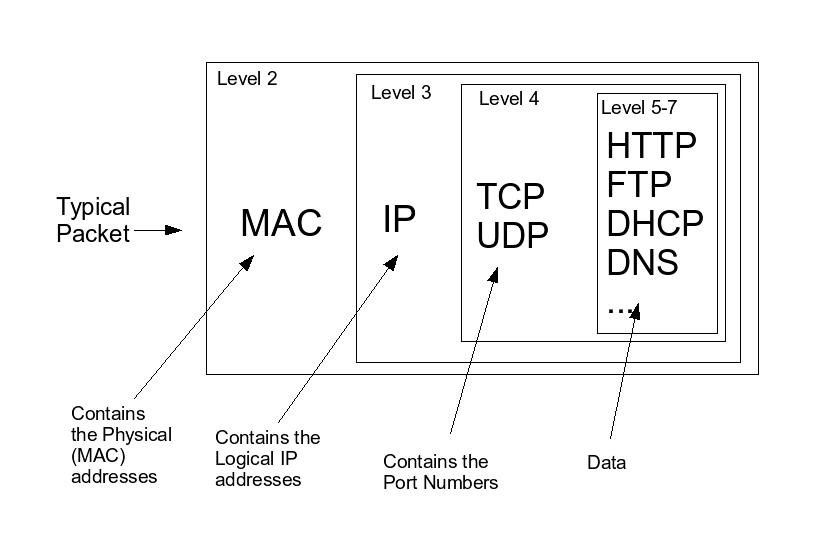
Think of a packet as a digital envelope. It has two main parts: the Header and the Payload. The payload is the actual data you’re trying to send, like a piece of an email or a fragment of an image. The header contains all the metadata needed to get that payload to its destination, much like the address and postage on a physical envelope. This header information is structured in layers, often conceptualized using the OSI Model. Key headers include:
- Ethernet Header (Layer 2): Contains the MAC addresses of the source and destination devices on the local network.
- IP Header (Layer 3): Contains the source and destination IP addresses (IPv4 or IPv6), which guide the packet across the internet.
- TCP/UDP Header (Layer 4): Manages the connection. TCP (Transmission Control Protocol) is connection-oriented and ensures reliable delivery (e.g., for file transfers), while UDP (User Datagram Protocol) is faster but less reliable (e.g., for streaming video or online gaming).
Key Protocols in Action
When you analyze packets, you’re primarily observing how these protocols interact. Some of the most common ones you’ll encounter are:
- TCP/IP: The foundational suite of the internet. You’ll often see TCP’s famous “three-way handshake” (SYN, SYN-ACK, ACK) at the beginning of a connection, which is a clear indicator of a new session being established.
- DNS Protocol: The Domain Name System translates human-readable domain names (like www.example.com) into machine-readable IP addresses. A spike in DNS requests can indicate anything from normal browsing to a potential DNS tunneling attack.
- HTTP/HTTPS Protocol: The language of the web. While HTTP traffic is sent in plaintext, HTTPS Protocol encrypts the payload, making it secure. In packet analysis, you can still see the HTTPS handshake and metadata, but the actual data (like passwords or credit card numbers) remains unreadable.
Essential Tools of the Trade
While many tools exist, a few are indispensable for packet analysis:
- Wireshark: A powerful, GUI-based packet analyzer that is the industry standard for deep inspection and network troubleshooting.
- tcpdump: A lightweight, command-line utility perfect for capturing traffic on servers or embedded devices where a GUI isn’t available. It’s fast, efficient, and highly scriptable.
Here’s a basic tcpdump command to capture the first 10 packets on the eth0 interface:
# Capture 10 packets on interface eth0, don't resolve hostnames (-n)
sudo tcpdump -i eth0 -n -c 10
Practical Packet Capture and Analysis with Python
While GUI tools like Wireshark are excellent for manual inspection, programmatic analysis opens up a world of possibilities for automation, custom alerting, and large-scale monitoring. Python, with its powerful libraries, is the perfect language for this. The most popular library for this task is Scapy.
Setting Up Your Python Environment
Scapy is a versatile packet manipulation library that allows you to sniff, forge, and dissect packets. It’s an essential tool for any Network Development project. To get started, you’ll need to install it via pip.
pip install scapyWith Scapy installed, you can start building custom network tools directly within Python.
Capturing and Summarizing Packets
Scapy’s sniff() function is the core of its packet-capturing capabilities. You can specify the number of packets to capture, the interface to listen on, and a function to process each packet as it arrives. The following script captures 5 packets and prints a brief summary of each.
#!/usr/bin/env python3
from scapy.all import sniff

def packet_summary(packet):
    """Prints a summary of each captured packet."""
    print(packet.summary())

def main():
    """Sniffs 5 packets from the network and prints their summary."""
    print("Starting packet capture for 5 packets...")
    # The 'prn' argument specifies a function to run for each packet captured.
    sniff(count=5, prn=packet_summary)
    print("Packet capture finished.")

if __name__ == "__main__":
    main()
Dissecting Packets to Extract Information
A summary is useful, but the real power comes from dissecting the packet layers. Scapy represents each protocol layer as a dictionary-like object, allowing you to access specific fields with ease. This is fundamental to Network Programming and building custom monitoring tools.
The script below captures TCP packets and extracts the source/destination IP addresses and port numbers, which is invaluable for understanding traffic flows.
#!/usr/bin/env python3
from scapy.all import sniff, IP, TCP

def process_tcp_packet(packet):
    """
    Processes a packet to extract and print TCP/IP layer information.
    """
    if IP in packet and TCP in packet:
        src_ip = packet[IP].src
        dst_ip = packet[IP].dst
        src_port = packet[TCP].sport
        dst_port = packet[TCP].dport

        print(f"TCP Packet: {src_ip}:{src_port} -> {dst_ip}:{dst_port}")

def main():
    """
    Sniffs network traffic, filtering for TCP packets, and processes them.
    """
    print("Capturing TCP packets... Press CTRL+C to stop.")
    # Use the 'filter' argument to capture only TCP packets.
    # The 'prn' argument calls our processing function for each packet.
    sniff(filter="tcp", prn=process_tcp_packet, store=False)

if __name__ == "__main__":
    main()
Advanced Packet Analysis Techniques
Once you’ve mastered basic capture and dissection, you can move on to more advanced techniques used in Network Security and performance analysis. These methods help you cut through the noise and focus on the traffic that matters most.
Intelligent Filtering for Targeted Analysis
A busy network can generate thousands of packets per second. Capturing everything is inefficient and makes analysis difficult. The key is to apply filters at the point of capture. Most tools, including Scapy and tcpdump, use Berkeley Packet Filter (BPF) syntax for this. BPF filters are highly efficient as they are applied in the kernel, discarding unwanted packets before they even reach your application.

For example, let’s write a script to monitor DNS queries in real-time. This can be useful for spotting requests to malicious domains or troubleshooting name resolution issues. We’ll filter for UDP traffic on port 53, which is the standard for DNS.
#!/usr/bin/env python3
from scapy.all import sniff, DNS, DNSQR

def process_dns_query(packet):
    """
    Checks for DNS queries in a packet and prints the queried domain.
    """
    # Check if the packet has a DNS layer and specifically a DNS Question Record (DNSQR)
    if packet.haslayer(DNS) and packet.getlayer(DNS).qr == 0: # qr=0 means it's a query
        if packet.haslayer(DNSQR):
            query = packet[DNSQR].qname.decode('utf-8')
            print(f"[DNS Query] -> {query}")

def main():
    """
    Sniffs for DNS queries on the network.
    """
    print("Monitoring for DNS queries... Press CTRL+C to stop.")
    # BPF filter for DNS traffic (typically UDP port 53)
    bpf_filter = "udp and port 53"
    sniff(filter=bpf_filter, prn=process_dns_query, store=False)

if __name__ == "__main__":
    main()
Detecting Network Anomalies
Packet analysis is a cornerstone of intrusion detection systems (IDS) and modern Firewalls. By establishing a baseline of normal network behavior, you can write scripts to flag anomalies that might indicate a security threat. Examples include:
- Port Scanning: A single IP address sending TCP SYN packets to many different ports on the same host is a strong indicator of a port scan.
- Unusual Protocols: The sudden appearance of traffic using obscure protocols or non-standard ports could signal malware communication.
- Data Exfiltration: An unusually large and sustained upload of data from an internal host to an external IP address could be a sign of data theft.
This level of inspection, often called Deep Packet Inspection (DPI), is what allows security appliances to enforce granular policies and protect the network architecture.
Best Practices and Real-World Applications
While the technical skills are important, applying them effectively and ethically is paramount. Here are some key considerations for anyone performing packet analysis.
Ethical and Legal Considerations
This cannot be overstated: only capture and analyze traffic on networks you own or have explicit permission to monitor. Unauthorized packet sniffing is a violation of privacy and is illegal in most jurisdictions. When analyzing traffic, always be mindful of sensitive information that might be present in packet payloads, such as passwords, personal data, or proprietary business information, especially in unencrypted protocols like HTTP or FTP.
Performance and Optimization
Continuous packet capture on a high-traffic network can consume significant CPU and storage resources. To minimize impact:
- Filter Aggressively: Always use the most specific BPF filter possible to capture only the traffic you need.
- Capture Headers Only: If you don’t need the payload, configure your tool to capture only the packet headers. This drastically reduces the amount of data stored. In
tcpdump, you can use the-sflag (e.g.,-s 96to capture the first 96 bytes). - Use Ring Buffers: For continuous monitoring, use a ring buffer to overwrite the oldest capture files, preventing your disk from filling up.
Applications in Modern Networking
Packet analysis remains incredibly relevant in today’s complex IT environments:
- DevOps and Cloud Networking: When debugging communication issues between microservices in a Kubernetes cluster or virtual machines in the cloud, packet analysis can pinpoint exactly where a request is failing.
- Remote Work and Travel Tech: For a Digital Nomad or remote worker, understanding packet analysis can help diagnose tricky VPN connectivity problems or identify why network performance is poor in a specific location.
- Network Automation: Scripts that analyze network traffic can trigger automated responses, such as re-routing traffic, blocking a malicious IP, or sending an alert to a System Administration team.
Conclusion
Packet analysis is a deep and rewarding discipline that transforms the invisible flow of data into a clear, understandable narrative. We’ve journeyed from the basic structure of a packet and the protocols that guide it, to hands-on packet capture with command-line tools and advanced, programmatic analysis using Python and Scapy. By mastering this skill, you empower yourself to solve complex network problems, enhance security, and optimize performance in any environment, from a traditional on-premise data center to a distributed cloud infrastructure.
The next step is to apply this knowledge. Set up a safe, controlled lab environment—using virtual machines is a great way to start—and begin exploring. Examine the traffic your own computer generates. Try to identify the DNS, TCP, and HTTPS handshakes. The more you practice, the more intuitive it will become, solidifying your role as a capable and insightful network professional.