
The Unseen Engine: A Deep Dive into the Application Layer
In the vast world of Computer Networking, we often focus on the physical infrastructure—the cables, routers, and switches that form the internet’s backbone. However, the true magic happens at the very top of the network stack: the Application Layer. This is where data becomes meaningful, transforming from abstract packets of ones and zeros into the emails, websites, and video calls we interact with daily. It’s the bridge between network protocols and the end-user software, making it the most tangible and arguably most critical layer for developers, network engineers, and even power users.
Understanding the Application Layer is essential not just for Network Administration but for anyone building modern software. From designing a robust REST API for a mobile app to optimizing a global service with a CDN, the principles of this layer are at play. This article will demystify the Application Layer, exploring its core protocols, practical implementation in modern software architecture, advanced techniques for performance and security, and the best practices that every Network Engineer and developer should know. Whether you’re troubleshooting a slow API or building the next great application for Remote Work, a solid grasp of this layer is your key to success.
Section 1: Deconstructing the Application Layer – Core Concepts and Protocols
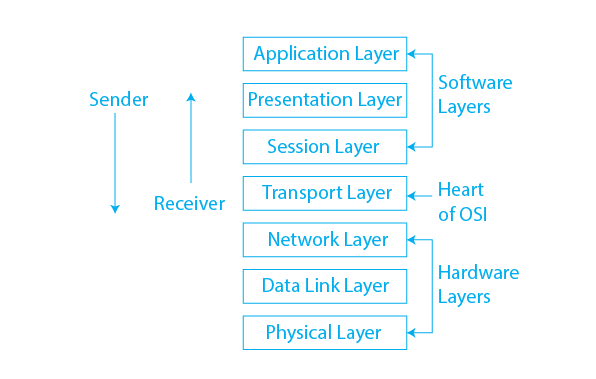
The Application Layer sits at the top of both the OSI Model (Layer 7) and the TCP/IP model. Its primary function is to provide network services directly to end-user applications. Unlike the lower layers (Transport, Network, etc.) which are concerned with data delivery, routing, and addressing, the Application Layer is concerned with data *meaning* and *presentation*. It defines the rules and conventions for how applications communicate over the network.
Key Protocols That Power the Web
Several fundamental protocols operate at this layer, each designed for a specific task. Without them, the internet as we know it would not exist.
- HTTP/HTTPS Protocol: The Hypertext Transfer Protocol is the foundation of the World Wide Web. It defines how clients (like your browser) request resources and how servers respond. HTTPS Protocol is its secure counterpart, encrypting the data in transit.
- DNS Protocol: The Domain Name System acts as the internet’s phonebook. It translates human-readable domain names (e.g., www.example.com) into machine-readable IP addresses (e.g., 93.184.216.34), a crucial step before any HTTP request can be made.
- SMTP, POP3, IMAP: These protocols govern email communication. SMTP (Simple Mail Transfer Protocol) is used for sending emails, while POP3 (Post Office Protocol 3) and IMAP (Internet Message Access Protocol) are used for retrieving them.
- FTP/SFTP: The File Transfer Protocol and its secure version are used for transferring files between a client and a server.
A Look Under the Hood: Socket Programming
At the lowest level of application development, we can interact with network protocols using sockets. A socket is an endpoint for sending or receiving data across a computer network. The following Python example demonstrates a very simple TCP client that connects to a server, sends a message, and receives a response. This is the fundamental building block upon which protocols like HTTP are built.
import socket

def run_simple_client():
    # Define the server's host and port
    HOST = '127.0.0.1'  # The server's hostname or IP address (localhost)
    PORT = 65432        # The port used by the server

    # Create a socket object using IPv4 and TCP
    # AF_INET specifies the address family (IPv4)
    # SOCK_STREAM specifies the socket type (TCP)
    with socket.socket(socket.AF_INET, socket.SOCK_STREAM) as s:
        try:
            # Connect to the server
            s.connect((HOST, PORT))
            print(f"Connected to server at {HOST}:{PORT}")

            # Send a message to the server
            message = b'Hello, Application Layer!'
            s.sendall(message)
            print(f"Sent: {message.decode('utf-8')}")

            # Receive data from the server (up to 1024 bytes)
            data = s.recv(1024)
            print(f"Received: {data.decode('utf-8')}")

        except ConnectionRefusedError:
            print("Connection failed. Is the server running?")
        except Exception as e:
            print(f"An error occurred: {e}")

if __name__ == '__main__':
    run_simple_client()
This Socket Programming example illustrates the core function of the Application Layer: establishing a connection and exchanging meaningful data between two programs over a network. While most developers today use higher-level libraries, understanding this foundation is crucial for effective Network Troubleshooting.
Section 2: Building on the Application Layer – APIs and Modern Services
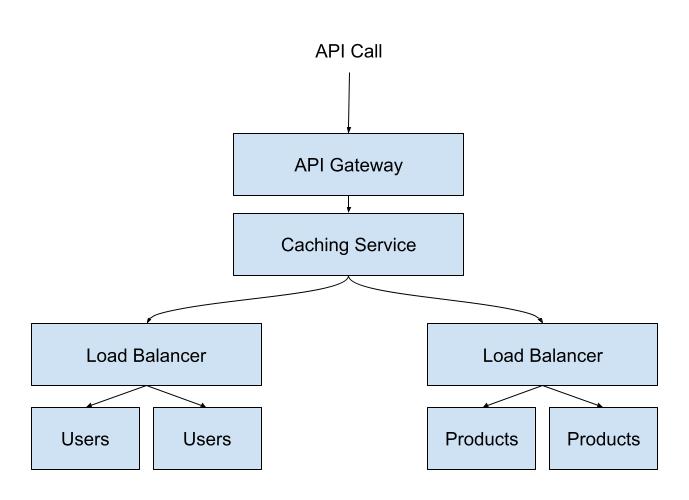
In modern software development, particularly in the era of Microservices and distributed systems, the Application Layer is synonymous with Application Programming Interfaces (APIs). APIs define the contracts that allow different software components to communicate with each other, abstracting away the underlying network complexity. This is the “application layer” in a software architecture context, where services interact to deliver a complete user experience.
The Rise of REST and GraphQL
Two dominant paradigms for API Design have emerged:
- REST API (Representational State Transfer): An architectural style that uses standard HTTP methods (GET, POST, PUT, DELETE) to perform operations on resources. It’s stateless, scalable, and has been the de facto standard for building Web Services for over a decade.
- GraphQL: A query language for APIs developed by Facebook. It allows clients to request exactly the data they need and nothing more, which can significantly improve Network Performance by reducing payload size and the number of requests, especially for complex applications or low-Bandwidth environments common for a Digital Nomad.
Practical Example: Building a Simple REST API
Let’s build a simple REST API using Python and the Flask framework. This API could be the backend for a Travel Tech application that provides information about city destinations. This demonstrates how easily developers can leverage the HTTP Protocol to create powerful services.
from flask import Flask, jsonify, request

# Initialize the Flask application
app = Flask(__name__)

# In-memory "database" of travel destinations
destinations = {
    "tokyo": {"country": "Japan", "description": "A bustling metropolis blending the traditional and futuristic."},
    "lisbon": {"country": "Portugal", "description": "A coastal capital known for its hilly streets and historic trams."},
    "canggu": {"country": "Indonesia", "description": "A popular spot for digital nomads with great surf and cafes."}
}

# Define a route to get all destinations
@app.route('/api/v1/destinations', methods=['GET'])
def get_destinations():
    return jsonify(destinations)

# Define a route to get a specific destination
@app.route('/api/v1/destinations/<string:city>', methods=['GET'])
def get_destination(city):
    city_lower = city.lower()
    destination = destinations.get(city_lower)
    if destination:
        return jsonify(destination)
    else:
        return jsonify({"error": "Destination not found"}), 404

# Run the app
if __name__ == '__main__':
    # Running in debug mode for development
    app.run(debug=True, port=5000)
This code creates two endpoints. A `GET` request to `/api/v1/destinations` returns all destinations, while a request to `/api/v1/destinations/tokyo` returns only the data for Tokyo. This is a classic example of how the Application Layer is used to build the services that power modern applications.
Section 3: Advanced Techniques and Modern Network Architecture
As applications become more complex and distributed, so do the challenges at the Application Layer. Modern Network Architecture employs advanced techniques to manage communication, enhance security, and ensure high performance.
Real-Time Communication with WebSockets
While HTTP is perfect for request-response interactions, it’s inefficient for real-time applications like chat apps or live dashboards. This is where WebSockets come in. A WebSocket connection is a persistent, full-duplex communication channel over a single TCP connection, allowing for instant, two-way data exchange between a client and a server.
Here is a simple JavaScript client-side example of establishing a WebSocket connection.
// The URL for the WebSocket server
const wsUrl = "wss://echo.websocket.events";

// Create a new WebSocket instance
const socket = new WebSocket(wsUrl);

// Event listener for when the connection is opened
socket.addEventListener('open', (event) => {
    console.log('WebSocket connection established!');
    // Send a message to the server
    socket.send('Hello from the client!');
});

// Event listener for incoming messages from the server
socket.addEventListener('message', (event) => {
    console.log('Message from server: ', event.data);
});

// Event listener for connection errors
socket.addEventListener('error', (event) => {
    console.error('WebSocket error observed:', event);
});

// Event listener for when the connection is closed
socket.addEventListener('close', (event) => {
    console.log('WebSocket connection closed.');
});

// Function to send a message (can be called by a button click, etc.)
function sendMessage(message) {
    if (socket.readyState === WebSocket.OPEN) {
        socket.send(message);
    } else {
        console.log('WebSocket is not connected.');
    }
}
Microservices, Service Mesh, and API Security
In a Microservices architecture, an application is broken down into smaller, independent services. This creates a complex web of inter-service communication, all happening at the Application Layer. A Service Mesh (e.g., Istio, Linkerd) is a dedicated infrastructure layer that handles this communication, providing features like service discovery, Load Balancing, and traffic encryption without requiring changes to the application code itself.
Furthermore, securing this layer is paramount. API Security involves practices like:
- Authentication: Verifying the identity of the client (e.g., using API keys, OAuth 2.0).
- Authorization: Ensuring the client has permission to access the requested resource.
- Rate Limiting: Preventing abuse by limiting the number of requests a client can make.
- Input Validation: Protecting against injection attacks by sanitizing all incoming data.
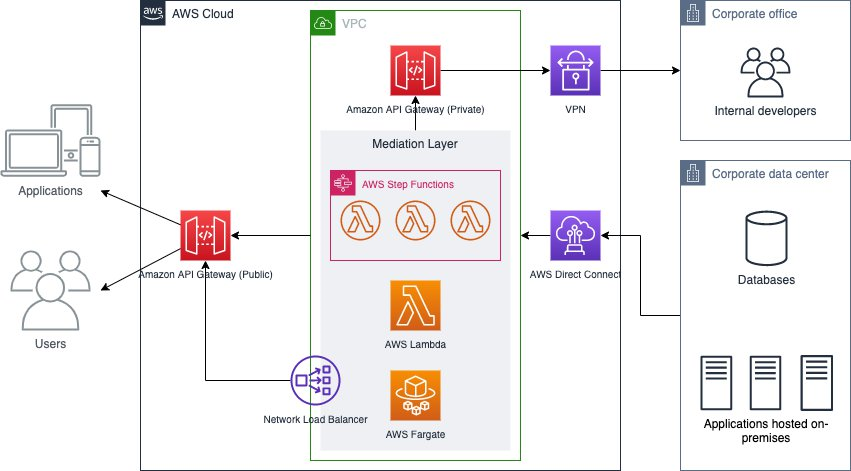
These security measures are implemented at the application gateway or directly within the service, forming a critical part of a robust Network Security posture alongside traditional Firewalls and VPNs.
Section 4: Best Practices for Optimization and Troubleshooting
Building and maintaining high-performing applications requires a focus on optimizing and troubleshooting the Application Layer. Poor performance here, often perceived as high Latency, can ruin the user experience.
API Design and Performance Best Practices
- Use Proper HTTP Status Codes: Use codes like `200 OK`, `201 Created`, `404 Not Found`, and `500 Internal Server Error` correctly. This provides clear, machine-readable feedback to clients.
- Implement Caching: Use HTTP caching headers (e.g., `Cache-Control`) to allow clients or intermediate proxies (like a CDN) to cache responses, reducing server load and improving response times.
- Choose Efficient Data Formats: While JSON is human-readable and widely used, binary formats like Protocol Buffers or MessagePack can offer better performance due to smaller payload sizes.
- Version Your APIs: Introduce changes without breaking existing clients by versioning your API (e.g., `/api/v2/destinations`).
- Leverage Edge Computing: By processing data closer to the user at the “edge,” you can dramatically reduce latency for global applications.
Troubleshooting with Network Tools
When things go wrong, a Network Engineer or DevOps professional needs the right tools for Network Troubleshooting.
- Wireshark: This powerful tool for Packet Analysis allows you to capture and inspect network traffic in real-time. You can filter for HTTP traffic, examine request and response headers, and diagnose issues at the lowest level.
- curl/Postman: These Network Tools are indispensable for testing API endpoints directly, allowing you to craft specific HTTP requests and inspect the raw responses without needing a full client application.
- Network Monitoring Solutions: Tools like Prometheus, Grafana, or Datadog provide high-level monitoring of application metrics, such as request latency, error rates, and throughput, helping you spot trends and anomalies.
By combining proactive optimization with effective troubleshooting techniques, you can ensure your applications remain fast, reliable, and secure.
Conclusion: The Ever-Evolving Application Layer
The Application Layer is far more than just the seventh layer of a theoretical model; it is the dynamic, evolving space where network technology meets software innovation. From the foundational protocols like HTTP and DNS that built the internet to the sophisticated API Design, Microservices, and real-time communication patterns that power today’s applications, this layer is where value is created. For developers, understanding how to build efficient and secure APIs is paramount. For network professionals, knowing how to monitor, troubleshoot, and optimize this traffic is a critical skill in modern Network Administration.
As technology advances with trends like Edge Computing and Software-Defined Networking (SDN), the capabilities and complexities of the Application Layer will only continue to grow. The next step for any aspiring tech professional is to dive deeper: build your own APIs, experiment with WebSockets, and use tools like Wireshark to see the protocols in action. By mastering the principles of the Application Layer, you equip yourself to build the next generation of connected, responsive, and intelligent software.