
Introduction to the Wireless Paradigm Shift
The landscape of Wireless Networking is undergoing a seismic shift. We have moved far beyond the era where Wi-Fi was simply a convenience for checking emails in a coffee shop. Today, wireless networks form the backbone of critical infrastructure, driving everything from industrial IoT and smart grids to Edge Computing and autonomous logistics. As the density of devices increases, the fundamental challenge shifts from simple connectivity to “Wireless Coexistence”—the ability for disparate protocols and devices to operate simultaneously in crowded spectrums without degrading Network Performance.
Modern Network Architecture is increasingly relying on Software-Defined Networking (SDN) and Network Virtualization to manage this complexity. By decoupling the control plane from the data plane, network engineers can now utilize Digital Twin technology to model, predict, and control the behavior of wireless nodes in real-time. This evolution requires a deep understanding of the OSI Model, specifically the physical and data link layers, alongside modern Network Automation techniques.
In this comprehensive guide, we will explore the technical depths of modern wireless systems. We will cover the mechanics of coexistence, the implementation of SDN in wireless environments, and the role of Network Programming in building resilient systems. Whether you are a Network Engineer, a DevOps Networking specialist, or a developer interested in Socket Programming, understanding these concepts is vital for the future of connectivity.
Section 1: Wireless Coexistence and Protocol Fundamentals
Wireless coexistence refers to the ability of different wireless technologies (such as Wi-Fi, Bluetooth, Zigbee, and proprietary sub-GHz protocols) to operate in the same frequency band without causing harmful interference. In the 2.4 GHz ISM band, this is particularly challenging. To manage this, devices utilize complex algorithms involving Clear Channel Assessment (CCA) and random backoff timers.
The Physics of Interference and CSMA/CA
Unlike wired Ethernet, where collisions can be detected (CSMA/CD), wireless networks use Carrier Sense Multiple Access with Collision Avoidance (CSMA/CA). Before a device transmits, it listens to the medium. If the medium is busy, it waits for a random period. This stochastic behavior is critical for Network Standards compliance and ensuring fair access to Bandwidth.
However, in high-density environments like smart metering infrastructures, simple CSMA/CA isn’t enough. Engineers must implement advanced coexistence strategies, often requiring custom Protocol Implementation at the firmware or driver level. Understanding Packet Analysis via tools like Wireshark is essential to visualize these collisions and backoff behaviors.
Simulating Backoff Algorithms
To understand how devices handle collision avoidance, let’s look at a Python simulation of an exponential backoff algorithm. This logic is fundamental to TCP/IP flow control and wireless MAC layers.
import random
import time

class WirelessNode:
    def __init__(self, node_id):
        self.node_id = node_id
        self.attempt = 0
        self.max_attempts = 10
        self.base_slot_time = 0.1  # seconds

    def send_packet(self):
        while self.attempt < self.max_attempts:
            # Simulate Carrier Sense (Check if medium is busy)
            if self.check_medium_busy():
                print(f"Node {self.node_id}: Medium busy. Backing off...")
                self.backoff()
            else:
                print(f"Node {self.node_id}: Transmitting Data...")
                # Simulate transmission time
                time.sleep(0.2)
                print(f"Node {self.node_id}: Transmission Complete.")
                self.attempt = 0
                return True

        print(f"Node {self.node_id}: Packet dropped after {self.max_attempts} attempts.")
        return False

    def check_medium_busy(self):
        # Simulate random network congestion
        return random.choice([True, False])

    def backoff(self):
        # Exponential Backoff Algorithm
        # The wait window doubles with every failed attempt
        max_slots = 2 ** self.attempt
        wait_slots = random.randint(0, max_slots)
        wait_time = wait_slots * self.base_slot_time

        print(f"Node {self.node_id}: Waiting for {wait_time:.2f}s (Attempt {self.attempt + 1})")
        time.sleep(wait_time)
        self.attempt += 1

# Simulation Execution
if __name__ == "__main__":
    node = WirelessNode(node_id="Sensor-01")
    node.send_packet()
This code demonstrates the "listen before talk" mechanism. In a real-world scenario involving Smart Meters or IoT devices, this logic prevents the network from collapsing under "broadcast storms." It is a critical concept in Network Troubleshooting when diagnosing high Latency issues.
Section 2: Implementing Software-Defined Networking (SDN) in Wireless
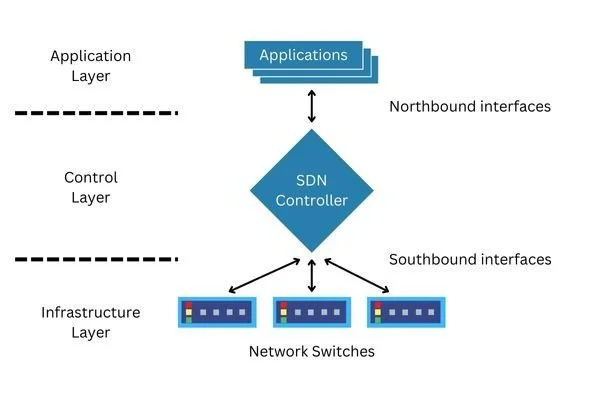
Traditional Network Devices like Routers and Switches have rigid, embedded firmware. Software-Defined Networking (SDN) changes this by centralizing the intelligence. In a wireless context, an SDN controller can dynamically adjust power levels, channel assignments, and routing paths based on real-time data.
The Digital Twin Concept
By incorporating a "Digital Twin" into the SDN control plane, we create a virtual mirror of the physical network. The controller receives state data (signal strength, battery life, queue depth) from physical nodes and updates the digital model. Algorithms then analyze this model to optimize the network, pushing configuration changes back to the physical devices via Network APIs.
This approach is particularly relevant for Cloud Networking and managing large-scale deployments where manual configuration is impossible. It allows for predictive maintenance and automated Network Security responses.
Building a Simple SDN Controller Endpoint
The following example uses Python and Flask to create a rudimentary SDN controller API. This REST API listens for status updates from wireless nodes (the "Digital Twin" data ingestion) and responds with configuration commands.
from flask import Flask, request, jsonify
import json

app = Flask(__name__)

# The "Digital Twin" State Store
network_state = {
    "nodes": {}
}

@app.route('/api/v1/telemetry', methods=['POST'])
def receive_telemetry():
    """
    Endpoint for nodes to report their operating state.
    """
    data = request.json
    node_id = data.get('node_id')
    metrics = data.get('metrics')

    # Update the Digital Twin
    network_state['nodes'][node_id] = metrics

    print(f"Updated state for {node_id}: RSSI={metrics.get('rssi')}dBm")

    # Analyze state and determine control action
    config_response = calculate_optimization(node_id, metrics)

    return jsonify(config_response)

def calculate_optimization(node_id, metrics):
    """
    Logic to determine if the node needs to change behavior.
    Example: If interference is high (low SNR), switch channels.
    """
    response = {"action": "keep_alive"}

    rssi = metrics.get('rssi', -70)
    snr = metrics.get('snr', 20)

    # Threshold-based logic (Simplified SDN Control)
    if rssi < -80 or snr < 10:
        print(f"Alert: Poor signal for {node_id}. Commanding channel switch.")
        response = {
            "action": "configure",
            "parameters": {
                "channel": "auto_select",
                "tx_power": "high",
                "modulation": "QPSK" # Lower modulation for better range
            }
        }

    return response

if __name__ == '__main__':
    # Simulating a control plane server
    print("Starting SDN Control Plane...")
    app.run(port=5000, debug=True)
This script represents the Application Layer logic of a network controller. It ingests data, updates the model, and issues commands. In a production environment, this would interface with Service Mesh architectures and might be deployed using Microservices on platforms like Kubernetes.
Section 3: Advanced Network Programming and Security
When building custom wireless applications, relying on high-level HTTP libraries isn't always sufficient. Socket Programming allows developers to manipulate Transport Layer (TCP/UDP) traffic directly. This is essential for creating lightweight protocols for IoT devices or high-performance Network Tools.
Secure Socket Communication
Security is paramount. Wireless networks are inherently broadcast mediums, making them susceptible to eavesdropping. Implementing HTTPS Protocol or wrapping raw sockets in SSL/TLS is mandatory. Whether you are dealing with IPv4 or IPv6, the encryption layer remains the primary defense against interception.
Below is an example of a secure TCP client in Python that connects to a server, mimicking a secure handshake in a VPN or secure enterprise network.
import socket
import ssl

def create_secure_client(host, port):
    # Create a standard TCP socket (IPv4)
    sock = socket.socket(socket.AF_INET, socket.SOCK_STREAM)

    # Create an SSL context
    # In production, use ssl.CERT_REQUIRED and verify_mode
    context = ssl.create_default_context()
    context.check_hostname = False
    context.verify_mode = ssl.CERT_NONE

    # Wrap the socket
    secure_sock = context.wrap_socket(sock, server_hostname=host)

    try:
        print(f"Connecting to {host}:{port}...")
        secure_sock.connect((host, port))

        # Send data securely
        request = "GET / HTTP/1.1\r\nHost: {}\r\n\r\n".format(host)
        secure_sock.sendall(request.encode('utf-8'))

        # Receive response
        response = secure_sock.recv(4096)
        print("Received Secure Response:")
        print(response.decode('utf-8')[:100] + "...")

    except Exception as e:
        print(f"Connection failed: {e}")
    finally:
        secure_sock.close()

if __name__ == "__main__":
    # Example connecting to a public secure server
    create_secure_client('www.example.com', 443)
Network Addressing and Subnetting in Wireless
Advanced wireless setups often require complex Network Addressing. With the explosion of IoT, CIDR (Classless Inter-Domain Routing) and Subnetting are vital to segment traffic effectively. Segregating guest Wi-Fi from corporate data or IoT sensors from the main control plane reduces broadcast domains and enhances security. System Administration teams must be adept at calculating subnets to prevent address exhaustion, especially when transitioning to IPv6.
Section 4: Best Practices, Optimization, and Tools
Optimizing wireless networks requires a holistic approach combining hardware placement, software configuration, and continuous monitoring.
1. Site Surveys and Heat Mapping
Before deploying any Network Design, perform a physical site survey. Walls, metal racking, and even water pipes attenuate signals. Tools that visualize RF coverage help in placing Access Points effectively to minimize dead zones and maximize Bandwidth.
2. Monitoring with Modern Tools
Network Monitoring is not a "set it and forget it" task. Use tools like Prometheus or Grafana to visualize metrics exported by your SDN controller. For deep packet inspection, Wireshark remains the gold standard. A Network Engineer should be comfortable capturing handshakes to diagnose authentication failures (e.g., WPA2/WPA3 4-way handshake issues).
3. Automation and DevOps
Adopt DevOps Networking principles. Infrastructure as Code (IaC) should apply to your wireless configurations. Use Network Automation tools like Ansible or Terraform to provision VLANs, SSIDs, and security policies across thousands of devices simultaneously. This ensures consistency and reduces human error.
4. Travel Tech and Remote Access
For the Digital Nomad and Travel Tech enthusiasts, understanding VPN technologies and portable routers is crucial. Securing a connection on a public hotel Wi-Fi using a personal VPN tunnel ensures that sensitive work data remains encrypted. Travel Photography backups and Remote Work video calls rely heavily on the stability provided by these personal networking practices.
Automated Network Scan Script
To maintain security, administrators should regularly scan for unauthorized devices (rogue APs). Here is a simple Python script using `scapy` (a powerful Network Library) to scan the local subnet.
from scapy.all import ARP, Ether, srp

def scan_network(ip_range):
    """
    Scans the local network using ARP requests to find active devices.
    Requires root/admin privileges.
    """
    print(f"Scanning network: {ip_range}...")

    # Create ARP request packet
    arp = ARP(pdst=ip_range)
    ether = Ether(dst="ff:ff:ff:ff:ff:ff")
    packet = ether/arp

    # Send packet and capture response
    result = srp(packet, timeout=3, verbose=0)[0]

    devices = []
    for sent, received in result:
        devices.append({'ip': received.psrc, 'mac': received.hwsrc})

    return devices

if __name__ == "__main__":
    # Example range - adjust to your local subnet
    # WARNING: Only run on networks you own or have permission to scan.
    try:
        found_devices = scan_network("192.168.1.1/24")
        print("Available devices in the network:")
        print("IP" + " "*18+"MAC")
        for device in found_devices:
            print("{:16}    {}".format(device['ip'], device['mac']))
    except PermissionError:
        print("Error: This script requires root/admin privileges to access raw sockets.")
Conclusion
The future of Wireless Networking lies in the convergence of physical radio technologies and intelligent software control. As we have explored, concepts like Wireless Coexistence are no longer just academic theories but practical necessities for smart grids and IoT ecosystems. By leveraging Software-Defined Networking, we can create Digital Twins of our infrastructure, allowing for unprecedented control and optimization.
For the modern Network Engineer or developer, the skillset must expand beyond cabling and basic configuration. It now encompasses API Design, Python scripting, Security protocols, and a deep understanding of how data flows through the OSI Model. Whether you are optimizing a high-density office network or designing the next generation of smart meters, the integration of automation and deep technical knowledge will be the key to success.
As networks continue to evolve towards 6G and beyond, staying updated with Network Standards and mastering tools like Wireshark and Network Automation platforms will ensure you remain at the forefront of this dynamic field.