


Introduction: The Evolution of API Network Architecture
In the rapidly evolving landscape of Web Services and Network Architecture, the way clients and servers communicate has undergone a paradigm shift. For years, REST (Representational State Transfer) was the undisputed standard for API Design, relying heavily on the HTTP Protocol verbs and resource-oriented URLs. However, as mobile usage surged and the demand for highly responsive, data-rich applications grew, the limitations of REST—specifically over-fetching and under-fetching data—became apparent. Enter GraphQL.
GraphQL is a query language for APIs and a runtime for fulfilling those queries with your existing data. Unlike traditional Network Design patterns where the server dictates the structure of the response, GraphQL shifts control to the client. This allows front-end developers, whether they are building Travel Tech applications for a Digital Nomad or complex enterprise dashboards, to request exactly the data they need and nothing more. This efficiency significantly reduces Bandwidth usage and Network Latency, crucial factors in mobile networks and Edge Computing environments.
However, great power comes with great responsibility. The flexibility that makes GraphQL attractive also introduces unique challenges in Network Security and System Administration. Poorly implemented GraphQL endpoints can inadvertently expose sensitive data or fall victim to Denial of Service (DoS) attacks through complex nested queries. This article provides a comprehensive technical analysis of GraphQL, covering core concepts, implementation strategies, critical security measures, and optimization techniques relevant to the modern Network Engineer and DevOps Networking professional.
Section 1: Core Concepts and The Graph Data Model
To understand GraphQL, one must look beyond the traditional OSI Model layers. While GraphQL operates at the Application Layer (Layer 7), it abstracts much of the complexity found in lower layers like the Transport Layer or Network Layer. It is protocol agnostic but typically served over HTTP or HTTPS Protocol.
The Schema Definition Language (SDL)
At the heart of every GraphQL server is the schema. The schema defines the hierarchy of types and fields that populate your data graph. It serves as a contract between the client and the server. In a Microservices architecture, this schema acts as a unified interface over disparate services, effectively creating a Service Mesh gateway.
Let’s look at a basic schema for a hypothetical Travel Photography platform where users can upload photos and tag locations. This example demonstrates how types are related.
type User {
  id: ID!
  username: String!
  email: String!
  portfolio: [Photo]
  travelStatus: String
}

type Photo {
  id: ID!
  url: String!
  metadata: PhotoMetadata
  photographer: User!
}

type PhotoMetadata {
  camera: String
  lens: String
  shutterSpeed: String
  iso: Int
}

type Query {
  getUser(id: ID!): User
  getRecentPhotos(limit: Int): [Photo]
}

type Mutation {
  uploadPhoto(url: String!, metadata: MetadataInput): Photo
}

input MetadataInput {
  camera: String
  lens: String
}
Resolvers: The Logic Layer
The schema describes what data is available, but the resolvers determine how that data is fetched. Resolvers are functions that connect schema fields to backend data sources, whether that be a SQL database, a NoSQL store, or another REST API. This is where Network Programming concepts come into play. A resolver might execute a database query, perform Socket Programming to reach a real-time service, or trigger a Network Automation script.
In a Cloud Networking environment, resolvers often act as orchestrators, gathering data from various Network Devices or virtualized services. The beauty of GraphQL is that the client remains agnostic to whether the data comes from a local cache or a server across the globe via CDN.
Section 2: Implementation Details and Transport
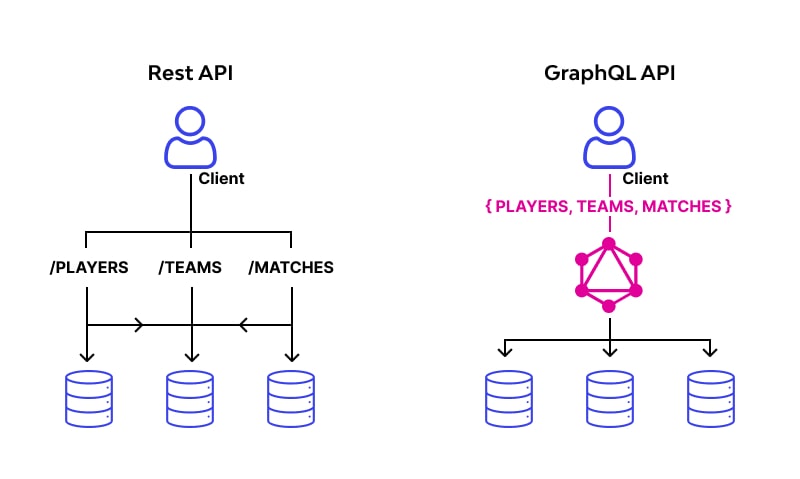
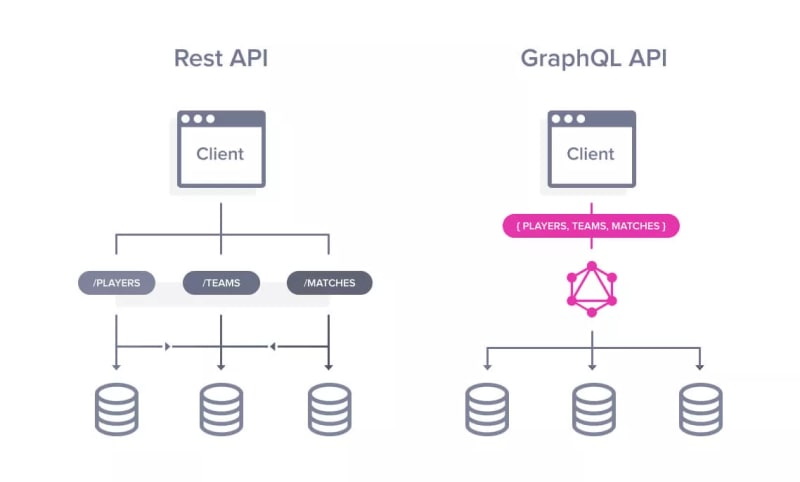
Implementing a GraphQL server requires a shift in mindset regarding Network Addressing and routing. In REST, you might have hundreds of endpoints (e.g., /users, /users/1/photos). In GraphQL, you typically expose a single endpoint, usually /graphql. This simplifies Load Balancing and Firewalls configuration but complicates Network Monitoring and caching.
Setting Up a Server with Node.js
Let’s implement a simple server using Apollo Server, a popular library in the JavaScript ecosystem. This setup assumes a standard TCP/IP stack and requires Node.js installed. We will simulate a data source that might be used by a Remote Work platform managing employee devices.
const { ApolloServer, gql } = require('apollo-server');

// A schema is a collection of type definitions (hence "typeDefs")
// that together define the "shape" of queries that are executed against
// your data.
const typeDefs = gql`
  type Device {
    id: ID
    hostname: String
    ipAddress: String
    type: String
  }

  type Query {
    devices: [Device]
    device(id: ID!): Device
  }
`;

// Mock dataset - in production, this would be a DB call
const devices = [
  {
    id: '1',
    hostname: 'router-core-01',
    ipAddress: '192.168.1.1',
    type: 'Router',
  },
  {
    id: '2',
    hostname: 'switch-access-02',
    ipAddress: '192.168.1.2',
    type: 'Switch',
  },
];

// Resolvers define the technique for fetching the types defined in the
// schema.
const resolvers = {
  Query: {
    devices: () => devices,
    device: (parent, args) => devices.find(device => device.id === args.id),
  },
};

// The ApolloServer constructor requires two parameters: your schema
// definition and your set of resolvers.
const server = new ApolloServer({ typeDefs, resolvers });

// The `listen` method launches a web server.
server.listen().then(({ url }) => {
  console.log(`🚀  Server ready at ${url}`);
});
The Transport Layer and HTTP
When a client sends a query, it is typically a POST request to the HTTP server. The body of the request contains a JSON object with a query string. Packet Analysis using tools like Wireshark reveals that unlike REST, where the intent is in the URL and Method, here the intent is buried in the payload. This has implications for Network Tools designed to inspect traffic; they must parse the JSON body to understand the nature of the traffic.
Furthermore, because GraphQL is transport-agnostic, it can be implemented over WebSockets for real-time subscriptions. This is vital for applications requiring instant updates, such as Network Performance dashboards monitoring Routers and Switches in real-time.
Section 3: Advanced Security and Vulnerability Mitigation
Security is the most critical aspect of GraphQL implementation. Because GraphQL allows clients to ask for exactly what they want, a malicious actor can ask for too much or ask for data they shouldn’t see. This is where API Security intersects with Network Security.
Introspection and Information Disclosure
One of the most common vulnerabilities in GraphQL is leaving “Introspection” enabled in production. Introspection is a feature that allows clients to query the schema itself to discover available types and fields. While useful for development tools, in production, it hands hackers a blueprint of your entire backend data structure. If your schema contains internal fields (e.g., isAdmin, internal_ip, or user_hashed_password), introspection allows attackers to discover and target them.
Always disable introspection in production environments unless you are building a public API intended for third-party developers.
Query Depth and Complexity Attacks
Since types can reference other types, it is possible to construct a recursive query that can crash the server. For example, if a User has Friends (which are Users), an attacker could request user { friends { friends { friends ... } } }. This exponential growth in complexity can lead to resource exhaustion, effectively a DoS attack consuming all CPU and Bandwidth.
To mitigate this, you must implement Query Depth Limiting and Query Complexity Analysis. Below is an example using Python and the graphene library, illustrating how one might structure middleware to validate depth.
import graphene
from graphql.backend import GraphQLCoreBackend

class DepthLimitBackend(GraphQLCoreBackend):
    def __init__(self, max_depth=10, **kwargs):
        super().__init__(**kwargs)
        self.max_depth = max_depth

    def document_from_string(self, schema, document_string):
        document = super().document_from_string(schema, document_string)
        self.check_depth(document)
        return document

    def check_depth(self, document):
        # Simplified logic to traverse the AST (Abstract Syntax Tree)
        # and calculate the nesting level of the query.
        # If depth > self.max_depth, raise an Exception.

        def get_depth(node, current_depth=0):
            if current_depth > self.max_depth:
                raise Exception(f"Query depth limit of {self.max_depth} exceeded")

            # Logic to iterate over selections and recurse
            if hasattr(node, 'selection_set') and node.selection_set:
                for selection in node.selection_set.selections:
                    get_depth(selection, current_depth + 1)

        # Start traversal
        for definition in document.definitions:
            get_depth(definition)

# Usage in configuration
# backend = DepthLimitBackend(max_depth=5)
# schema.execute(query_string, backend=backend)
Authorization and Field-Level Security
Authentication (who you are) is often handled by the HTTP Protocol headers (e.g., Bearer tokens). However, Authorization (what you can see) must be handled within the GraphQL business logic. Moving authorization to the resolver level ensures that even if a user guesses a valid ID, they cannot access the data unless they own it or have admin privileges.
Failure to implement field-level authorization is how massive data leaks occur. A user might query for their own record but include a field for social_security_number or private_messages that the developer forgot to protect.
Section 4: Best Practices and Optimization
Beyond security, Network Performance is the primary concern for System Administration. GraphQL solves the over-fetching problem but introduces the “N+1 Problem.”
The N+1 Problem and DataLoaders
Imagine querying a list of 50 posts, and for each post, requesting the author’s name. A naive implementation would execute one query to get the posts, and then 50 separate queries to get the author for each post. This floods the database and creates unnecessary Network Traffic.
The solution is a pattern called DataLoader. It batches requests and caches them. Instead of 50 queries, DataLoader waits for the event loop to finish, collects all 50 author IDs, and sends a single query to the database: SELECT * FROM users WHERE id IN (1, 2, ... 50).
const DataLoader = require('dataloader');

// Batch function: accepts an array of keys, returns an array of values
const batchUsers = async (keys) => {
  // Simulate a DB call: SELECT * FROM users WHERE id IN keys
  const users = await db.fetchAllUsers(keys);

  // Important: The order of results must match the order of keys
  return keys.map(key => users.find(user => user.id === key));
};

const userLoader = new DataLoader(batchUsers);

// Usage inside a resolver
const resolvers = {
  Post: {
    author: (post, args, context) => {
      // Instead of calling db directly, use the loader
      return userLoader.load(post.authorId);
    },
  },
};
Caching and CDN Strategies
Because GraphQL uses POST requests, traditional CDN and browser caching (which rely on GET and unique URLs) do not work out of the box. To leverage Edge Computing and caching, developers often use Persisted Queries. This technique hashes the query string on the client side and sends the hash to the server. If the server recognizes the hash, it executes the query. This allows the API to use GET requests with the hash as a query parameter, enabling standard HTTP caching mechanisms.
Network Troubleshooting
When debugging GraphQL in a production environment, standard Network Commands like ping or traceroute are insufficient for diagnosing application errors. You need robust logging that tracks the operationName and execution time of resolvers. Tools that integrate with Software-Defined Networking (SDN) stacks can help correlate slow resolvers with underlying database latency or Ethernet congestion issues.
Conclusion
GraphQL represents a significant leap forward in Network Development and API interaction. It empowers frontend teams, reduces Bandwidth consumption, and provides a flexible layer over complex Microservices. However, it requires a disciplined approach to API Security. The shift from rigid endpoints to a flexible graph exposes new attack vectors, specifically regarding introspection and query complexity.
For the modern Network Engineer or Full Stack Developer, mastering GraphQL involves more than just learning the syntax. It requires a deep understanding of the Application Layer, rigorous implementation of authorization controls, and the use of optimization tools like DataLoaders. As Cloud Networking continues to dominate, and as we see more adoption of Network Virtualization, GraphQL will likely remain a cornerstone of modern application architecture. By adhering to the best practices outlined in this article, organizations can harness the power of the graph while keeping their user data secure and their networks performant.