In the vast world of computer networking, sockets are the fundamental building blocks that enable communication between devices. From the simple act of browsing a website to complex real-time applications like online gaming and chat services, sockets work silently in the background, making our interconnected world possible. For any developer, network engineer, or tech enthusiast, understanding socket programming is not just an academic exercise—it’s a crucial skill for building robust, efficient, and scalable network applications.
This comprehensive guide will demystify socket programming. We’ll start with the core concepts of the client-server model and network protocols like TCP/IP. We’ll then walk through practical, hands-on code examples in both Python and Node.js to illustrate how to create servers and clients. Finally, we’ll explore advanced topics, including modern abstractions like WebSockets, best practices for network security, and performance optimization techniques. Whether you’re a DevOps professional managing microservices or a digital nomad building the next great travel tech app, mastering sockets will empower you to control the flow of data at its most fundamental level.
The Foundations of Network Communication
Before we write a single line of code, it’s essential to grasp the core concepts that underpin all network communication. At the heart of it all is the socket, which serves as an endpoint for sending or receiving data across a computer network. Think of it as a doorway on a specific house (IP address) with a numbered apartment (port number). When two applications want to talk, they each open a socket and establish a connection between them.
TCP vs. UDP: The Two Pillars of the Transport Layer
When creating a socket, you must choose a protocol from the Transport Layer of the OSI Model. The two most common choices are the Transmission Control Protocol (TCP) and the User Datagram Protocol (UDP).
- TCP (Transmission Control Protocol): This is a connection-oriented protocol. It establishes a reliable, three-way handshake before any data is sent. It guarantees that packets arrive in order and re-transmits any lost packets. This reliability makes it perfect for applications where data integrity is paramount, such as file transfers (FTP), web browsing (HTTP/HTTPS Protocol), and email (SMTP).
- UDP (User Datagram Protocol): This is a connectionless protocol. It’s a “fire-and-forget” system that sends packets (datagrams) without establishing a connection or guaranteeing delivery. It’s faster and has lower overhead than TCP, making it ideal for time-sensitive applications where speed is more important than perfect reliability, such as video streaming, online gaming, and DNS lookups.
The Client-Server Network Architecture
Most network applications follow the client-server model. The server is a program that listens on a specific IP address and port, waiting for incoming connection requests. The client is a program that initiates a connection to the server to exchange information. Our first example will demonstrate this by building a simple TCP server that listens for connections.
# A simple Python TCP server

import socket

# Define the host and port
HOST = '127.0.0.1'  # Standard loopback interface address (localhost)
PORT = 65432        # Port to listen on (non-privileged ports are > 1023)

# Create a socket object using IPv4 and TCP
# AF_INET specifies the IPv4 address family
# SOCK_STREAM specifies the TCP protocol
with socket.socket(socket.AF_INET, socket.SOCK_STREAM) as s:
    # Bind the socket to the address and port
    s.bind((HOST, PORT))

    # Enable the server to accept connections
    # The argument specifies the maximum number of queued connections
    s.listen()
    print(f"Server is listening on {HOST}:{PORT}")

    # Block execution and wait for an incoming connection
    conn, addr = s.accept()

    with conn:
        print(f"Connected by {addr}")
        while True:
            # Receive data from the client (up to 1024 bytes)
            data = conn.recv(1024)
            if not data:
                break # If no data is received, the client has closed the connection

            # Echo the received data back to the client
            print(f"Received from client: {data.decode('utf-8')}")
            conn.sendall(data)

print("Connection closed.")
The Socket Lifecycle in Practice
The code above demonstrates the typical lifecycle of a server socket. Each function call represents a critical step in the network programming process. Let’s break down these steps for both the server and the client.
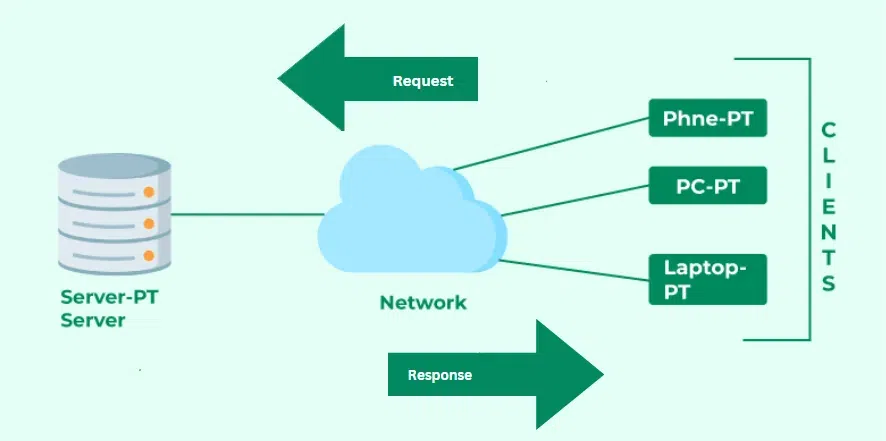
Client-server architecture diagram – 1: The Pandora Editor Architecture | Download Scientific Diagram
Server-Side Socket Lifecycle
socket(): Creates a new socket endpoint. We specify the address family (AF_INETfor IPv4) and the socket type (SOCK_STREAMfor TCP).bind(): Associates the socket with a specific network interface (IP address) and port number. The server can now be found at this address.listen(): Puts the socket into listening mode, making it a “server” socket that can accept incoming connections.accept(): This is a blocking call. The server waits here until a client attempts to connect. When a connection is made, it returns a new socket object representing the connection and the client’s address. All further communication with that specific client happens through this new socket.
Client-Side Socket Lifecycle
Now, let’s create a client to connect to our server. The client’s lifecycle is simpler.
socket(): Creates a socket, just like the server.connect(): Actively attempts to establish a connection with the server at its specified IP address and port.
Once the connection is established, both the client and server use send() or sendall() to transmit data and recv() to receive it. Finally, close() is called to terminate the connection.
# A simple Python TCP client to connect to our server

import socket

HOST = '127.0.0.1'  # The server's hostname or IP address
PORT = 65432        # The port used by the server

with socket.socket(socket.AF_INET, socket.SOCK_STREAM) as s:
    # Connect to the server
    s.connect((HOST, PORT))

    # Send a message to the server
    message = "Hello, server!"
    s.sendall(message.encode('utf-8'))

    # Receive the echo back from the server
    data = s.recv(1024)

print(f"Received echo: {data.decode('utf-8')}")
To run this, first start the server script in one terminal, then run the client script in another. You’ll see the connection being made and the message echoed back. This simple exchange is the foundation of complex network protocols like the HTTP Protocol.
Advanced Sockets and Modern Abstractions
While the blocking nature of our Python example is simple to understand, it’s not efficient for handling multiple clients simultaneously. If our server is busy communicating with one client, all other new clients have to wait. This is where asynchronous, non-blocking I/O comes in—a cornerstone of modern network development, especially in environments like Node.js.
Blocking vs. Non-Blocking Sockets
By default, socket operations like accept() and recv() are blocking. The program’s execution is paused until the operation completes. In contrast, non-blocking sockets return immediately, even if there’s no data to read or no connection to accept. This allows a single thread to manage multiple connections, a technique known as I/O multiplexing. Node.js is built around this event-driven, non-blocking architecture, making it highly efficient for I/O-heavy tasks like network servers.
Here is how a similar TCP echo server looks in Node.js, showcasing its asynchronous nature.
// A simple asynchronous TCP server in Node.js

const net = require('net');

const HOST = '127.0.0.1';
const PORT = 65432;

// Create a new TCP server.
const server = net.createServer((socket) => {
    // This callback is executed for each new connection.
    console.log(`Client connected from: ${socket.remoteAddress}:${socket.remotePort}`);

    // Handle incoming data from the client.
    socket.on('data', (data) => {
        console.log(`Received from client: ${data.toString()}`);

        // Echo the data back to the client.
        socket.write(data);
    });

    // Handle the client closing the connection.
    socket.on('close', () => {
        console.log('Client disconnected.');
    });

    // Handle any errors on the socket.
    socket.on('error', (err) => {
        console.error(`Socket Error: ${err.message}`);
    });
});

// Start listening for connections.
server.listen(PORT, HOST, () => {
    console.log(`Server listening on ${HOST}:${PORT}`);
});
Enter WebSockets and High-Level Libraries
Client-server architecture diagram – Client Server Architecture | Download Scientific Diagram
Raw TCP sockets are powerful but low-level. For web applications requiring real-time, bi-directional communication (like chat apps, live dashboards, or collaborative tools), a higher-level protocol called WebSocket is often used. WebSockets provide a persistent, full-duplex communication channel over a single TCP connection, initiated via an HTTP handshake. This avoids the overhead of traditional HTTP polling.
Libraries like Socket.IO build on top of WebSockets, providing an even simpler API and adding crucial features like automatic reconnection, fallback to older technologies for browser compatibility, and broadcasting messages to multiple clients. For many developers, especially in web services and microservices, using a library like Socket.IO is the most practical way to implement real-time features.
// A basic real-time chat server using Express and Socket.IO

const express = require('express');
const http = require('http');
const { Server } = require("socket.io");

const app = express();
const server = http.createServer(app);
const io = new Server(server);

const PORT = 3000;

app.get('/', (req, res) => {
  res.sendFile(__dirname + '/index.html'); // Serve a simple HTML file
});

// Listen for new connections
io.on('connection', (socket) => {
  console.log('A user connected');

  // Listen for 'chat message' events from a client
  socket.on('chat message', (msg) => {
    console.log('message: ' + msg);
    // Broadcast the message to all connected clients
    io.emit('chat message', msg);
  });

  socket.on('disconnect', () => {
    console.log('User disconnected');
  });
});

server.listen(PORT, () => {
  console.log(`Server running on http://localhost:${PORT}`);
});
Best Practices, Security, and Performance
Writing functional socket code is one thing; writing robust, secure, and performant code is another. As you move from simple examples to real-world applications, consider these critical factors.
Robust Error Handling
Network connections are inherently unreliable. Connections can drop, clients can disconnect abruptly, and firewalls can block traffic. Your code must anticipate these issues. Always wrap socket operations in error-handling blocks (like try...except in Python) and gracefully handle exceptions like broken pipes or connection resets. Implement logic to clean up resources and close sockets properly when a connection is terminated unexpectedly.
Client-server architecture diagram – JSOC pipeline sessions
Network Security: Securing Sockets with TLS/SSL
The examples above transmit data in plain text, which is a major security risk. Anyone performing packet analysis with a tool like Wireshark could intercept and read the data. To protect sensitive information, you must encrypt the communication channel. This is achieved by wrapping your sockets with Transport Layer Security (TLS), the successor to SSL. Python’s ssl module and Node.js’s tls module provide the tools to create secure server and client sockets, which is fundamental for implementing protocols like HTTPS.
Performance Optimization
Optimizing network performance involves balancing bandwidth, latency, and server load.
- Buffering: Instead of sending many small packets, buffer data and send it in larger chunks to reduce protocol overhead. However, don’t buffer for too long, as this can increase latency.
- Protocol Choice: Choose TCP for reliability and UDP for speed. Understanding your application’s needs is key.
- Connection Management: For applications making many short-lived connections, consider using connection pools to reuse existing connections and avoid the overhead of repeated TCP handshakes.
- Load Balancing: For high-traffic applications, a single server won’t suffice. Use a load balancer to distribute incoming connections across multiple backend servers, ensuring high availability and scalability.
Conclusion: From Sockets to Systems
We’ve journeyed from the fundamental definition of a socket to the practical implementation of client-server applications and the high-level abstractions that power the modern real-time web. The key takeaway is that sockets are the universal interface for network communication, and understanding how they work provides a powerful foundation for any developer or system administrator.
By mastering the socket API, you gain the ability to implement any network protocol, debug complex network issues, and design scalable network architectures. Your next steps could be to explore network monitoring with packet analysis tools like Wireshark, build a custom REST API from scratch without a web framework, or dive into the world of cloud networking and Software-Defined Networking (SDN). The principles of socket programming are timeless and will serve you well no matter where your tech journey takes you.