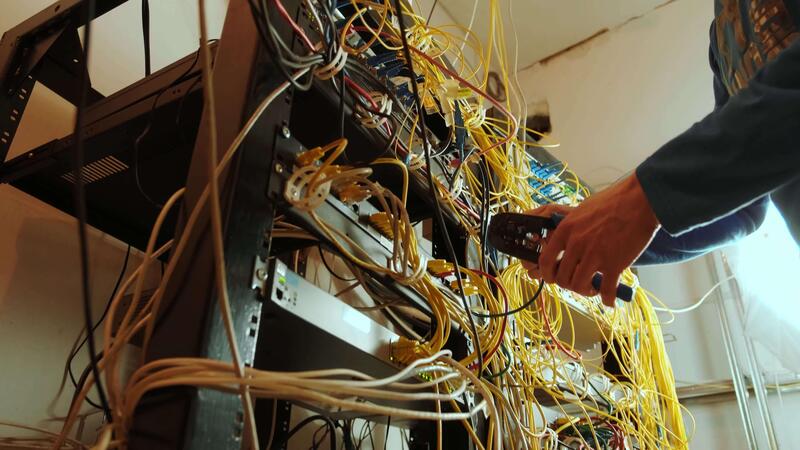
In the modern digital landscape, the stability of an organization’s infrastructure relies heavily on the resilience of its connectivity. Network Monitoring is not merely a reactive task reserved for when the internet goes down; it is a proactive, continuous process of overseeing the health, availability, and performance of a computer network. For a Network Engineer or a System Administration team, visibility is everything. Without granular insight into traffic flow, bandwidth utilization, and device status, maintaining a robust Network Architecture is impossible.
As we transition into an era dominated by Cloud Networking and Microservices, the scope of monitoring has expanded beyond simple “up/down” checks. It now encompasses complex Network Protocols, sophisticated Security Hardening, and the intricate dance of API interactions. Whether you are managing a massive data center or ensuring connectivity for a Digital Nomad team relying on VPNs for Remote Work, understanding the depths of network observability is critical. This guide explores the core concepts of network monitoring, practical Network Programming implementations, and the best practices for securing your infrastructure.
Section 1: Core Concepts and The OSI Model
To effectively monitor a network, one must understand the fundamental layers of communication. The OSI Model (Open Systems Interconnection) remains the standard framework for understanding how data moves from the physical hardware to the software application. Effective monitoring strategies usually target specific layers, from the physical Network Cables and Ethernet connections up to the Application Layer where HTTP Protocol and DNS Protocol operate.
The Metrics That Matter
When analyzing Network Performance, three key metrics usually take center stage: Latency, Bandwidth, and Packet Loss. Latency measures the time it takes for a packet to travel from source to destination, often critical for real-time applications like VoIP or high-frequency trading. Bandwidth refers to the maximum rate of data transfer across a given path. Network Troubleshooting often begins when users report “slowness,” which is frequently a symptom of high latency or bandwidth saturation.
Furthermore, understanding Network Addressing is vital. Whether dealing with legacy IPv4 or modern IPv6, monitoring tools must respect Subnetting and CIDR (Classless Inter-Domain Routing) configurations to correctly map network topologies. If a monitoring tool cannot properly parse the IP schema, it cannot accurately alert on outages.
Protocol-Based Monitoring (ICMP and SNMP)
The most basic form of monitoring utilizes the ICMP (Internet Control Message Protocol). This is the protocol behind the ubiquitous ping command. While simple, it provides the most immediate “heartbeat” of a device. However, for deep introspection into Network Devices like Routers and Switches, SNMP (Simple Network Management Protocol) is the industry standard. SNMP allows a central manager to query devices for CPU load, memory usage, and interface traffic statistics.
Below is a practical example of creating a basic availability monitor using Python. This script utilizes standard libraries to perform ICMP checks, a fundamental skill in Network Development.
import platform
import subprocess
import time
from datetime import datetime

def ping_host(host):
    """
    Returns True if host (str) responds to a ping request.
    Differentiates parameters based on OS (Windows vs Unix).
    """
    param = '-n' if platform.system().lower() == 'windows' else '-c'

    # Building the command. We suppress output to keep logs clean.
    command = ['ping', param, '1', host]

    try:
        output = subprocess.call(command, stdout=subprocess.DEVNULL, stderr=subprocess.DEVNULL)
        return output == 0
    except Exception as e:
        print(f"Error pinging {host}: {e}")
        return False

def monitor_network(hosts, interval=5):
    print(f"Starting Network Monitoring for: {hosts}")
    try:
        while True:
            for host in hosts:
                status = "UP" if ping_host(host) else "DOWN"
                timestamp = datetime.now().strftime("%Y-%m-%d %H:%M:%S")

                # In a real scenario, you might push this to a database or alert system
                if status == "DOWN":
                    print(f"[CRITICAL] {timestamp} - Host {host} is {status}")
                else:
                    print(f"[INFO] {timestamp} - Host {host} is {status}")

            time.sleep(interval)
    except KeyboardInterrupt:
        print("\nStopping monitoring.")

if __name__ == "__main__":
    # List of targets: Google DNS, Local Router, Internal Server
    target_hosts = ["8.8.8.8", "192.168.1.1", "10.0.0.5"]
    monitor_network(target_hosts)
Section 2: Deep Packet Analysis and Security Monitoring
While ping checks tell you if a host is alive, they don’t tell you what that host is doing. This is where Packet Analysis comes into play. Tools like Wireshark are indispensable for deep-diving into TCP/IP headers to diagnose connection resets, retransmissions, or malicious traffic patterns. In the context of Network Security, monitoring is the first line of defense. By analyzing traffic flow, administrators can detect anomalies that suggest a breach, such as data exfiltration or unauthorized port scanning.
The Role of Firewalls and VPNs
Security hardening requires strict oversight of Firewalls and VPN concentrators. A VPN (Virtual Private Network) is essential for modern Tech Travel and remote employees, but it also introduces an encrypted tunnel that can hide malicious activity. Effective monitoring involves inspecting the metadata of encrypted traffic (without breaking encryption) to ensure volume and endpoints align with expected business behavior.
Network Engineers often use “sniffers” to capture raw data from the wire. In a DevOps Networking environment, you might automate this capture to trigger when an anomaly is detected. Python’s scapy library is a powerful tool for this level of Network Programming, allowing for the manipulation and analysis of packets at the wire level.
The following example demonstrates how to create a simple packet sniffer that filters for TCP traffic, useful for debugging specific application flows or spotting unauthorized service usage.
from scapy.all import sniff, IP, TCP

def packet_callback(packet):
    """
    Callback function to process each captured packet.
    Extracts Source IP, Destination IP, and TCP Flags.
    """
    if packet.haslayer(IP) and packet.haslayer(TCP):
        src_ip = packet[IP].src
        dst_ip = packet[IP].dst
        src_port = packet[TCP].sport
        dst_port = packet[TCP].dport

        # Analyze TCP Flags (SYN, ACK, FIN, etc.)
        flags = packet[TCP].flags

        log_entry = (
            f"Packet: {src_ip}:{src_port} -> {dst_ip}:{dst_port} | "
            f"Flags: {flags}"
        )

        # In a security context, we might look for SYN floods (only 'S' flag repeatedly)
        if flags == 'S':
            print(f"[NEW CONNECTION ATTEMPT] {log_entry}")
        elif flags == 'F' or flags == 'FA':
            print(f"[CONNECTION TEARDOWN] {log_entry}")
        else:
            # Verbose logging for standard traffic
            pass

def start_sniffer(interface=None, count=20):
    print("Starting TCP Packet Capture...")
    # Filter only TCP traffic to reduce noise
    sniff(iface=interface, filter="tcp", prn=packet_callback, count=count)

if __name__ == "__main__":
    # Note: This requires root/admin privileges to access the network interface
    try:
        start_sniffer(count=50)
    except PermissionError:
        print("Error: Packet sniffing requires root/administrator privileges.")
Section 3: Application Layer and Cloud Networking
As we move up the stack to the Application Layer, monitoring shifts from “packets” to “requests.” In the age of Microservices and Web Services, the network is often abstracted away by Service Mesh technologies and Load Balancing. Here, we are concerned with HTTP Status codes, API Latency, and the successful resolution of DNS queries.
Monitoring APIs and Microservices
Modern applications rely heavily on REST API and GraphQL interfaces. A router might be functioning perfectly, but if the API endpoint is returning 500 Internal Server Errors, the network is effectively useless to the end-user. API Security is also a major concern; monitoring tools must track rate limiting and unauthorized access attempts.
Software-Defined Networking (SDN) and Network Virtualization have made it easier to automate these checks. Instead of manually configuring monitoring for every new server, Network Automation scripts can dynamically discover new instances in the cloud and add them to the monitoring rotation. This is crucial for environments utilizing Edge Computing or CDNs (Content Delivery Networks), where infrastructure is ephemeral.

Below is a script utilizing Python’s socket and requests libraries. This represents a “synthetic transaction” monitor, which simulates a user’s action to verify that the Web Services are actually performing as expected.
import requests
import socket
import time

def check_port_open(host, port, timeout=2):
    """
    Low-level socket check to see if a specific port is listening.
    Useful for checking database or custom service availability.
    """
    sock = socket.socket(socket.AF_INET, socket.SOCK_STREAM)
    sock.settimeout(timeout)
    try:
        result = sock.connect_ex((host, port))
        sock.close()
        return result == 0
    except Exception:
        return False

def check_http_endpoint(url):
    """
    High-level HTTP check for API availability and performance.
    """
    try:
        start_time = time.time()
        response = requests.get(url, timeout=5)
        latency = (time.time() - start_time) * 1000 # Convert to ms

        status = {
            "url": url,
            "status_code": response.status_code,
            "latency_ms": round(latency, 2),
            "healthy": 200 <= response.status_code < 300
        }
        return status
    except requests.exceptions.RequestException as e:
        return {
            "url": url,
            "error": str(e),
            "healthy": False
        }

if __name__ == "__main__":
    # Example: Checking a Web Service and a Database Port
    api_url = "https://jsonplaceholder.typicode.com/todos/1"
    db_host = "localhost"
    db_port = 5432 # PostgreSQL default

    # Check HTTP Layer
    http_health = check_http_endpoint(api_url)
    if http_health['healthy']:
        print(f"[API OK] {http_health['url']} responded in {http_health['latency_ms']}ms")
    else:
        print(f"[API FAIL] Issue with {http_health['url']}")

    # Check Transport Layer
    if check_port_open(db_host, db_port):
        print(f"[PORT OK] Connection to {db_host}:{db_port} successful.")
    else:
        print(f"[PORT FAIL] Cannot reach {db_host}:{db_port}.")
Section 4: Best Practices and Optimization
Implementing tools is only half the battle; interpreting the data is where the real value lies. One of the most common pitfalls in Network Administration is "alert fatigue." If your monitoring system sends a critical alert every time a CPU spikes for one second, the operations team will eventually ignore all alerts, including the genuine ones. This is where baselining becomes essential.
Baselining and Anomaly Detection
You cannot know what is "abnormal" if you don't know what is "normal." Network Design should include a phase for establishing baseline metrics. What is the average latency during business hours? What is the expected bandwidth usage during a nightly backup? Modern tools use AI to establish these baselines dynamically.
Security Integration
Network monitoring should be tightly coupled with security protocols. Logs from Wireless Networking access points, VPN logs, and firewall hits should be aggregated into a central SIEM (Security Information and Event Management) system. This is particularly relevant for the "Digital Nomad" lifestyle or Travel Photography businesses where large files are transferred over public WiFi; ensuring these transfers are encrypted and monitored for interception is vital.
Documentation and Topology
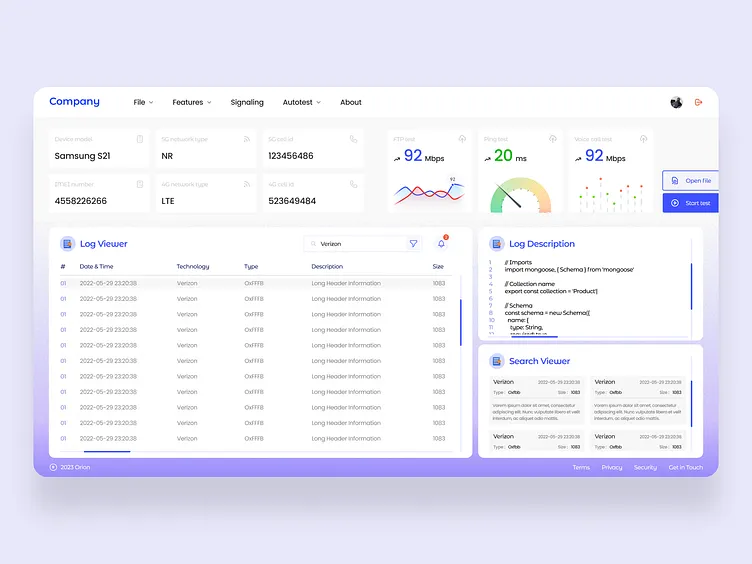
Finally, keep your network diagrams up to date. A monitoring dashboard showing a red light on "Switch-04" is useless if no one knows where Switch-04 is physically located or what VLANs it serves. Use Network Libraries and automation tools to auto-generate topology maps.
Conclusion
Network Monitoring is a discipline that bridges the gap between hardware and software, security and performance. From the physical layer of Ethernet cables to the abstract complexities of Cloud Networking and REST APIs, the ability to visualize and analyze traffic is the superpower of the modern Network Engineer. By mastering protocols like TCP/IP and HTTP, utilizing tools like Wireshark and Python, and adhering to strict security hardening practices, IT professionals can ensure their infrastructure remains robust, secure, and efficient.
As networks continue to evolve towards Software-Defined Networking and automation, the line between a developer and a network admin will continue to blur. Embracing code-based monitoring and proactive analysis is not just a recommendation; it is the future of infrastructure management.