
In the vast ecosystem of Computer Networking, data does not simply teleport from a server to a client. It is broken down, encapsulated, and transmitted as discrete units known as packets. Understanding the anatomy of these packets is the superpower of the modern Network Engineer and Security Analyst. Packet analysis—often referred to as packet sniffing or protocol analysis—is the process of capturing and interpreting live data as it flows across a network wire or wireless medium.
Whether you are troubleshooting Network Performance issues involving high Latency, auditing Network Security for potential breaches, or reverse-engineering an obscure legacy protocol, packet analysis is the foundational skill required. It bridges the gap between abstract Network Architecture diagrams and the gritty reality of bits and bytes moving through Routers and Switches.
In this comprehensive guide, we will explore the depths of packet capture, dissect the TCP/IP stack, and implement practical tools using Network Programming techniques. We will move beyond simple Wireshark GUI usage and dive into programmatic analysis, empowering DevOps Networking professionals and System Administrators to build custom monitoring solutions.
Core Concepts: The OSI Model and Packet Encapsulation
To analyze a packet, one must understand how it is constructed. The OSI Model (Open Systems Interconnection) breaks networking down into seven layers. When an application sends data, it travels down these layers, with each layer adding a “header” (and sometimes a footer) to the data. This process is called encapsulation.
For effective Packet Analysis, we primarily focus on the following layers:
- Layer 2 (Data Link): Deals with Ethernet frames and MAC addresses. This is how devices communicate on a local LAN.
- Layer 3 (Network): The home of IPv4 and IPv6. This layer handles Routing and logical Network Addressing.
- Layer 4 (Transport): Where TCP/IP and UDP live. This layer manages reliability, flow control, and ports.
- Layer 7 (Application): The actual data payload, such as HTTP Protocol, DNS Protocol, or custom API data.
A Network Administrator must understand that a captured packet is essentially a “Russian Nesting Doll.” To read the HTTP JSON payload, you must first strip away the Ethernet header, then the IP header, and finally the TCP header.
Programmatic Packet Capture with Python
While tools like Wireshark are excellent for manual inspection, automation requires code. Python, with the Scapy library, is the industry standard for rapid Network Development and packet manipulation. Scapy allows us to sniff traffic in real-time and dissect layers effortlessly.
The following example demonstrates how to capture packets, filter for TCP traffic, and extract source and destination IPs. This is the “Hello World” of Network Monitoring.
from scapy.all import sniff, IP, TCP

def packet_callback(packet):
    # Check if the packet has an IP layer and a TCP layer
    if packet.haslayer(IP) and packet.haslayer(TCP):
        ip_layer = packet[IP]
        tcp_layer = packet[TCP]

        src_ip = ip_layer.src
        dst_ip = ip_layer.dst
        src_port = tcp_layer.sport
        dst_port = tcp_layer.dport

        # Basic analysis of the TCP flags (SYN, ACK, FIN)
        flags = tcp_layer.flags

        print(f"[*] Detected TCP Traffic: {src_ip}:{src_port} -> {dst_ip}:{dst_port} | Flags: {flags}")

        # If there is a Raw payload (Application Layer data)
        if packet.haslayer('Raw'):
            payload = packet['Raw'].load
            # Attempt to decode HTTP headers if present
            try:
                decoded = payload.decode('utf-8')
                if "HTTP" in decoded:
                    print(f"    [+] HTTP Data Snippet: {decoded.split('\\r\\n')[0]}")
            except:
                pass

# Start sniffing.
# 'count=0' means infinite.
# 'filter' uses BPF syntax (standard for network tools)
print("Starting Packet Capture...")
sniff(filter="tcp", prn=packet_callback, store=0, count=20)
This script puts the network interface into a mode where it listens to traffic not just destined for the local machine, but potentially all traffic on the collision domain (if in promiscuous mode). This is essential for Network Troubleshooting when diagnosing connectivity issues between other devices.
Implementation Details: Raw Sockets and Protocol Decoding
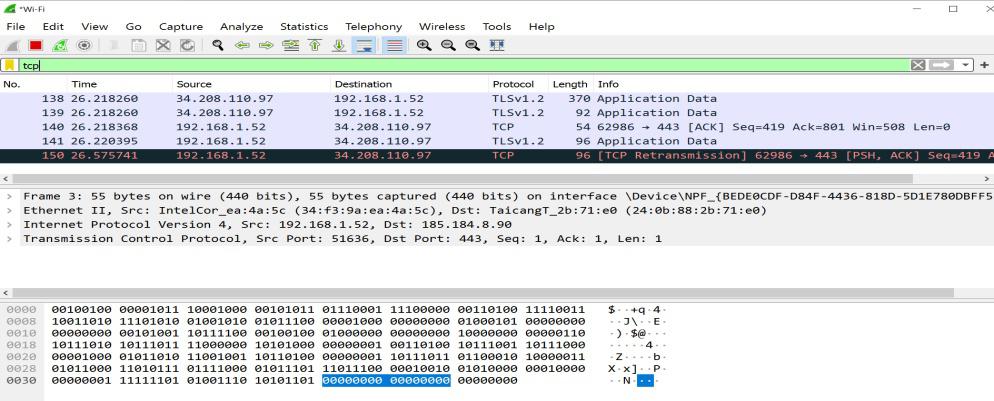
Libraries like Scapy are powerful, but they can be slow for high-bandwidth applications. For high-performance Network Tools, or to truly understand Socket Programming, one should understand how to handle raw sockets. This involves manually unpacking binary data using structures.
When you capture a raw packet, you receive a stream of bytes. You must know the exact offset and length of every field defined in Network Standards (RFCs). For example, the IPv4 header is typically 20 bytes long. The first byte contains the Version and IHL (Internet Header Length).
Unpacking Headers with Python Structs
This approach is often used in Network Security appliances and Firewalls where processing speed is critical. Below is an implementation that bypasses high-level wrappers and uses the built-in socket and struct libraries to analyze the IP header directly.
import socket
import struct
import sys

def get_mac_addr(bytes_addr):
    # Convert bytes to human readable MAC address (AA:BB:CC...)
    bytes_str = map('{:02x}'.format, bytes_addr)
    return ':'.join(bytes_str).upper()

def main():
    # Create a raw socket that binds to all protocols
    # Note: This requires Root/Admin privileges
    try:
        # For Linux: socket.AF_PACKET, socket.SOCK_RAW, socket.ntohs(3)
        # For Windows, the setup is slightly different (AF_INET, SOCK_RAW, IPPROTO_IP)
        # This example targets a Linux environment common in DevOps Networking
        conn = socket.socket(socket.AF_PACKET, socket.SOCK_RAW, socket.ntohs(3))
    except PermissionError:
        print("Error: Raw sockets require root/admin privileges.")
        sys.exit(1)

    while True:
        raw_data, addr = conn.recvfrom(65535)

        # Parse Ethernet Header (First 14 bytes)
        dest_mac, src_mac, eth_proto = struct.unpack('! 6s 6s H', raw_data[:14])

        # Ethernet Protocol 8 means IPv4
        if socket.ntohs(eth_proto) == 8:
            # Parse IP Header
            # The first byte of IP header contains Version and IHL
            version_header_len = raw_data[14]
            version = version_header_len >> 4
            header_len = (version_header_len & 15) * 4

            ttl, proto, src, target = struct.unpack('! 8x B B 2x 4s 4s', raw_data[14:14+20])

            src_ip = socket.inet_ntoa(src)
            target_ip = socket.inet_ntoa(target)

            print(f"IPv4 Packet: {src_ip} ==> {target_ip} | Protocol: {proto} | TTL: {ttl}")

            # If Protocol is 6 (TCP), we could further unpack the TCP header here
            # starting at index 14 + header_len

if __name__ == "__main__":
    main()
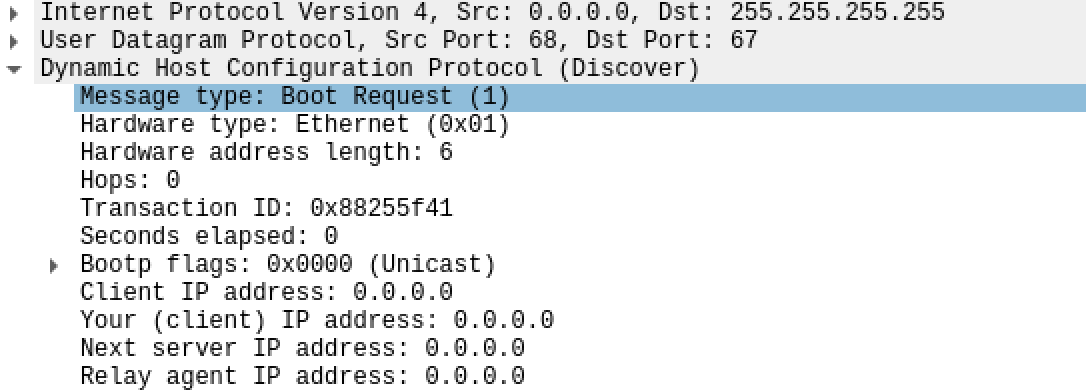
This code highlights the complexity of Protocol Implementation. You are manually handling the bits that Network Layers usually abstract away. Understanding Subnetting and CIDR is also crucial here, as you may need to filter traffic based on bitwise operations on the IP addresses.
Advanced Techniques: Proxies, Streams, and Exporting
Packet analysis often leads to the need for interception or modification. This is where TCP Proxy tools come into play. A proxy sits between a client and a server, terminating the connection on one side and initiating a new one on the other. This allows for real-time inspection and manipulation of the application payload.
In modern Cloud Networking and Microservices architectures, analyzing traffic between services (Service Mesh) is vital. Often, this data needs to be exported for long-term storage or ingestion into SIEM tools. JSONL (JSON Lines) is a preferred format for this because it is easy to parse and append to.
Golang for High-Performance Packet Processing
While Python is great for scripting, Go (Golang) has become a favorite for Network Engineering tools due to its concurrency model and speed. The gopacket library is a powerful tool for analyzing PCAP files or live traffic.
The following example demonstrates reading a PCAP file (perhaps captured via tcpdump on a remote server), analyzing the HTTP layer, and exporting the metadata to a JSON structure suitable for Network Automation pipelines.
package main

import (
	"encoding/json"
	"fmt"
	"log"
	"os"

	"github.com/google/gopacket"
	"github.com/google/gopacket/layers"
	"github.com/google/gopacket/pcap"
)

// PacketMetadata struct for JSON export
type PacketMetadata struct {
	SrcIP    string `json:"src_ip"`
	DstIP    string `json:"dst_ip"`
	Protocol string `json:"protocol"`
	Payload  string `json:"payload_preview"`
}

func main() {
	// Open file instead of live capture
	handle, err := pcap.OpenOffline("traffic_dump.pcap")
	if err != nil {
		log.Fatal(err)
	}
	defer handle.Close()

	packetSource := gopacket.NewPacketSource(handle, handle.LinkType())

	// Open JSONL output file
	outFile, _ := os.Create("analysis_output.jsonl")
	defer outFile.Close()

	for packet := range packetSource.Packets() {
		// Analyze Network Layer
		ipLayer := packet.Layer(layers.LayerTypeIPv4)
		if ipLayer != nil {
			ip, _ := ipLayer.(*layers.IPv4)

			meta := PacketMetadata{
				SrcIP: ip.SrcIP.String(),
				DstIP: ip.DstIP.String(),
				Protocol: "IPv4",
			}

			// Check for Application Layer (payload)
			appLayer := packet.ApplicationLayer()
			if appLayer != nil {
				// Grab first 50 bytes of payload for preview
				payload := appLayer.Payload()
				limit := 50
				if len(payload) < 50 {
					limit = len(payload)
				}
				meta.Payload = string(payload[:limit])
			}

			// Serialize to JSON
			jsonData, _ := json.Marshal(meta)

			// Write to file (JSONL format)
			outFile.WriteString(string(jsonData) + "\n")
			fmt.Println("Processed packet from:", meta.SrcIP)
		}
	}
}
This approach allows Network Engineers to process gigabytes of capture files efficiently, extracting only the relevant metadata needed for Network Troubleshooting or security audits.
Best Practices and Optimization
Packet analysis is resource-intensive. Capturing every packet on a 10Gbps link will quickly overwhelm CPU and disk I/O. Here are critical best practices for effective analysis:
1. Capture Filters (BPF)
Always filter as early as possible. Using Berkeley Packet Filters (BPF) at the capture level (e.g., tcp port 80 and host 192.168.1.5) prevents the kernel from copying irrelevant packets to user space. This drastically reduces CPU load and is essential in High-Performance environments.
2. Encryption and HTTPS
The modern web is encrypted. Analyzing HTTPS Protocol traffic is difficult because the payload is TLS-encrypted. To analyze this, you must either use a Man-in-the-Middle (MitM) proxy with a custom CA certificate or export "SSL Keylogs" from the browser/server to decrypt the PCAP later in Wireshark. Be aware that this changes the Network Security posture of the session.
3. Legal and Ethical Considerations
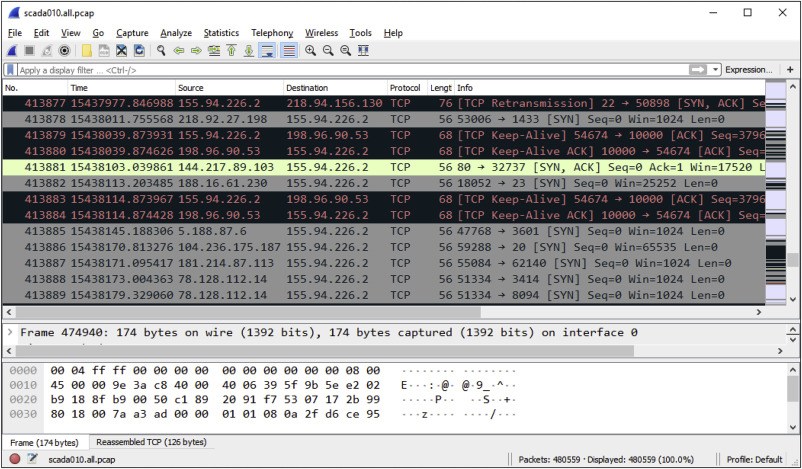
Packet sniffing is a sensitive activity. Capturing traffic on a network you do not own or have permission to audit is illegal in many jurisdictions. For Digital Nomads working in Travel Tech or using public WiFi, using VPNs prevents others from analyzing your packets, but you must ensure you are not inadvertently sniffing others' traffic.
4. Handling Jumbo Frames and Fragmentation
In Data Center environments, Jumbo Frames (packets larger than the standard 1500 bytes) are common. Furthermore, IP fragmentation can split a single logical message across multiple packets. A robust analysis tool must implement "TCP Stream Reassembly" to reconstruct the full data stream before attempting to parse Application Layer protocols like HTTP or REST API responses.
Conclusion
Packet analysis is the ultimate source of truth in networking. While logs can be misleading and dashboards can be averaged out, the packets on the wire do not lie. From debugging complex Microservices interactions to securing Software-Defined Networking (SDN) environments, the ability to capture, parse, and analyze traffic programmatically is indispensable.
As networks evolve toward Edge Computing and Network Virtualization, the tools we use must also evolve. Moving from manual Wireshark inspection to building custom tools with Python, Go, and JSONL exports allows DevOps teams to integrate network observability directly into their pipelines. Whether you are analyzing legacy protocols or optimizing modern Web Services, the journey begins with capturing that first packet.