In the modern digital landscape, speed is not merely a feature; it is the fundamental currency of user experience. While Bandwidth often dominates marketing materials with promises of gigabit speeds, Latency is the silent architect of performance. Whether you are a Network Engineer optimizing TCP/IP routes, a developer building Microservices, or an architect designing AI agents with sub-millisecond retrieval times, understanding the nuances of latency is critical.
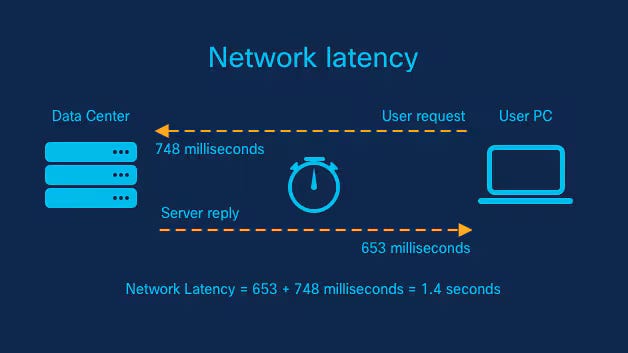
Latency refers to the time delay between a cause and an effect in a system. In Computer Networking, it is the time it takes for a data packet to travel from source to destination. However, in the era of Edge Computing and Generative AI, the definition has expanded. It now encompasses the entire lifecycle of a request: network propagation, serialization, database retrieval, and algorithmic inference. High latency destroys the illusion of real-time interaction, frustrating users and breaking complex distributed systems.
This comprehensive guide explores the technical depths of latency. We will traverse the OSI Model, dissect Network Protocols, and implement code-level optimizations to minimize delay. From Network Troubleshooting with Wireshark to optimizing REST API responses, we will cover the strategies required to build truly responsive systems.
Section 1: The Anatomy of Latency in Network Architecture
To optimize latency, one must first understand where it accumulates. In Network Design, latency is rarely a single number; it is a sum of four distinct delays: propagation, transmission, processing, and queuing.
The Four Pillars of Network Delay
Propagation Delay is strictly physical—it is limited by the speed of light through fiber optics or Network Cables like copper Ethernet. For a Digital Nomad engaging in Remote Work, the physical distance to the server is the primary bottleneck. This is why CDNs (Content Delivery Networks) are essential; they reduce physical distance.
Transmission Delay is determined by the link’s bandwidth and the packet size. Processing Delay occurs when Network Devices like Routers and Switches examine the packet header to determine the route. Finally, Queuing Delay happens when the network is congested, and packets sit in a buffer waiting to be processed. This is often the culprit during peak traffic times.
Transport Layer Protocols: TCP vs. UDP
The choice of protocol at the Transport Layer heavily influences latency. TCP/IP guarantees delivery through a three-way handshake (SYN, SYN-ACK, ACK). While reliable, this handshake introduces a Round Trip Time (RTT) penalty before data is even exchanged. For real-time applications like VoIP or gaming, UDP is often preferred because it fires packets without waiting for confirmation, sacrificing reliability for raw speed.
Below is a Python example using Socket Programming to measure the TCP connection latency (handshake time) to a target host. This is a fundamental technique in Network Monitoring.
import socket
import time

def measure_tcp_latency(host, port, runs=5):
    """
    Measures the TCP handshake latency to a specific host and port.
    """
    print(f"Measuring TCP latency to {host}:{port}...")
    latencies = []

    for i in range(runs):
        # Create a raw socket object (IPv4, TCP)
        sock = socket.socket(socket.AF_INET, socket.SOCK_STREAM)
        sock.settimeout(5)  # 5 second timeout

        start_time = time.perf_counter()
        try:
            # The connect call initiates the TCP 3-way handshake
            sock.connect((host, port))
            end_time = time.perf_counter()

            # Calculate latency in milliseconds
            latency_ms = (end_time - start_time) * 1000
            latencies.append(latency_ms)
            print(f"Run {i+1}: {latency_ms:.2f} ms")

            # Close the connection gracefully
            sock.close()
        except socket.error as e:
            print(f"Connection failed: {e}")
            return

    avg_latency = sum(latencies) / len(latencies)
    print(f"\nAverage TCP Handshake Latency: {avg_latency:.2f} ms")

# Example usage: Measuring latency to a public DNS resolver
if __name__ == "__main__":
    measure_tcp_latency("8.8.8.8", 53)
This script isolates the network overhead. If this value is high, no amount of code optimization on the server will fix the user experience. You would need to look into Network Architecture changes, such as moving to Cloud Networking regions closer to the user or utilizing Edge Computing.

Section 2: Application Latency and Database Retrieval
Once a packet traverses the Firewalls and reaches the server, we enter the realm of Application Latency. In modern Microservices architectures, a single user request might trigger a cascade of internal API calls. This is known as the “fan-out” problem. If Service A calls Service B, which calls Service C, the latencies add up sequentially.
The Database Bottleneck
The most common source of application latency is inefficient data retrieval. Whether using SQL or performing a vector search for AI, the I/O operation is expensive. System Administration best practices dictate keeping “hot” data in memory.
For AI agents and high-performance apps, a tiered memory architecture is often used. This mimics human cognition: Working Memory (fastest, volatile) -> Session Memory (fast, persistent) -> Long-term Memory (slower, vast). In technical terms, this translates to RAM -> Redis/Memcached -> Disk/Vector Database.
Here is an implementation of a “Cache-Aside” pattern using Python and Redis. This pattern significantly reduces latency by avoiding slow database hits for frequently accessed data.
import redis
import time
import json

# Initialize Redis connection (simulating a Session Memory tier)
# In a real scenario, use environment variables for host/port
cache = redis.Redis(host='localhost', port=6379, db=0, decode_responses=True)

def mock_slow_database_query(user_id):
    """
    Simulates a slow retrieval from a Long-term Memory store (SQL/Vector DB).
    """
    time.sleep(0.5)  # Simulate 500ms latency
    return {
        "user_id": user_id,
        "preferences": "dark_mode",
        "last_login": "2023-10-27"
    }

def get_user_profile(user_id):
    """
    Retrieves user data with sub-ms latency targets using caching.
    """
    cache_key = f"user:{user_id}"
    start_time = time.perf_counter()

    # 1. Check Session Memory (Redis)
    cached_data = cache.get(cache_key)

    if cached_data:
        duration = (time.perf_counter() - start_time) * 1000
        print(f"Cache HIT: Retrieved in {duration:.4f} ms")
        return json.loads(cached_data)

    # 2. Fallback to Long-term Memory (Database)
    print("Cache MISS: Fetching from DB...")
    data = mock_slow_database_query(user_id)

    # 3. Store in Cache for future fast retrieval (TTL 1 hour)
    cache.setex(cache_key, 3600, json.dumps(data))

    duration = (time.perf_counter() - start_time) * 1000
    print(f"DB Fetch: Retrieved in {duration:.4f} ms")
    return data

# Simulation
if __name__ == "__main__":
    # First call: Slow (DB access)
    get_user_profile("user_123")

    print("-" * 30)

    # Second call: Fast (Redis access)
    get_user_profile("user_123")
By implementing this tiered approach, we transform a 500ms latency into a sub-millisecond operation for subsequent requests. This is crucial for API Design in Web Services where SLA (Service Level Agreements) are strict.
Section 3: Advanced Techniques for AI and Real-Time Systems
As we move toward AI-driven applications, latency becomes even more complex. We aren’t just retrieving rows; we are performing semantic search and graph traversal. Software-Defined Networking (SDN) and Network Virtualization allow us to dynamically route traffic, but the computational cost of AI inference remains a hurdle.
Asynchronous Concurrency
In Network Programming, blocking I/O is the enemy. If an AI agent needs to fetch context from a graph database and a vector database simultaneously, doing it sequentially doubles the latency. Using asynchronous programming allows the system to wait for multiple I/O operations in parallel.
This is particularly relevant for DevOps Networking tools that might query hundreds of devices, or AI agents aggregating memory from different sources.
import asyncio
import random

async def fetch_semantic_memory(query):
    """Simulate vector database retrieval"""
    await asyncio.sleep(random.uniform(0.1, 0.3)) # Simulate network/processing delay
    return f"Semantic results for '{query}'"

async def fetch_graph_memory(entity_id):
    """Simulate knowledge graph retrieval"""
    await asyncio.sleep(random.uniform(0.1, 0.3))
    return f"Graph connections for '{entity_id}'"

async def hybrid_retrieval(query, entity_id):
    start_time = asyncio.get_running_loop().time()

    # Execute both retrievals concurrently
    # This is critical for keeping total latency low
    results = await asyncio.gather(
        fetch_semantic_memory(query),
        fetch_graph_memory(entity_id)
    )

    end_time = asyncio.get_running_loop().time()
    total_time = (end_time - start_time) * 1000

    print(f"Hybrid Retrieval Complete in {total_time:.2f} ms")
    return results

# Run the async loop
if __name__ == "__main__":
    asyncio.run(hybrid_retrieval("latency optimization", "node_99"))
Using asyncio.gather, the total latency is determined by the slowest single request, rather than the sum of all requests. In complex Network Automation scripts or AI memory retrieval, this technique is non-negotiable.

Section 4: Best Practices, Protocols, and Optimization
Reducing latency requires a holistic approach, combining Network Security, protocol selection, and infrastructure management. Here are the actionable best practices for the modern Network Engineer and developer.
Protocol Evolution: HTTP/2, HTTP/3 and QUIC
The HTTP Protocol has evolved to combat latency. HTTP/1.1 suffered from head-of-line blocking. HTTP/2 introduced multiplexing, allowing multiple requests over a single TCP connection. However, HTTP/3 (based on QUIC) moves the transport to UDP, eliminating TCP’s head-of-line blocking entirely and reducing handshake overhead. For Travel Tech apps used by Travel Photography enthusiasts uploading large files on spotty Wireless Networking (WiFi) connections, HTTP/3 is a game changer.
Infrastructure and Load Balancing
Load Balancing is essential not just for redundancy, but for latency. Algorithms like “Least Response Time” direct traffic to the server that is currently responding fastest. Furthermore, implementing a Service Mesh (like Istio or Linkerd) helps manage inter-service communication, providing observability into where latency is occurring within a cluster.
Network Security measures, such as VPNs and Firewalls, inevitably add inspection overhead. To mitigate this, modern architectures use hardware acceleration and optimized TLS handshakes (TLS 1.3) to minimize the security penalty.

Client-Side Optimization
Latency isn’t always on the server. Large JavaScript bundles or unoptimized rendering can make a fast network request feel slow. Below is a JavaScript snippet to measure the “perceived” latency from the client’s perspective using the Performance API.
async function measureFetchLatency(url) {
    const start = performance.now();

    try {
        const response = await fetch(url);

        // Time to First Byte (TTFB) approximation
        const ttfb = performance.now() - start;

        const data = await response.json();

        // Total time including download and parsing
        const totalTime = performance.now() - start;

        console.log(`URL: ${url}`);
        console.log(`TTFB: ${ttfb.toFixed(2)} ms`);
        console.log(`Total Execution: ${totalTime.toFixed(2)} ms`);

    } catch (error) {
        console.error("Network error:", error);
    }
}

// Example usage
measureFetchLatency('https://api.publicapis.org/entries');
Tips and Considerations for Latency Reduction:
- DNS Resolution: Use fast DNS providers. Slow DNS Protocol lookups delay the initial connection.
- CDN Usage: Cache static assets (images, CSS, JS) as close to the user as possible.
- Connection Keep-Alive: Reusing existing TCP connections avoids the handshake penalty.
- Payload Compression: Use Gzip or Brotli to reduce the size of data traveling over the Network Layer.
- IPv6: Ensure your infrastructure supports IPv6, which can offer more efficient routing in modern networks compared to legacy IPv4.
Conclusion
Mastering latency is an ongoing battle that spans the entire technology stack. It begins with the physics of Network Cables and Subnetting, moves through the logic of Routing and Switching, and ends with efficient API Security and code execution. Whether you are optimizing a Travel Tech platform for Digital Nomads or engineering the next generation of cognitive AI agents, the goal remains the same: reduce the gap between intent and action.
By leveraging tools like Wireshark for Packet Analysis, adopting modern protocols like HTTP/3, and implementing tiered memory architectures in your code, you can achieve the sub-millisecond performance that modern users demand. As we move toward more immersive technologies, the engineers who can effectively manage latency will define the future of digital interaction.